# Speech-to-Text in Blazor AI AssistView
The Syncfusion Blazor AI AssistView component integrates `Speech-to-Text` functionality through the browser's [Web Speech API](https://developer.mozilla.org/en-US/docs/Web/API/Web_Speech_API). This enables the conversion of spoken words into text using the device's microphone, allowing users to interact with the AI AssistView through voice input.
## Prerequisites
Before integrating `Speech-to-Text`, ensure the following:
1. The Syncfusion AI AssistView component is properly set up in your Blazor application.
- [Blazor Getting Started Guide](../getting-started)
2. The AI AssistView component is integrated with Azure OpenAI
- [Integration of Azure OpenAI With Blazor AI AssistView component](../ai-integrations/openai-integration.md)
## Configure Speech-to-Text
To enable Speech-to-Text functionality in the Blazor AI AssistView component, update the `Home.razor` file to incorporate the Web Speech API.
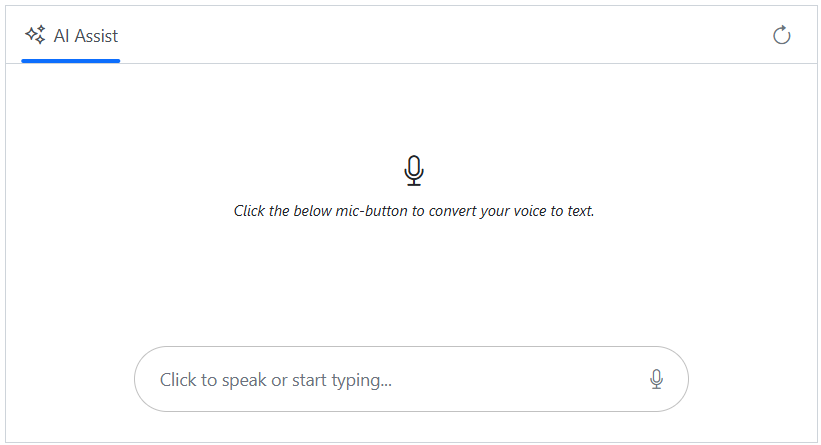
The [SpeechToText](https://blazor.syncfusion.com/documentation/speech-to-text/getting-started-web-app) component listens to audio input from the device’s microphone, transcribes spoken words into text, and updates the AI AssistView’s editable footer using the [FooterTemplate](https://help.syncfusion.com/cr/blazor/Syncfusion.Blazor.InteractiveChat.AssistView.html#Syncfusion_Blazor_InteractiveChat_AssistView_FooterTemplate) tag directive to display the transcribed text. The transcribed text is then sent as a prompt to the Azure OpenAI service via the AI AssistView component.
### Configuration Options
* **[`Language`](https://help.syncfusion.com/cr/blazor/Syncfusion.Blazor.Inputs.SfSpeechToText.html#Syncfusion_Blazor_Inputs_SfSpeechToText_Language)**: Specifies the language for speech recognition. For example:
* `en-US` for American English
* `fr-FR` for French
* **[`AllowInterimResults`](https://help.syncfusion.com/cr/blazor/Syncfusion.Blazor.Inputs.SfSpeechToText.html#Syncfusion_Blazor_Inputs_SfSpeechToText_AllowInterimResults)**: Set to `true` to receive real-time (interim) recognition results, or `false` to receive only final results.
The `speechtotext.js` file handles operations related to the content of the editable footer, such as checking for meaningful input, clearing existing text, and updating the content with the transcribed value. Meanwhile, the `speechtotext.css` file styles the AI AssistView layout and ensures the component remains responsive across different screen sizes and devices.
{% tabs %}
{% highlight c# tabtitle="razor" %}
@using Syncfusion.Blazor.InteractiveChat
@using AssistView_OpenAI.Components.Services
@using Syncfusion.Blazor.Navigations
@using Syncfusion.Blazor.Inputs
@using Syncfusion.Blazor.Buttons
@inject AzureOpenAIService OpenAIService
@inject IJSRuntime JSRuntime
Click the below mic-button to convert your voice to text.
@code {
private SfAIAssistView assistView;
private string finalResponse { get; set; }
private string AssistViewFooterValue = String.Empty;
private ElementReference EditableDiv;
private string FooterContent = String.Empty;
private string SpeechToTextCssClass = "visible";
private string ButtonCssClass = String.Empty;
private async void OnTranscriptChange(TranscriptChangeEventArgs args)
{
AssistViewFooterValue = args.Transcript;
await JSRuntime.InvokeVoidAsync("updateContentEditableDiv", EditableDiv, AssistViewFooterValue);
await InvokeAsync(StateHasChanged);
}
private async Task UpdateContent()
{
FooterContent = await JSRuntime.InvokeAsync("isFooterContainsValue", EditableDiv);
ToggleVisibility();
}
private async Task HandleStopRecognition()
{
FooterContent = AssistViewFooterValue;
ToggleVisibility();
await InvokeAsync(StateHasChanged);
}
private void ToggleVisibility()
{
ButtonCssClass = string.IsNullOrWhiteSpace(FooterContent) ? "" : "visible";
SpeechToTextCssClass = string.IsNullOrWhiteSpace(FooterContent) ? "visible" : "";
}
private async Task PromptRequest(AssistViewPromptRequestedEventArgs args)
{
AssistViewFooterValue = String.Empty;
await JSRuntime.InvokeVoidAsync("emptyFooterValue", EditableDiv);
await UpdateContent();
var lastIdx = assistView.Prompts.Count - 1;
assistView.Prompts[lastIdx].Response = string.Empty;
finalResponse = string.Empty;
try
{
await foreach (var chunk in OpenAIService.GetChatResponseStreamAsync(args.Prompt))
{
await UpdateResponse(args, chunk);
}
args.Response = finalResponse;
}
catch (Exception ex)
{
args.Response = $"Error: {ex.Message}";
}
ToggleVisibility();
}
private async Task UpdateResponse(AssistViewPromptRequestedEventArgs args, string response)
{
var lastIdx = assistView.Prompts.Count - 1;
await Task.Delay(30); // Small delay for UI updates
assistView.Prompts[lastIdx].Response += response.Replace("\n", "
");
finalResponse = assistView.Prompts[lastIdx].Response;
StateHasChanged();
}
private async Task SendButtonClicked()
{
await assistView.ExecutePromptAsync(FooterContent);
}
private void ToolbarItemClicked(AssistViewToolbarItemClickedEventArgs args)
{
if (args.Item.IconCss == "e-icons e-refresh")
{
assistView.Prompts.Clear();
}
}
private async Task OnKeyDown(KeyboardEventArgs e)
{
if (e.Key == "Enter" && !e.ShiftKey)
{
await SendButtonClicked();
}
}
private async void PromptToolbarItemClicked(AssistViewToolbarItemClickedEventArgs args)
{
if (args.Item.IconCss == "e-icons e-assist-edit") {
AssistViewFooterValue = assistView.Prompts[args.DataIndex].Prompt;
await JSRuntime.InvokeVoidAsync("updateContentEditableDiv", EditableDiv, AssistViewFooterValue);
await UpdateContent();
}
}
}
{% endhighlight %}
{% highlight c# tabtitle="speechtotext.js" %}
// Checks if the content editable element contains meaningful text and cleans up.
function isFooterContainsValue(elementref) {
if (!elementref.innerText.trim() !== '') {
if ((elementref.innerHTML === '
' || elementref.innerHTML.trim() === '')) {
elementref.innerHTML = '';
}
}
return elementref.innerText || "";
}
// Clears the text content of a content editable element.
function emptyFooterValue(elementref) {
if (elementref) {
elementref.innerText = "";
}
}
// Updates the text content of a content editable element with a specified value.
function updateContentEditableDiv(element, value) {
if (element) {
element.innerText = value;
}
}
{% endhighlight %}
{% highlight c# tabtitle="speechtotext.css" %}
.integration-speechtotext-section {
height: 350px;
width: 650px;
margin: 0 auto;
}
.integration-speechtotext-section .banner-content .e-listen-icon:before {
font-size: 25px;
}
.integration-speechtotext-section .e-view-container {
margin: auto;
}
.integration-speechtotext-section .banner-content {
display: flex;
flex-direction: column;
gap: 10px;
text-align: center;
}
.integration-speechtotext-section #assistview-sendButton {
width: 40px;
height: 40px;
font-size: 20px;
border: none;
background: none;
cursor: pointer;
}
.integration-speechtotext-section #speechToText.visible,
.integration-speechtotext-section #assistview-sendButton.visible {
display: inline-block;
}
.integration-speechtotext-section #speechToText,
.integration-speechtotext-section #assistview-sendButton {
display: none;
}
@media only screen and (max-width: 750px) {
.integration-speechtotext-section {
width: 100%;
}
}
.integration-speechtotext-section .e-footer-wrapper {
display: flex;
border: 1px solid #c1c1c1;
padding: 5px 5px 5px 10px;
margin: 5px 5px 0 5px;
border-radius: 30px;
}
.integration-speechtotext-section .content-editor {
width: 100%;
overflow-y: auto;
font-size: 14px;
min-height: 25px;
max-height: 200px;
padding: 10px;
}
.integration-speechtotext-section .content-editor[contentEditable=true]:empty:before {
content: attr(placeholder);
color: #6b7280;
}
.integration-speechtotext-section .option-container {
align-self: flex-end;
}
{% endhighlight %}
{% endtabs %}
## Error Handling
The `SpeechToText` component provides events to handle errors that may occur during speech recognition. For more information, refer to the [Error Handling](https://blazor.syncfusion.com/documentation/speech-to-text/speech-recognition#error-handling) section in the documentation.
## Browser Compatibility
The `SpeechToText` component relies on the [Speech Recognition API](https://developer.mozilla.org/en-US/docs/Web/API/SpeechRecognition), which has limited browser support. Refer to the [Browser Compatibility](https://blazor.syncfusion.com/documentation/speech-to-text/speech-recognition#browser-support) section for detailed information.
## See Also
* [Text-to-Speech](./text-to-speech.md)