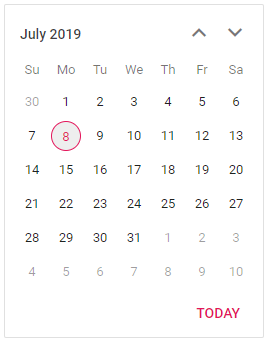
Show Dates of Other Months in Blazor Calendar Component
18 Jun 20261 minute to read
By default, the Blazor Calendar hides dates that belong to adjacent months in month view. The following approach uses a CSS override to make out-of-month dates visible and clickable, enabling users to navigate and select those days directly. Existing rules such as min/max and disabled dates continue to apply.
The following code demonstrates how to show dates of other months. Using the styles below, you can bring the dates of other months to visibility from its hidden state.
@using Syncfusion.Blazor.Calendars

<SfCalendar TValue="DateTime?"></SfCalendar>

<style>
    .e-control.e-calendar {
        max-width: 260px;
    }
    .e-calendar .e-content tr.e-month-hide,
    .e-calendar .e-content td.e-other-month>span.e-day {
        display: block;
    }

    .e-calendar .e-content td.e-month-hide,
    .e-calendar .e-content td.e-other-month {
        pointer-events: auto;
        touch-action: auto;
    }
</style>