Mention Integration in Blazor Chat UI
6 Aug 20264 minutes to read
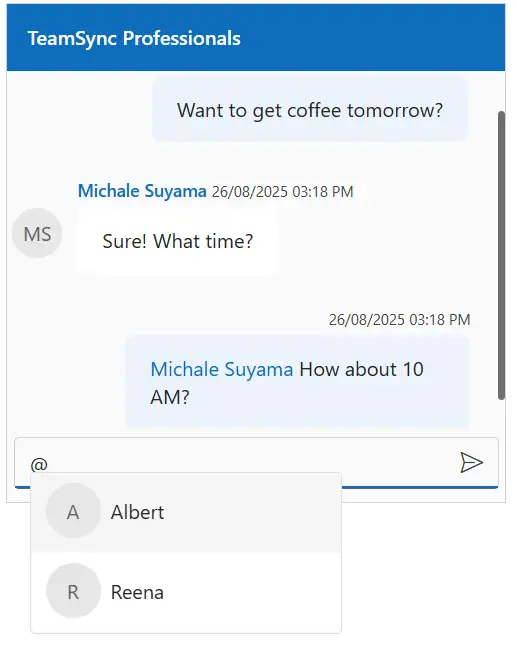
The Chat UI allows users to mention others in messages using the @ character, which displays a dropdown for selecting users. The following sections explain how to configure mentions.
Configure Mention Users
Use the MentionUsers property to define a list of users for the mention suggestion popup.
@using Syncfusion.Blazor.InteractiveChat

<div style="height: 400px; width: 400px;">
    <SfChatUI User="CurrentUserModel" Messages="ChatUserMessages" MentionUsers="MentionUsers" HeaderText="TeamSync Professionals"></SfChatUI>
</div>

@code {
    private static UserModel CurrentUserModel = new UserModel() { ID = "User1", User = "Albert" };
    private static UserModel MichaleUserModel = new UserModel() { ID = "User2", User = "Michale Suyama" };
    private static UserModel ReenaUserModel = new UserModel() { ID = "custom-user", User = "Reena" };
    private List<UserModel> MentionUsers = new List<UserModel>()
    {
        CurrentUserModel,
        ReenaUserModel
    };

    private List<ChatMessage> ChatUserMessages = new List<ChatMessage>()
    {
        new ChatMessage() { Text = "Want to get coffee tomorrow?", Author = CurrentUserModel },
        new ChatMessage() { Text = "Sure! What time?", Author = MichaleUserModel },
        new ChatMessage() { Text = "{0} How about 10 AM?", Author = CurrentUserModel, MentionUsers = new List<UserModel>() { MichaleUserModel } }
    };
}
Customize the Mention trigger character
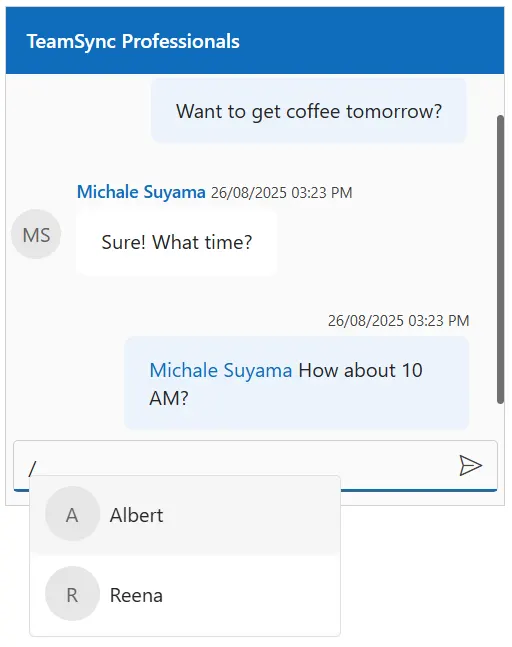
Use the MentionChar property to customize the character that triggers the mention popup. The default value is @.
@using Syncfusion.Blazor.InteractiveChat

<div style="height: 400px; width: 400px;">
    <SfChatUI User="CurrentUserModel" Messages="ChatUserMessages" MentionUsers="MentionUsers" HeaderText="TeamSync Professionals" MentionChar="MentionCharacter"></SfChatUI>
</div>

@code {
    private static UserModel CurrentUserModel = new UserModel() { ID = "User1", User = "Albert" };
    private static UserModel MichaleUserModel = new UserModel() { ID = "User2", User = "Michale Suyama" };
    private static UserModel ReenaUserModel = new UserModel() { ID = "custom-user", User = "Reena" };
    private List<UserModel> MentionUsers = new List<UserModel>()
    {
        CurrentUserModel,
        ReenaUserModel
    };
    private char MentionCharacter { get; set; } = '/';
    private List<ChatMessage> ChatUserMessages = new List<ChatMessage>()
    {
        new ChatMessage() { Text = "Want to get coffee tomorrow?", Author = CurrentUserModel },
        new ChatMessage() { Text = "Sure! What time?", Author = MichaleUserModel },
        new ChatMessage() { Text = "{0} How about 10 AM?", Author = CurrentUserModel, MentionUsers = new List<UserModel>() { MichaleUserModel } }
    };
}
Predefined Mentions in Messages
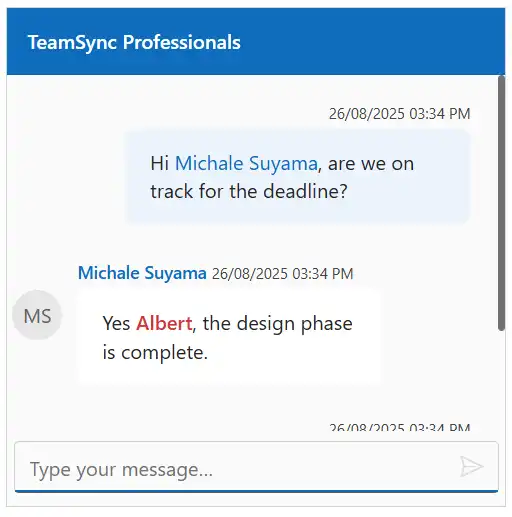
Use the Text property in the ChatMessage to include predefined mentions in chat messages. The mentions logic maps placeholders like {0} and {1} to users listed in the message’s MentionUsers property.
The
MentionUsersproperty in a message contains a list of users, mapped by their order where{0}is replaced by the first user,{1}by the second, and so on. If a placeholder’s index is out of bounds (e.g., using{5}with only two users), the placeholder text itself (e.g.,{5}) is displayed.
@using Syncfusion.Blazor.InteractiveChat

<div style="height: 400px; width: 400px;">
    <SfChatUI User="CurrentUserModel" Messages="ChatUserMessages" HeaderText="TeamSync Professionals"></SfChatUI>
</div>

@code {
    private static UserModel CurrentUserModel = new UserModel() { ID = "user1", User = "Albert" };
    private static UserModel MichaleUserModel = new UserModel() { ID = "user2", User = "Michale Suyama" };

    private List<ChatMessage> ChatUserMessages = new List<ChatMessage>()
    {
        new ChatMessage() {
            Author = CurrentUserModel,
            Text = "Hi {0}, are we on track for the deadline?",
            MentionUsers = new List<UserModel>() { MichaleUserModel }
        },
        new ChatMessage() { Author = MichaleUserModel, Text = "Yes {0}, the design phase is complete.", MentionUsers = new List<UserModel>() { CurrentUserModel }},
        new ChatMessage() { Author = CurrentUserModel, Text = "I’ll review it and send feedback by today." }
    };
}
Configure mentionSelect
Use the ValueSelecting event to execute custom logic when a user is selected from the mention dropdown. The event provides access to the selected user’s details.
@using Syncfusion.Blazor.InteractiveChat
@using Syncfusion.Blazor.DropDowns

<div style="height: 400px; width: 400px;">
    <SfChatUI ID="mentionSelect" MentionUsers="MentionUsers" ValueSelecting="ValueSelecting"></SfChatUI>
</div>

@code {
    private static UserModel CurrentUserModel = new UserModel() { ID = "user1", User = "Albert" };
    private static UserModel MichaleUserModel = new UserModel() { ID = "user2", User = "Michale Suyama" };

    private List<UserModel> MentionUsers = new List<UserModel>()
    {
        CurrentUserModel,
        MichaleUserModel
    };

    private void ValueSelecting(MentionValueSelectingEventArgs<UserModel> args)
    {
        // Your required action here
    }
}