Aggregate Customization in Blazor Data Grid
7 Aug 20268 minutes to read
Aggregates are displayed as summary rows in the DataGrid footer, providing a consolidated view of totals, averages, or counts. These rows can be styled using CSS to match the layout and design of the grid. Styling options are available for:
- Aggregate root container: The outer wrapper of the footer row.
- Aggregate summary row and cells: The row that shows summary values, and the cells that display each result.
Customize the aggregate root element
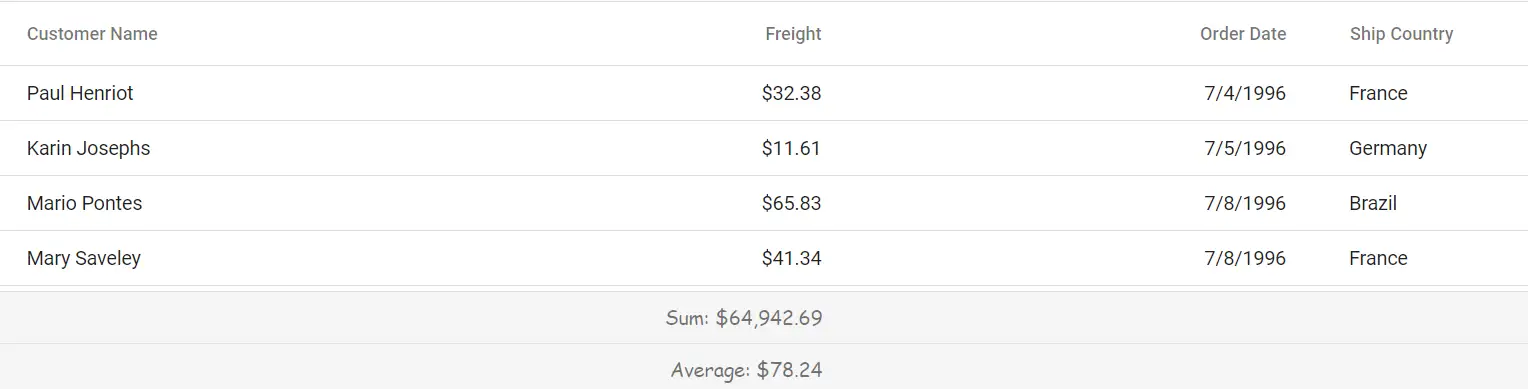
The .e-gridfooter class styles the root container of the aggregate footer row. Use CSS to adjust its appearance:
.e-grid .e-gridfooter {
    font-family: cursive;
}
Properties like font-family, font-size, and padding can be changed to fit the grid layout design.
Customize the aggregate cell elements
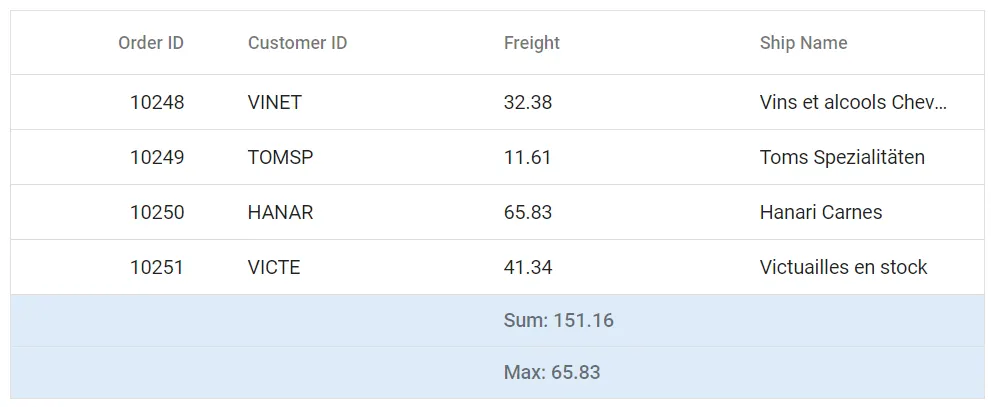
The .e-summaryrow and .e-summarycell classes define the appearance of the summary row and its individual cells in the Blazor DataGrid. Apply CSS to modify their look:
.e-grid .e-summaryrow .e-summarycell {
    background-color: #deecf9;
}
Properties such as background-color, color, and text-align can be adjusted to improve clarity and interaction.
@using Syncfusion.Blazor.Grids

<SfGrid DataSource="@Orders" Height="315" AllowPaging="true">
    <GridPageSettings PageSize="8"></GridPageSettings>
    <GridAggregates>
        <GridAggregate>
            <GridAggregateColumns>
                <GridAggregateColumn Field=@nameof(OrderData.Freight) Type="AggregateType.Sum">
                    <FooterTemplate>
                        @{
                            var aggregate = (context as AggregateTemplateContext);
                            <div class="aggregate-chip">Sum: @aggregate.Sum</div>
                        }
                    </FooterTemplate>
                </GridAggregateColumn>
            </GridAggregateColumns>
        </GridAggregate>
        <GridAggregate>
            <GridAggregateColumns>
                <GridAggregateColumn Field=@nameof(OrderData.Freight) Type="AggregateType.Max">
                    <FooterTemplate>
                        @{
                            var aggregate = (context as AggregateTemplateContext);
                            <div class="aggregate-chip">Max: @aggregate.Max</div>
                        }
                    </FooterTemplate>
                </GridAggregateColumn>
            </GridAggregateColumns>
        </GridAggregate>
    </GridAggregates>
    <GridColumns>
        <GridColumn Field=@nameof(OrderData.OrderID) HeaderText="Order ID" TextAlign="TextAlign.Right" Width="140"></GridColumn>
        <GridColumn Field=@nameof(OrderData.CustomerID) HeaderText="Customer ID" Width="120"></GridColumn>
        <GridColumn Field=@nameof(OrderData.Freight) HeaderText="Freight" TextAlign="TextAlign.Right" Width="120"></GridColumn>
        <GridColumn Field=@nameof(OrderData.OrderDate) HeaderText="Order Date" Format="d" TextAlign="TextAlign.Right" Width="110"></GridColumn>
    </GridColumns>
</SfGrid>

<style>
    .e-grid .e-gridfooter { font-family: cursive; background-color: #f5f8fc; }
    .e-grid .e-summaryrow .e-summarycell { background-color: #deecf9; }
    .aggregate-chip { padding: 4px 8px; border-radius: 6px; background-color: #fff; border: 1px solid #bcd3ea; display: inline-block; min-width: 120px; text-align: center; color: #0b3f73; font-weight: 600; }
    .e-grid .e-summarycell:focus-visible { outline: 2px solid #005a9e; outline-offset: -2px; }
</style>

@code {
    private List<OrderData> Orders { get; set; }
    protected override void OnInitialized()
    {
        Orders = OrderData.GetAllRecords();
    }
}
internal sealed class OrderData
{
private static readonly List<OrderData> Data = new();
public OrderData(int orderID, string customerID, double freight, DateTime orderDate)
{
OrderID = orderID;
CustomerID = customerID;
Freight = freight;
OrderDate = orderDate;
}
internal static List<OrderData> GetAllRecords()
{
if (Data.Count == 0)
{
Data.Add(new OrderData(10248, "VINET", 32.38, new DateTime(2024, 1, 10)));
Data.Add(new OrderData(10249, "TOMSP", 11.61, new DateTime(2024, 1, 11)));
Data.Add(new OrderData(10250, "HANAR", 65.83, new DateTime(2024, 1, 12)));
Data.Add(new OrderData(10251, "VICTE", 41.34, new DateTime(2024, 1, 13)));
Data.Add(new OrderData(10252, "SUPRD", 51.30, new DateTime(2024, 1, 14)));
Data.Add(new OrderData(10253, "HANAR", 58.17, new DateTime(2024, 1, 15)));
Data.Add(new OrderData(10254, "CHOPS", 22.98, new DateTime(2024, 1, 16)));
Data.Add(new OrderData(10255, "RICSU", 148.33, new DateTime(2024, 1, 17)));
Data.Add(new OrderData(10256, "WELLI", 13.97, new DateTime(2024, 1, 18)));
Data.Add(new OrderData(10257, "HILAA", 81.91, new DateTime(2024, 1, 19)));
}
return Data;
}
public int OrderID { get; }
public string CustomerID { get; }
public double Freight { get; }
public DateTime OrderDate { get; }
}