---
layout: post
title: Selection styling with CSS in Blazor DataGrid | Syncfusion®
description: Learn how to style row and cell selection in Blazor DataGrid using CSS, with tips on isolation and selector specificity.
platform: Blazor
control: DataGrid
documentation: ug
---
# Selection customization in Blazor DataGrid
The appearance of selection elements in the [Blazor DataGrid](https://www.syncfusion.com/blazor-components/blazor-datagrid) can be customized using CSS. Styling options are available for:
- **Row selection background:** Highlights the entire row when selected.
- **Cell selection background:** Highlights individual cells when selected.
## Customize row selection background
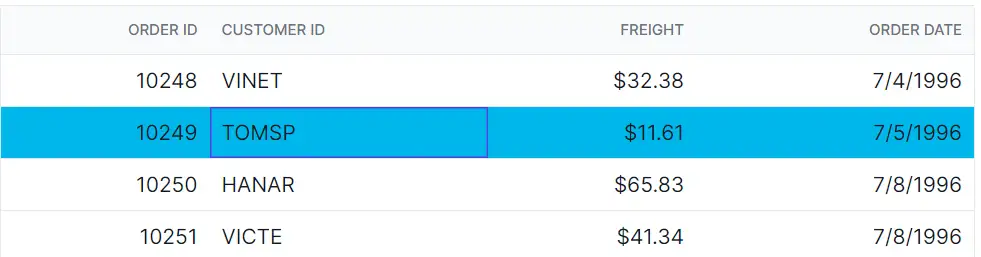
The **.e-selectionbackground** class styles the background of selected rows in the DataGrid. Use CSS to modify its appearance:
```css
.e-grid td.e-selectionbackground {
background-color: #00b7ea;
}
```
Properties such as **background-color**, **color**, and **font-weight** can be adjusted to match the grid’s design.
{% tabs %}
{% highlight razor tabtitle="Index.razor" %}
@using Syncfusion.Blazor.Grids
@code {
private SfGrid Grid;
private List Orders { get; set; }
protected override void OnInitialized()
{
Orders = OrderData.GetAllRecords();
}
}
{% endhighlight %}
{% highlight c# tabtitle="OrderData.cs" %}
internal sealed class OrderData
{
private static readonly List Data = new List();
public OrderData(int orderId, string customerId, double freight, DateTime orderDate)
{
OrderID = orderId;
CustomerID = customerId;
Freight = freight;
OrderDate = orderDate;
}
public static List GetAllRecords()
{
if (Data.Count == 0)
{
Data.Add(new OrderData(10248, "VINET", 32.38, new DateTime(2024, 1, 10)));
Data.Add(new OrderData(10249, "TOMSP", 11.61, new DateTime(2024, 1, 11)));
Data.Add(new OrderData(10250, "HANAR", 65.83, new DateTime(2024, 1, 12)));
Data.Add(new OrderData(10251, "VICTE", 41.34, new DateTime(2024, 1, 13)));
Data.Add(new OrderData(10252, "SUPRD", 51.3, new DateTime(2024, 1, 14)));
Data.Add(new OrderData(10253, "HANAR", 58.17, new DateTime(2024, 1, 15)));
Data.Add(new OrderData(10254, "CHOPS", 22.98, new DateTime(2024, 1, 16)));
Data.Add(new OrderData(10255, "RICSU", 148.33, new DateTime(2024, 1, 17)));
Data.Add(new OrderData(10256, "WELLI", 13.97, new DateTime(2024, 1, 18)));
Data.Add(new OrderData(10257, "HILAA", 81.91, new DateTime(2024, 1, 19)));
}
return Data;
}
public int OrderID { get; set; }
public string CustomerID { get; set; }
public double Freight { get; set; }
public DateTime OrderDate { get; set; }
}
{% endhighlight %}
{% endtabs %}
{% previewsample "https://blazorplayground.syncfusion.com/embed/VZVRNctCLdcmuGit?appbar=false&editor=false&result=true&errorlist=false&theme=fluent2" %}
## Customize cell selection background
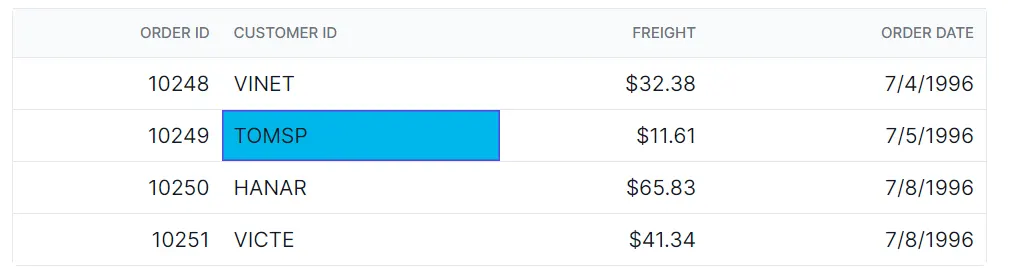
The **.e-cellselectionbackground** class styles the background of selected cells in the DataGrid. Apply CSS to customize its appearance:
```css
.e-grid td.e-cellselectionbackground {
background-color: #00b7ea;
}
```
Modify visual properties to align with the overall layout and improve clarity.
{% tabs %}
{% highlight razor tabtitle="Index.razor" %}
@using Syncfusion.Blazor.Grids
@code {
private SfGrid Grid;
private List Orders { get; set; }
protected override void OnInitialized()
{
Orders = OrderData.GetAllRecords();
}
}
{% endhighlight %}
{% highlight c# tabtitle="OrderData.cs" %}
internal sealed class OrderData
{
private static readonly List Data = new();
public OrderData(int orderID, string customerID, double freight, DateTime orderDate)
{
OrderID = orderID;
CustomerID = customerID;
Freight = freight;
OrderDate = orderDate;
}
internal static List GetAllRecords()
{
if (Data.Count == 0)
{
Data.Add(new OrderData(10248, "VINET", 32.38, new DateTime(2024, 1, 10)));
Data.Add(new OrderData(10249, "TOMSP", 11.61, new DateTime(2024, 1, 11)));
Data.Add(new OrderData(10250, "HANAR", 65.83, new DateTime(2024, 1, 12)));
Data.Add(new OrderData(10251, "VICTE", 41.34, new DateTime(2024, 1, 13)));
Data.Add(new OrderData(10252, "SUPRD", 51.3, new DateTime(2024, 1, 14)));
Data.Add(new OrderData(10253, "HANAR", 58.17, new DateTime(2024, 1, 15)));
Data.Add(new OrderData(10254, "CHOPS", 22.98, new DateTime(2024, 1, 16)));
Data.Add(new OrderData(10255, "RICSU", 148.33, new DateTime(2024, 1, 17)));
Data.Add(new OrderData(10256, "WELLI", 13.97, new DateTime(2024, 1, 18)));
Data.Add(new OrderData(10257, "HILAA", 81.91, new DateTime(2024, 1, 19)));
}
return Data;
}
public int OrderID { get; set; }
public string CustomerID { get; set; }
public double Freight { get; set; }
public DateTime OrderDate { get; set; }
}
{% endhighlight %}
{% endtabs %}
{% previewsample "https://blazorplayground.syncfusion.com/embed/LXhRZQtWrxljoYeg?appbar=false&editor=false&result=true&errorlist=false&theme=fluent2" %}