---
layout: post
title: Toolbar styling in Blazor DataGrid using CSS | Syncfusion®
description: Learn how to customize the Blazor DataGrid toolbar using CSS, including styling the toolbar container and buttons with CSS isolation tips.
platform: Blazor
control: DataGrid
documentation: ug
---
# Toolbar customization in Blazor DataGrid
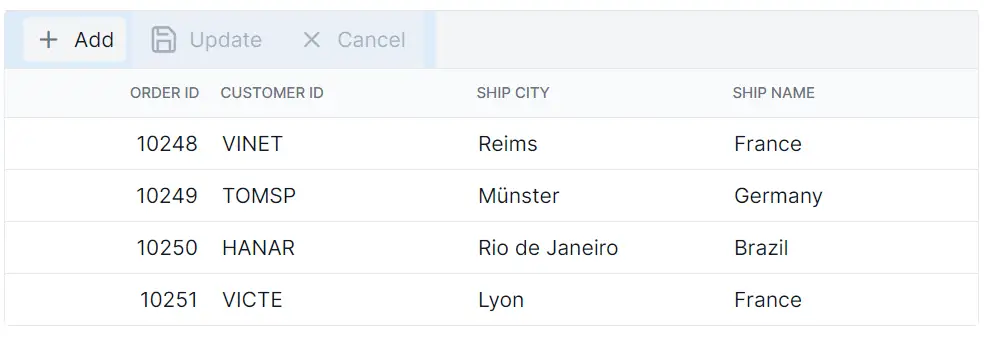
The appearance of toolbar elements in the Blazor DataGrid can be customized using CSS. Styling options are available for different parts of the toolbar interface:
- **Toolbar root container:** The outer wrapper that contains all toolbar items.
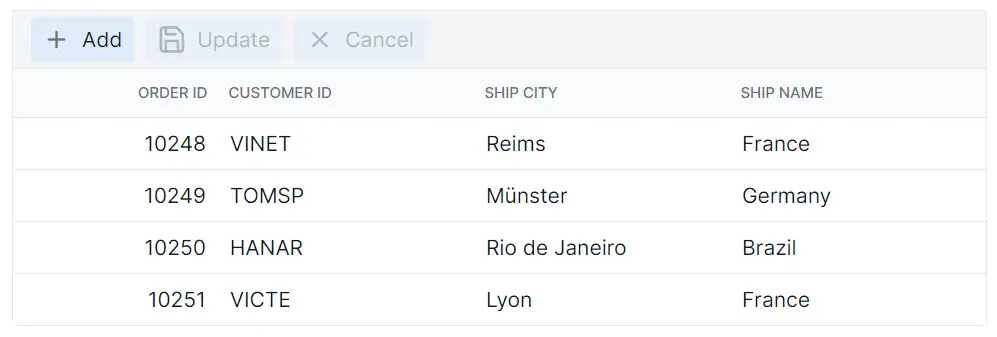
- **Toolbar buttons:** Shows interactive elements used for actions such as Add, Edit, Delete, Update, and Cancel.
## Customize the toolbar root element
The **.e-toolbar-items** class styles the toolbar root container in the Blazor DataGrid. This container holds all toolbar items and can be styled using CSS:
```css
.e-grid .e-toolbar-items {
background-color: #deecf9;
}
```
Properties such as **background-color**, **padding**, **border**, and **box-shadow** can be modified to suit the layout design.
## Customize the toolbar button elements
The **.e-btn** class inside **.e-toolbar** defines the appearance of toolbar buttons in the Blazor DataGrid. Apply CSS to customize their styling:
```css
.e-grid .e-toolbar .e-btn {
background-color: #deecf9;
}
```
Properties such as **background-color**, **color**, **border**, **font-size**, and **padding** can be adjusted to align with the design. Ensure that customized colors meet WCAG contrast guidelines and that focus indicators remain visible for keyboard navigation.
{% tabs %}
{% highlight razor tabtitle="Index.razor" %}
@using Syncfusion.Blazor.Grids
@code {
private List Orders { get; set; }
protected override void OnInitialized()
{
Orders = OrderData.GetAllRecords();
}
}
{% endhighlight %}
{% highlight c# tabtitle="OrderData.cs" %}
internal sealed class OrderData
{
private static readonly List Data = new List();
internal OrderData(int orderID, string customerID, string shipCity, string shipName)
{
OrderID = orderID;
CustomerID = customerID;
ShipCity = shipCity;
ShipName = shipName;
}
public static List GetAllRecords()
{
if (Data.Count == 0)
{
Data.Add(new OrderData(10248, "VINET", "Reims", "Vins et alcools Chevalier"));
Data.Add(new OrderData(10249, "TOMSP", "Münster", "Toms Spezialitäten"));
Data.Add(new OrderData(10250, "HANAR", "Rio de Janeiro", "Hanari Carnes"));
Data.Add(new OrderData(10251, "VICTE", "Lyon", "Victuailles en stock"));
Data.Add(new OrderData(10252, "SUPRD", "Charleroi", "Suprêmes délices"));
Data.Add(new OrderData(10253, "HANAR", "Rio de Janeiro", "Hanari Carnes"));
Data.Add(new OrderData(10254, "CHOPS", "Bern", "Chop-suey Chinese"));
Data.Add(new OrderData(10255, "RICSU", "Genève", "Richter Supermarkt"));
Data.Add(new OrderData(10256, "WELLI", "Resende", "Wellington Import Export"));
Data.Add(new OrderData(10257, "HILAA", "San Cristóbal", "Hila Alimentos"));
Data.Add(new OrderData(10258, "ERNSH", "Graz", "Ernst Handel"));
Data.Add(new OrderData(10259, "CENTC", "México D.F.", "Centro comercial"));
Data.Add(new OrderData(10260, "OTTIK", "Köln", "Ottilies Käseladen"));
Data.Add(new OrderData(10261, "QUEDE", "Rio de Janeiro", "Que delícia"));
Data.Add(new OrderData(10262, "RATTC", "Albuquerque", "Rattlesnake Canyon Grocery"));
}
return Data;
}
public int OrderID { get; set; }
public string CustomerID { get; set; }
public string ShipCity { get; set; }
public string ShipName { get; set; }
}
{% endhighlight %}
{% endtabs %}
{% previewsample "https://blazorplayground.syncfusion.com/embed/rthHtctMLGtPFIRX?appbar=false&editor=false&result=true&errorlist=false&theme=fluent2" %}