Week Number in Blazor DatePicker
27 Aug 20261 minute to read
The Blazor DatePicker can display the week number alongside each row of the calendar. Use the WeekNumber property to toggle the display. The default value of WeekNumber is false.
@using Syncfusion.Blazor.Calendars

<SfDatePicker TValue="DateTime?" Width="250px" WeekNumber="true"></SfDatePicker>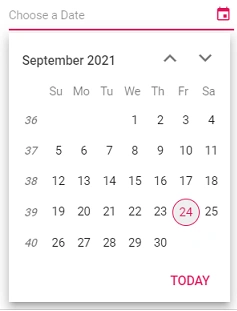
Week rule
Use the WeekRule property to specify the rule used to define the first week of the year. The default value of WeekRule is WeekRule.FirstDay. The available values are:
| Value | Description |
|---|---|
WeekRule.FirstDay |
The first week of the year is numbered 1. The numbering then continues as 1, 2, 3, … |
WeekRule.FirstFullWeek |
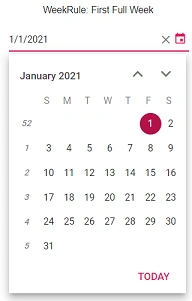
The first week of the year is numbered 52 or 53 (that is, the last week of the previous December). The numbering then continues as 53, 1, 2, … |
WeekRule.FirstFourDayWeek |
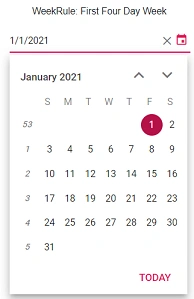
The week number is based on the majority of dates in the week: if the week contains more January dates than December dates, the first week of the year is numbered 1; otherwise it is numbered 52 or 53. |
The following example uses the FirstFullWeek rule.
@using Syncfusion.Blazor.Calendars

<SfDatePicker TValue="DateTime?" Width="250px" WeekNumber="true" WeekRule="WeekRule.FirstFullWeek"></SfDatePicker>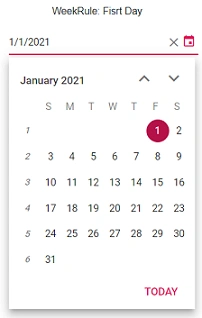
See also
- WeekNumber property
- WeekRule property
- Date Format
- Calendar component