Globalization in Blazor DateRangePicker
27 Aug 20261 minute to read
Blazor DateRangePicker component can be localized. Refer to Blazor Localization topic to localize Blazor components.
Right-To-Left
The Blazor DateRangePicker supports RTL (right-to-left) functionality for languages like Arabic and Hebrew. Use the EnableRtl property to set the RTL direction. The component renders based on the system culture.
The following code example initializes the Blazor DateRangePicker component in RTL mode.
@using Syncfusion.Blazor
@using Syncfusion.Blazor.Calendars

<SfDateRangePicker TValue="DateTime?" EnableRtl=true></SfDateRangePicker>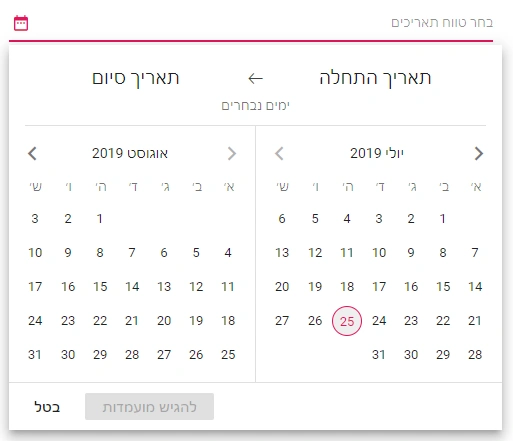
NOTE
You can refer to our Blazor Date Range Picker feature tour page for its groundbreaking feature representations. You can also explore our Blazor Date Range Picker example to understand how to present and manipulate data.