How to change the caret icon in Blazor Dropdown Menu
14 Aug 20261 minute to read
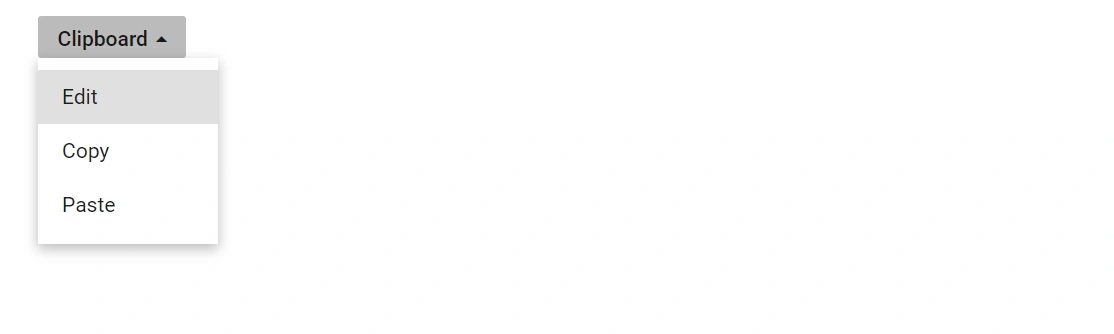
The caret icon in the Dropdown Menu component can be customized when the popup opens and closes by handling the OnOpen and OnClose events. These callbacks trigger before the popup is displayed or hidden, providing a convenient place to toggle CSS classes that adjust the caret appearance.
In the following example, the e-caret-up class is added to the button on popup open and removed on popup close, rotating the caret icon 180° to point up while the popup is visible.
@using Syncfusion.Blazor.SplitButtons

<SfDropDownButton CssClass="@IconCss" Content="Clipboard">
    <DropDownButtonEvents OnOpen="beforeOpen" OnClose="beforeClose"></DropDownButtonEvents>
    <DropDownMenuItems>
        <DropDownMenuItem Text="Edit"></DropDownMenuItem>
        <DropDownMenuItem Text="Copy"></DropDownMenuItem>
        <DropDownMenuItem Text="Paste"></DropDownMenuItem>
    </DropDownMenuItems>
</SfDropDownButton>

@code {
    public string IconCss = "";
    private void beforeOpen(BeforeOpenCloseMenuEventArgs args)
    {
        this.IconCss = "e-caret-up";
        this.StateHasChanged();
    }
    private void beforeClose(BeforeOpenCloseMenuEventArgs args)
    {
        this.IconCss = "";
        this.StateHasChanged();
    }
}

<style>
    .e-caret {
        transform: rotate(0deg);
        transition: transform 200ms ease-in-out;
    }

    .e-caret-up .e-caret {
        transform: rotate(180deg);
    }
</style>