How to enable right-to-left layout in Blazor Dropdown Menu
14 Aug 20261 minute to read
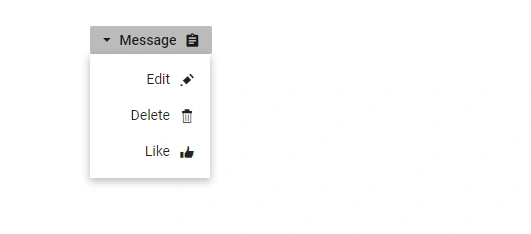
Dropdown Menu component has RTL support. This can be achieved by setting EnableRtl as true.
The following example illustrates how to enable right-to-left support in Dropdown Menu component.
@using Syncfusion.Blazor.SplitButtons

<SfDropDownButton Content="Message" IconCss="e-icons e-message" EnableRtl="true">
    <DropDownMenuItems>
        <DropDownMenuItem IconCss="e-icons e-edit" Text="Edit"></DropDownMenuItem>
        <DropDownMenuItem IconCss="e-icons e-delete" Text="Delete"></DropDownMenuItem>
        <DropDownMenuItem IconCss="e-icons e-like" Text="Like"></DropDownMenuItem>
    </DropDownMenuItems>
</SfDropDownButton>

<style>
    .e-message::before {
        content: '\e7cb';
    }

    .e-edit::before {
        content: '\e78f';
    }

    .e-delete::before {
        content: '\e773';
    }

    .e-like::before {
        content: '\e682';
    }

</style>