How to create Dropdown List in Popup in Blazor Dropdown Menu
14 Aug 20262 minutes to read
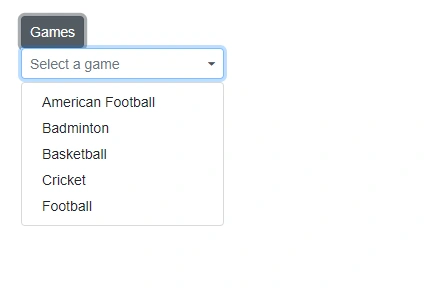
Render the DropDownList component inside the DropDownMenu popup by using the PopupContent property. This replaces the default menu items with custom content and allows embedding interactive controls within the dropdown panel.
In the following example, render DropDownList component in popup.
@using Syncfusion.Blazor.SplitButtons
@using Syncfusion.Blazor.DropDowns

<SfDropDownButton CssClass="e-caret-hide" Content="Games">
    <PopupContent>
        <div id="dropDownFilterExpenses">
            <SfDropDownList TValue="string" TItem="GameFields" PopupHeight="230px" Placeholder="Select a game" DataSource="@Games">
                <DropDownListFieldSettings Text="Text" Value="ID"></DropDownListFieldSettings>
                <DropDownListEvents Opened="OpenPopup" OnClose="beforeClose" TValue="string" TItem="GameFields"></DropDownListEvents>
            </SfDropDownList>
        </div>
    </PopupContent>
    <ChildContent>
        <DropDownButtonEvents OnClose="popupClose"></DropDownButtonEvents>
    </ChildContent>
</SfDropDownButton>


@code {

    private bool ispopUp = false;

    private void popupClose(BeforeOpenCloseMenuEventArgs args)
    {
        args.Cancel = this.ispopUp;
    }

    private void OpenPopup(PopupEventArgs args)
    {
        this.ispopUp = true;
    }

    private void beforeClose(PopupEventArgs args)
    {
        this.ispopUp = false;
    }

    public class GameFields
    {
        public string ID { get; set; }
        public string Text { get; set; }
    }
    private List<GameFields> Games = new List<GameFields>() {
        new GameFields(){ ID= "Game1", Text= "American Football" },
        new GameFields(){ ID= "Game2", Text= "Badminton" },
        new GameFields(){ ID= "Game3", Text= "Basketball" },
        new GameFields(){ ID= "Game4", Text= "Cricket" },
        new GameFields(){ ID= "Game5", Text= "Football" }
     };

}

<style>
    .e-dropdown-popup.e-transparent div {
        display: none;
    }
</style>