Globalization in Blazor In-place Editor
27 Aug 20262 minutes to read
This topic explains how to globalize the Blazor In-place Editor, including localizing UI text, enabling right-to-left (RTL) layout, and applying culture-aware formatting.
Localization
Blazor In-place Editor supports localization. To localize component text (such as tooltips and buttons), follow the guidance in Blazor Localization.
Right to left
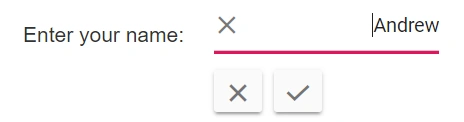
Specify the direction of the Blazor In-place Editor using the EnableRtl property. Use RTL layout for right-to-left languages such as Arabic, Hebrew, and Farsi. The layout direction can be switched to right-to-left independently of the current locale.
The layout direction is not automatically changed by the
EnableRtlproperty based on the current culture.
@using Syncfusion.Blazor.InPlaceEditor
@using Syncfusion.Blazor.Inputs

<table>
    <tr>
        <td class="control-title content-title"> Enter your name: </td>
        <td>
            <SfInPlaceEditor @bind-Value="@TextValue" EnableRtl="true" TValue="string">
                <EditorComponent>
                    <SfTextBox @bind-Value="@TextValue" Placeholder="Enter some text"></SfTextBox>
                </EditorComponent>
            </SfInPlaceEditor>
        </td>
    </tr>
</table>

@code {
    public string TextValue = "Andrew";
}
Format
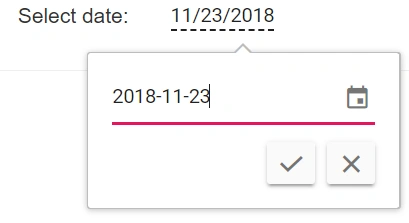
Formatting is a way of representing the value in different formats. Format the following components using their Format property when they are directly configured in the editor component.
@using Syncfusion.Blazor.InPlaceEditor
@using Syncfusion.Blazor.Calendars

<table>
    <tr>
        <td class="control-title"> DatePicker </td>
        <td>
            <SfInPlaceEditor Type="Syncfusion.Blazor.InPlaceEditor.InputType.Date" TValue="DateTime?" @bind-Value="@DateValue">
                <EditorComponent>
                    <SfDatePicker TValue="DateTime?" @bind-Value="@DateValue" Format="yyyy-MM-dd"  Placeholder="Choose a Date"></SfDatePicker>
                </EditorComponent>
            </SfInPlaceEditor>
        </td>
    </tr>
</table>

@code {
    public DateTime? DateValue { get; set; } = new DateTime(DateTime.Now.Year, DateTime.Now.Month, DateTime.Now.Day);
}