How to Use MaskedTextBoxFor in Blazor Input Mask
14 Aug 20261 minute to read
This section demonstrates how to use model binding and validation with the MaskedTextBox in a Blazor EditForm. Bind a model to the form, annotate its properties with data annotations, bind the component’s Value parameter to a model property, and display validation messages when the form is submitted.
For reference, see the SfMaskedTextBox, Mask, Placeholder, and Value API references, and the Blazor EditForm and data annotations validation guidance.
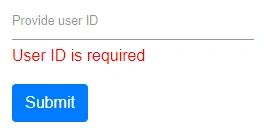
In this sample, click the Submit button to post the value in the MaskedTextBox. When the bound value is null, empty, or otherwise invalid according to data annotations, a validation error message is shown below the MaskedTextBox. If the model property is null at first render, the Value will be an empty string until the user provides a value.
@using Syncfusion.Blazor.Inputs
@using System.ComponentModel.DataAnnotations
@using Microsoft.AspNetCore.Components.Forms

<EditForm Model="@User" OnValidSubmit="@HandleValidSubmit">
    <DataAnnotationsValidator />
    <ValidationSummary />
    <div class="form-group">
        <SfMaskedTextBox Mask="00000" Placeholder="Provide user ID" @bind-Value="@User.ID"></SfMaskedTextBox>
        <ValidationMessage For="@(() => User.ID)" />
    </div>
    <button type="submit" class="btn btn-primary">Submit</button>
</EditForm>

@code {

    public Customer User = new Customer();

    public class Customer
    {
        [Required(ErrorMessage = "User ID is required")]
        public string ID { get; set; }
    }

    private void HandleValidSubmit()
    {
        // Handle the valid submit here.
    }
}