---
layout: post
title: Dual ListBox in Blazor ListBox | Syncfusion
description: Build a dual Blazor ListBox to move items between lists using toolbar actions and a shared Scope value.
platform: Blazor
control: List Box
documentation: ug
---
# Dual ListBox in Blazor ListBox
The dual ListBox enables moving items between two ListBoxes using toolbar buttons. Create a dual ListBox by configuring the [ListBoxToolbarSettings](https://help.syncfusion.com/cr/blazor/Syncfusion.Blazor.DropDowns.ListBoxToolbarSettings.html) on one of the ListBoxes and assigning the same [Scope](https://help.syncfusion.com/cr/blazor/Syncfusion.Blazor.DropDowns.SfListBox-2.html#Syncfusion_Blazor_DropDowns_SfListBox_2_Scope) value to both ListBoxes. The shared `Scope` value is what enables the toolbar and drag-and-drop actions to operate across the two ListBoxes.
The following operations can be performed in a dual ListBox by configuring the `ListBoxToolbarSettings.Items` array:
| Action | Description |
|------|-------------|
| `MoveUp` | Move the selected item up within the ListBox. |
| `MoveDown` | Move the selected item down within the ListBox. |
| `MoveTo` | Move the selected item to the other ListBox. |
| `MoveFrom` | Move the selected item from the other ListBox to this ListBox. |
| `MoveAllTo` | Move all items to the other ListBox. |
| `MoveAllFrom` | Move all items from the other ListBox to this ListBox. |
## Create a dual ListBox
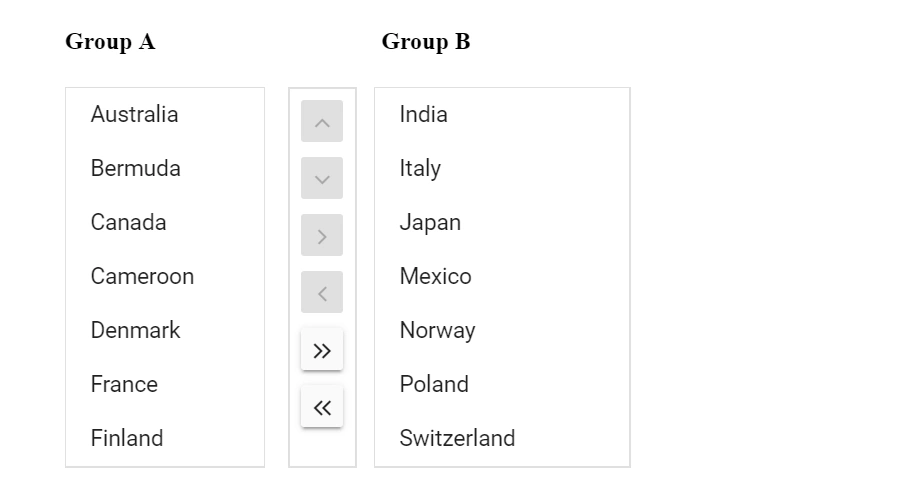
The following example illustrates how to move items between the **Group A** and **Group B** ListBoxes using the toolbar. Both ListBoxes share the same `Scope` value (`combined-list`) so the toolbar actions operate across them, and the `ListBoxToolbarSettings` is configured on the first ListBox.
```cshtml
@using Syncfusion.Blazor.DropDowns
Group A
Group B
@code {
private readonly Dictionary listbox1Attr = new Dictionary
{
{ "id", "scope1" }
};
private readonly Dictionary listbox2Attr = new Dictionary
{
{ "id", "scope2" }
};
public string[] Items = new string[] { "MoveUp", "MoveDown", "MoveTo", "MoveFrom", "MoveAllTo", "MoveAllFrom" };
public List GroupA = new List
{
new CountryCode{ Name = "Australia", Code = "AU" },
new CountryCode{ Name = "Bermuda", Code = "BM" },
new CountryCode{ Name = "Canada", Code = "CA" },
new CountryCode{ Name = "Cameroon", Code = "CM" },
new CountryCode{ Name = "Denmark", Code = "DK" },
new CountryCode{ Name = "France", Code = "FR" },
new CountryCode{ Name = "Finland", Code = "FI" }
};
public List GroupB = new List
{
new CountryCode{ Name = "India", Code = "IN" },
new CountryCode{ Name = "Italy", Code = "IT" },
new CountryCode{ Name = "Japan", Code = "JP" },
new CountryCode{ Name = "Mexico", Code = "MX" },
new CountryCode{ Name = "Norway", Code = "NO" },
new CountryCode{ Name = "Poland", Code = "PL" },
new CountryCode{ Name = "Switzerland", Code = "CH" }
};
public class CountryCode
{
public string Name { get; set; }
public string Code { get; set; }
}
}
```
## See also
* [Drag and Drop in Blazor ListBox](./drag-and-drop.md)
* [Selection in Blazor ListBox](./selection.md)
* [Data Binding in Blazor ListBox](./data-binding.md)
* [Getting Started with Blazor ListBox](./getting-started.md)