How can I help you?
Slash Commands in Blazor Rich Text Editor
12 Nov 202511 minutes to read
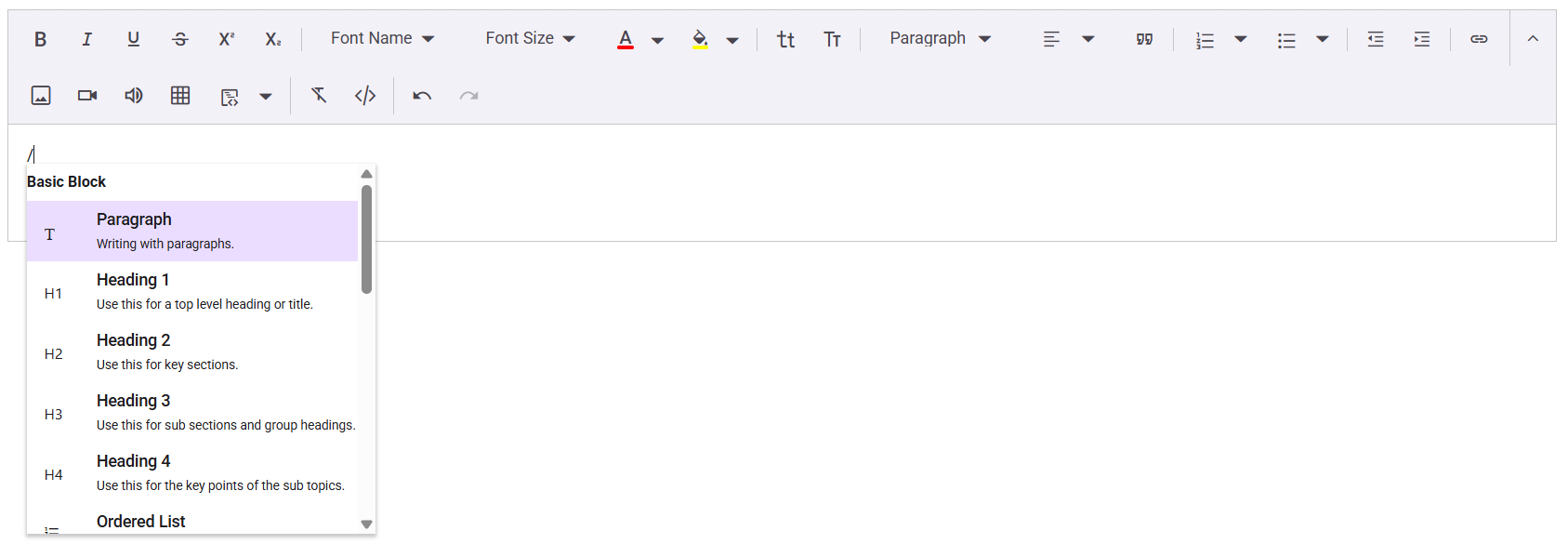
The slash menu in the Rich Text Editor offers users a streamlined way to apply formatting, insert elements, and execute custom commands by simply typing the “/” character. This feature enhances the user experience by offering quick access to common editing actions within the editor.
Enabling the slash menu
To enable the slash menu, set the Enable property within RichTextEditorSlashMenuSettings to true. By default, this feature is disabled. Once enabled, the slash menu will appear when the user types the “/” character in the editor.
NOTE
The SlashMenu feature is currently not supported in iframe mode of the Rich Text Editor. We are actively working on this, and support for SlashMenu in iframe mode is planned for a future update.
Configure the slash menu items
The RichTextEditorSlashMenuSettings property allows customization of the Items displayed in the slash menu. By setting the Items property with a list of SlashMenuItemModel, you can define which commands are available when a user types a slash (/) in the Rich Text Editor.
This list can include various formatting options such as paragraph and heading levels. Here’s an code snippet of configuring the slash menu items:
@using Syncfusion.Blazor.RichTextEditor

<SfRichTextEditor Placeholder="@editorPlaceholder">
    <RichTextEditorSlashMenuSettings Enable="true" Items="@slashmenuItems" />
</SfRichTextEditor>

@code{
    private string editorPlaceholder = "Type \"/\" and choose format";
    private List<SlashMenuItemModel> slashmenuItems = new List<SlashMenuItemModel> ()
    {
        new SlashMenuItemModel() {Command = SlashMenuCommand.Paragraph},
        new SlashMenuItemModel() {Command = SlashMenuCommand.Heading1},
        new SlashMenuItemModel() {Command = SlashMenuCommand.Heading2},
        new SlashMenuItemModel() {Command = SlashMenuCommand.Heading3},
    };
}
Customizing the popup width and height
The size of the slash menu popup can be customized using the PopupWidth and PopupHeight properties within RichTextEditorSlashMenuSettings. Adjusting these values allows for control over the dimensions of the menu.
Below is a code snippet showing how to customize both the width and height of the popup:
@using Syncfusion.Blazor.RichTextEditor

<SfRichTextEditor Placeholder="@editorPlaceholder" >
        <RichTextEditorSlashMenuSettings Enable="true" Items="@slashmenuItems" PopupWidth= "300px" PopupHeight= "250px"/>
</SfRichTextEditor>

@code{
    private string editorPlaceholder = "Type \"/\" and choose format";
    private List<SlashMenuItemModel> slashmenuItems = new List<SlashMenuItemModel> ()
    {
        new SlashMenuItemModel() {Command = SlashMenuCommand.Paragraph},
        new SlashMenuItemModel() {Command = SlashMenuCommand.Heading1},
        new SlashMenuItemModel() {Command = SlashMenuCommand.Heading2},
        new SlashMenuItemModel() {Command = SlashMenuCommand.Heading3},
    };
}
Adding custom slash menu items
Custom items can be added by defining the Items property within the RichTextEditorSlashMenuSettings. This property should be a list of SlashMenuItemModel objects, which represent custom menu items. Each SlashMenuItemModel can be configured to include details such as text labels, icons, descriptions, and grouping information, allowing users to access tailored commands quickly using the slash (/) functionality in the Rich Text Editor.
Each custom slash menu item can include the following properties:
| API | Description |
|---|---|
| Text | The label of the menu item. |
| Command | The action to be executed when the item is clicked. |
| GroupBy | Groups related items in the slash menu. |
| IconCss | Specifies the CSS class for the item’s icon. |
| Description | Provides a short description for the item. |
The following code demonstrates how to set up the custom slash menu item in the Rich Text Editor to insert meeting notes and signature:
@using Syncfusion.Blazor.RichTextEditor

<div class="control-section" id="slashmenuEditor">
    <SfRichTextEditor @ref="richTextEditorObj" Placeholder="@editorPlaceholder">
        <RichTextEditorToolbarSettings Items="@tools" />
        <RichTextEditorEvents SlashMenuItemSelecting = "OnSlashMenuItemSelect" />
        <RichTextEditorSlashMenuSettings Enable="true" Items="@slashmenuItems" />
    </SfRichTextEditor>
</div>
@code
{
    private SfRichTextEditor richTextEditorObj;
    private string editorPlaceholder = "Type \"/\" and choose format";
    private string horizontalline = @"<hr>";
    private string checklist = @"<ul class=""e-rte-checklist""><li> Task 1</li><li> Task 2</li></ul>";
    private string meetingNotes = @"<p><strong>Meeting Notes</strong></p><table class=""e-rte-table"" style=""width: 100%; min-width: 0px; height: 150px;""> <tbody> <tr style=""height: 20%;""> <td style=""width: 50%;""><strong>Attendees</strong></td> <td style=""width: 50%;""><br></td> </tr> <tr style=""height: 20%;""> <td style=""width: 50%;""><strong>Date & Time</strong></td> <td style=""width: 50%;""><br></td> </tr> <tr style=""height: 20%;""> <td style=""width: 50%;""><strong>Agenda</strong></td> <td style=""width: 50%;""><br></td> </tr> <tr style=""height: 20%;""> <td style=""width: 50%;""><strong>Discussed Items</strong></td> <td style=""width: 50%;""><br></td> </tr> <tr style=""height: 20%;""> <td style=""width: 50%;""><strong>Action Items</strong></td> <td style=""width: 50%;""><br></td> </tr> </tbody> </table>";
    private string signature = "<p><br></p><p>Warm regards,</p><p>John Doe<br>Event Coordinator<br>ABC Company</p>";
    private List<ToolbarItemModel> tools = new List<ToolbarItemModel> ()
    {
        new ToolbarItemModel() { Command = ToolbarCommand.Bold },
        new ToolbarItemModel() { Command = ToolbarCommand.Italic },
        new ToolbarItemModel() { Command = ToolbarCommand.Underline },
        new ToolbarItemModel() { Command = ToolbarCommand.StrikeThrough },
        new ToolbarItemModel() { Command = ToolbarCommand.SuperScript },
        new ToolbarItemModel() { Command = ToolbarCommand.SubScript },
        new ToolbarItemModel() { Command = ToolbarCommand.Separator },
        new ToolbarItemModel() { Command = ToolbarCommand.FontName },
        new ToolbarItemModel() { Command = ToolbarCommand.FontSize },
        new ToolbarItemModel() { Command = ToolbarCommand.FontColor },
        new ToolbarItemModel() { Command = ToolbarCommand.BackgroundColor },
        new ToolbarItemModel() { Command = ToolbarCommand.Separator },
        new ToolbarItemModel() { Command = ToolbarCommand.LowerCase },
        new ToolbarItemModel() { Command = ToolbarCommand.UpperCase },
        new ToolbarItemModel() { Command = ToolbarCommand.Separator },
        new ToolbarItemModel() { Command = ToolbarCommand.Formats },
        new ToolbarItemModel() { Command = ToolbarCommand.Alignments },
        new ToolbarItemModel() { Command = ToolbarCommand.Blockquote },
        new ToolbarItemModel() { Command = ToolbarCommand.Separator },
        new ToolbarItemModel() { Command = ToolbarCommand.NumberFormatList },
        new ToolbarItemModel() { Command = ToolbarCommand.BulletFormatList },
        new ToolbarItemModel() { Command = ToolbarCommand.Separator },
        new ToolbarItemModel() { Command = ToolbarCommand.Outdent },
        new ToolbarItemModel() { Command = ToolbarCommand.Indent },
        new ToolbarItemModel() { Command = ToolbarCommand.Separator },
        new ToolbarItemModel() { Command = ToolbarCommand.CreateLink },
        new ToolbarItemModel() { Command = ToolbarCommand.Image },
        new ToolbarItemModel() { Command = ToolbarCommand.Video },
        new ToolbarItemModel() { Command = ToolbarCommand.Audio },
        new ToolbarItemModel() { Command = ToolbarCommand.CreateTable },
        new ToolbarItemModel() { Command = ToolbarCommand.CodeBlock },
        new ToolbarItemModel() { Command = ToolbarCommand.Separator },
        new ToolbarItemModel() { Command = ToolbarCommand.ClearFormat },
        new ToolbarItemModel() { Command = ToolbarCommand.SourceCode },
        new ToolbarItemModel() { Command = ToolbarCommand.Separator },
        new ToolbarItemModel() { Command = ToolbarCommand.Undo },
        new ToolbarItemModel() { Command = ToolbarCommand.Redo }
    };
    private List<SlashMenuItemModel> slashmenuItems = new List<SlashMenuItemModel> ()
    {
        new SlashMenuItemModel() {Command = SlashMenuCommand.Paragraph},
        new SlashMenuItemModel() {Command = SlashMenuCommand.Heading1},
        new SlashMenuItemModel() {Command = SlashMenuCommand.Heading2},
        new SlashMenuItemModel() {Command = SlashMenuCommand.Heading3},
        new SlashMenuItemModel() {Command = SlashMenuCommand.Heading4},
        new SlashMenuItemModel() {Command = SlashMenuCommand.OrderedList},
        new SlashMenuItemModel() {Command = SlashMenuCommand.UnorderedList},
        new SlashMenuItemModel() {Command = SlashMenuCommand.Blockquote},
        new SlashMenuItemModel() {Command = SlashMenuCommand.CodeBlock},
        new SlashMenuItemModel() {Command = SlashMenuCommand.Image},
        new SlashMenuItemModel() {Command = SlashMenuCommand.Audio},
        new SlashMenuItemModel() {Command = SlashMenuCommand.Video},
        new SlashMenuItemModel() {Command = SlashMenuCommand.Link},
        new SlashMenuItemModel() {Command = SlashMenuCommand.Table},
        new SlashMenuItemModel() { Text="Meeting Notes", GroupBy = "Custom" , IconCss = "e-icons e-description", Description= "Insert a meeting note template." },
        new SlashMenuItemModel() { Text="Signature", GroupBy= "Custom" , IconCss = "e-icons e-signature", Description= "Insert a signature template." },
        new SlashMenuItemModel() { Text="HorizontalLine", GroupBy = "Custom" , IconCss = "e-icons e-horizontal-line", Description= "Insert a horizontal line" },
        new SlashMenuItemModel() { Text="CheckList", GroupBy= "Custom" , IconCss = "e-icons e-checklist", Description= "Insert a check list" }

    };
    public async Task OnSlashMenuItemSelect ( SlashMenuSelectEventArgs args )
    {
        if (args.ItemData.Text == "Meeting Notes")
        {
            await richTextEditorObj.ExecuteCommandAsync (CommandName.InsertHTML, meetingNotes);
        }
        else if (args.ItemData.Text == "Signature")
        {
            await richTextEditorObj.ExecuteCommandAsync (CommandName.InsertHTML, signature);
        }
        else if (args.ItemData.Text == "HorizontalLine")
        {
            await richTextEditorObj.ExecuteCommandAsync (CommandName.InsertHTML, horizontalline);
        }
        else if (args.ItemData.Text == "CheckList")
        {
            await richTextEditorObj.ExecuteCommandAsync (CommandName.InsertHTML, checklist);
        }
    }
}