How can I help you?
Toolbar Position in Blazor Rich Text Editor Component
12 Nov 20251 minute to read
The Rich Text Editor allows you to configure the toolbar’s position using the RichTextEditorToolbarSettings.Position property. The available positions are:
- Top
- Bottom
Configuring the toolbar position
You can position the toolbar at the top or bottom of the content area based on your layout requirements.
By default, the toolbar appears at the top of the editor, making all formatting and editing tools easily accessible above the content.
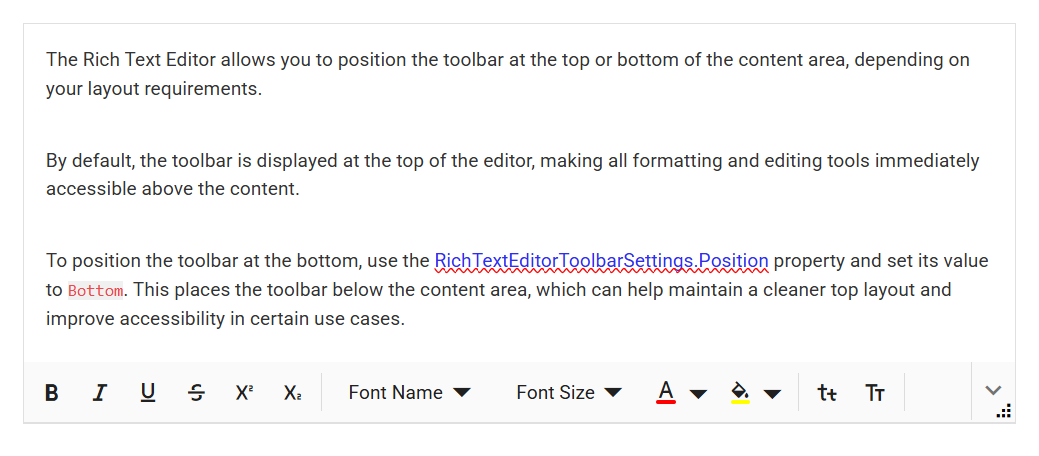
To move the toolbar to the bottom, set the RichTextEditorToolbarSettings.Position property to Bottom. This places the toolbar below the content area, which can help maintain a cleaner top layout and improve accessibility in certain scenarios.
@using Syncfusion.Blazor.RichTextEditor

<SfRichTextEditor>
    <RichTextEditorToolbarSettings Position="ToolbarPosition.Bottom" />
    <p>The Rich Text Editor component is WYSIWYG ('what you see is what you get') editor that provides the best user experience to create and update the content. Users can format their content using standard toolbar commands.</p>
</SfRichTextEditor>