Blazor Sparkline Charts Special Points Customization
12 Aug 20262 minutes to read
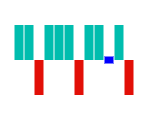
Add Custom Color for Special Points
The color of special points can be changed by specifying the corresponding property. This is applicable for Line, Column, and Area chart types. The following properties are used to customize special points:
@using Syncfusion.Blazor.Charts

<SfSparkline XName="CarName" YName="Rating" Width="130px" Height="150px" TValue="CarRating" DataSource="CarRatings" Type="SparklineType.Column" ValueType="SparklineValueType.Category"
             HighPointColor="blue" LowPointColor="orange" StartPointColor="green" EndPointColor="green" NegativePointColor="red">
</SfSparkline>

@code {
    public class CarRating
    {
        public string CarName { get; set; }
        public double Rating { get; set; }
    };

    public List<CarRating> CarRatings = new List<CarRating> {
        new CarRating { CarName = "AUDI", Rating = 1 },
        new CarRating { CarName = "BMW", Rating = 5 },
        new CarRating { CarName = "BUICK", Rating = -1 },
        new CarRating { CarName = "CETROEN", Rating = -6 },
        new CarRating { CarName = "CHEVROLET", Rating = 0.01 },
        new CarRating { CarName = "FIAT", Rating = 1 },
        new CarRating { CarName = "FORD", Rating = -2 },
        new CarRating { CarName = "HONDA", Rating = 7 },
        new CarRating { CarName = "HYUNDAI", Rating = -9 },
        new CarRating { CarName = "JEEP", Rating = 0.01 },
        new CarRating { CarName = "KIA", Rating = -10 },
        new CarRating { CarName = "MAZDA", Rating = 3 }
    };
}
Tie Point Color
To highlight the tie area of the Y-axis value, use the TiePointColor property. This is only applicable to the WinLoss type.
@using Syncfusion.Blazor.Charts

<SfSparkline Width="130px" Height="150px" Type="SparklineType.WinLoss" TiePointColor="blue" DataSource="new int[]{12, 15, -10, 13, 15, 6, -12, 17, 13, 0, 8, -10}">
</SfSparkline>