Rows and Columns in Blazor TextArea
14 Aug 20261 minute to read
The TextArea size can be tailored for layout and readability using properties that map to native textarea behavior. The rows setting controls the initial visible number of lines (vertical size), and the columns setting represents the initial visible width in characters per line (approximate, depending on font and CSS). These settings affect only the initial visible area; content can still exceed the view, and scrollbars may appear based on overflow settings.
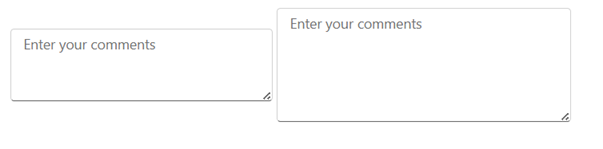
- Customize the TextArea by setting the number of rows with the RowCount property and the number of columns with the ColumnCount property. These properties provide precise control over the TextArea’s initial dimensions so it fits the application layout.
<SfTextArea Placeholder='Enter your comments' RowCount="3" ColumnCount="35"></SfTextArea>
<SfTextArea Placeholder='Enter your comments' RowCount="5" ColumnCount="40"></SfTextArea>