Template Column Editing in Blazor TreeGrid
7 Aug 20266 minutes to read
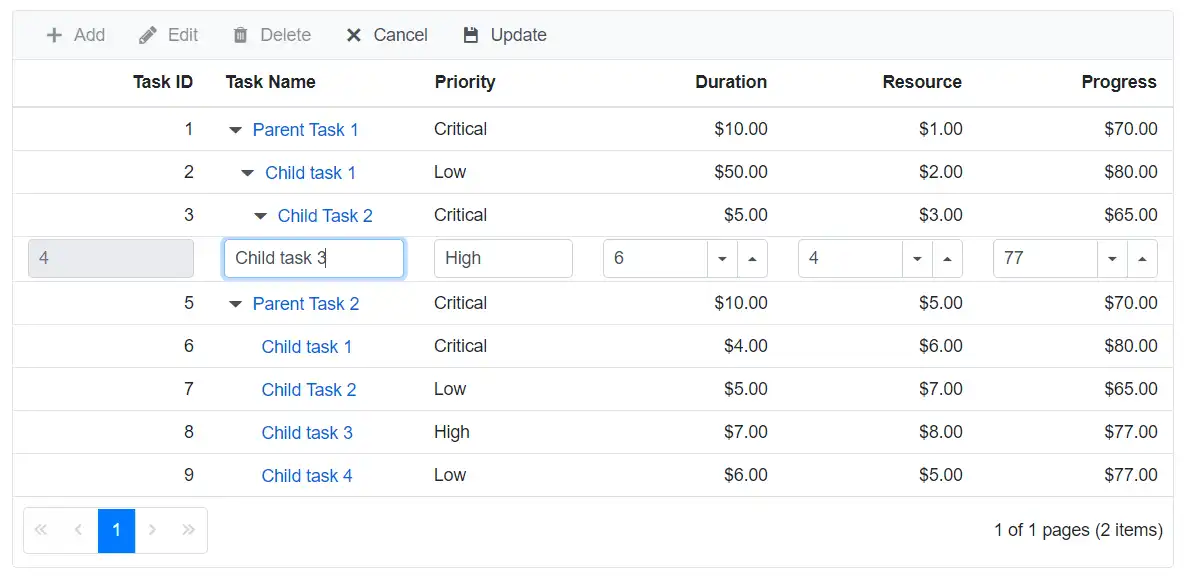
A template column value can be edited by defining the Field property for that particular TreeGridColumn component.
@using TreeGridComponent.Data;
@using  Syncfusion.Blazor.Grids;
@using  Syncfusion.Blazor.TreeGrid;

<SfTreeGrid DataSource="@TreeGridData" IdMapping="TaskId" ParentIdMapping="ParentId" AllowPaging="true"
                TreeColumnIndex="1" Toolbar="@(new List<string>() { "Add", "Edit", "Delete", "Cancel", "Update" })">
        <TreeGridEditSettings AllowEditing="true" AllowAdding="true" AllowDeleting="true" Mode="Syncfusion.Blazor.TreeGrid.EditMode.Row" />
        <TreeGridColumns>
            <TreeGridColumn Field="TaskId" HeaderText="Task ID" IsPrimaryKey="true" Width="70" TextAlign="TextAlign.Right"></TreeGridColumn>
            <TreeGridColumn Field="TaskName" HeaderText="Task Name" Width="75">
                <Template>
                    @{
                        var data = context as TreeData;
                        <a href="#">@data.TaskName</a>
                    }
                </Template>
            </TreeGridColumn>
            <TreeGridColumn Field="Priority" HeaderText="Priority" Width="60"></TreeGridColumn>
            <TreeGridColumn Field="Duration" HeaderText="Duration" Width="70" Format="C2" TextAlign="TextAlign.Right"></TreeGridColumn>
            <TreeGridColumn Field="Progress" HeaderText="Progress" Width="70" Format="C2" TextAlign="TextAlign.Right"></TreeGridColumn>

        </TreeGridColumns>
    </SfTreeGrid>

    @code{
        SfTreeGrid<TreeData> TreeGrid;

        public List<TreeData> TreeGridData { get; set; }
        protected override void OnInitialized()
        {
            this.TreeGridData = TreeData.GetSelfDataSource().ToList();
        }
    }
namespace TreeGridComponent.Data {
public class TreeData
{
public int TaskId { get; set; }
public string TaskName { get; set; }
public int? Duration { get; set; }
public int? Progress { get; set; }
public string Priority { get; set; }
public int? ParentId { get; set; }
public static List<TreeData> GetSelfDataSource()
{
List<TreeData> TreeDataCollection = new List<TreeData>();
TreeDataCollection.Add(new TreeData() { TaskId = 1, TaskName = "Parent Task 1", Duration = 10, Progress = 70, Priority = "Critical", ParentId = null });
TreeDataCollection.Add(new TreeData() { TaskId = 2, TaskName = "Child task 1", Progress = 80, Priority = "Low", Duration = 50, ParentId = 1 });
TreeDataCollection.Add(new TreeData() { TaskId = 3, TaskName = "Child Task 2", Duration = 5, Progress = 65, Priority = "Critical", ParentId = 2 });
TreeDataCollection.Add(new TreeData() { TaskId = 4, TaskName = "Child task 3", Duration = 6, Priority = "High", Progress = 77, ParentId = 3 });
TreeDataCollection.Add(new TreeData() { TaskId = 5, TaskName = "Parent Task 2", Duration = 10, Progress = 70, Priority = "Critical", ParentId = null });
TreeDataCollection.Add(new TreeData() { TaskId = 6, TaskName = "Child task 1", Duration = 4, Progress = 80, Priority = "Critical", ParentId = 5 });
TreeDataCollection.Add(new TreeData() { TaskId = 7, TaskName = "Child Task 2", Duration = 5, Progress = 65, Priority = "Low", ParentId = 5 });
TreeDataCollection.Add(new TreeData() { TaskId = 8, TaskName = "Child task 3", Duration = 6, Progress = 77, Priority = "High", ParentId = 5 });
TreeDataCollection.Add(new TreeData() { TaskId = 9, TaskName = "Child task 4", Duration = 6, Progress = 77, Priority = "Low", ParentId = 5 });
return TreeDataCollection;
}
}
}