Searching in Blazor TreeGrid
7 Aug 202624 minutes to read
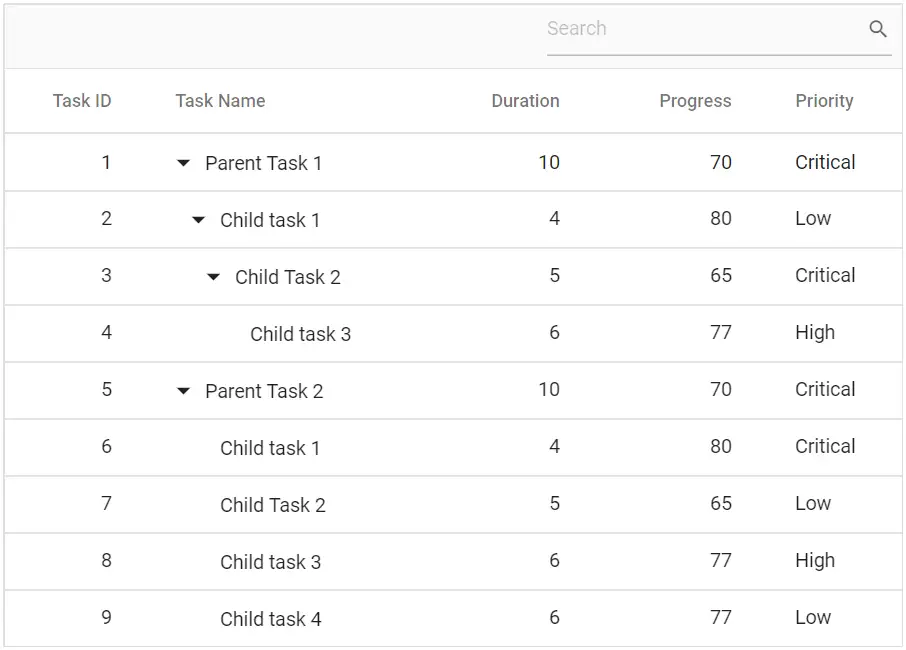
In a TreeGrid, records can be searched using the SearchAsync method by passing a search key as a parameter. A search textbox can also be integrated into the TreeGrid toolbar by adding the Search item to the Toolbar.
@using TreeGridComponent.Data;
@using Syncfusion.Blazor.TreeGrid;
@using Syncfusion.Blazor.Data;

<SfTreeGrid IdMapping="TaskId" DataSource="@TreeGridData"  ParentIdMapping="ParentId" TreeColumnIndex="1" Toolbar="@(new List<string>() { "Search" })">
    <TreeGridColumns>
        <TreeGridColumn Field="TaskId" HeaderText="Task ID" Width="80" TextAlign="Syncfusion.Blazor.Grids.TextAlign.Right"></TreeGridColumn>
        <TreeGridColumn Field="TaskName" HeaderText="Task Name" Width="160"></TreeGridColumn>
        <TreeGridColumn Field="Duration" HeaderText="Duration" Width="100" TextAlign="Syncfusion.Blazor.Grids.TextAlign.Right"></TreeGridColumn>
        <TreeGridColumn Field="Progress" HeaderText="Progress" Width="100" TextAlign="Syncfusion.Blazor.Grids.TextAlign.Right"></TreeGridColumn>
        <TreeGridColumn Field="Priority" HeaderText="Priority" Width="80"></TreeGridColumn>
    </TreeGridColumns>
</SfTreeGrid>

@code{
    public List<BusinessObject> TreeGridData { get; set; }
    protected override void OnInitialized()
    {
        this.TreeGridData = BusinessObject.GetSelfDataSource().ToList();
    }
}
namespace TreeGridComponent.Data {
public class BusinessObject
{
public int TaskId { get; set;}
public string TaskName { get; set;}
public int? Duration { get; set;}
public int? Progress { get; set;}
public string Priority { get; set;}
public int? ParentId { get; set;}
public static List<BusinessObject> GetSelfDataSource()
{
List<BusinessObject> BusinessObjectCollection = new List<BusinessObject>();
BusinessObjectCollection.Add(new BusinessObject() { TaskId = 1,TaskName = "Parent Task 1",Duration = 10,Progress = 70,Priority = "Critical",ParentId = null });
BusinessObjectCollection.Add(new BusinessObject() { TaskId = 2,TaskName = "Child task 1",Progress = 80,Priority = "Low",ParentId = 1 });
BusinessObjectCollection.Add(new BusinessObject() { TaskId = 3,TaskName = "Child Task 2",Duration = 5,Progress = 65,Priority = "Critical",ParentId = 2 });
BusinessObjectCollection.Add(new BusinessObject() { TaskId = 4,TaskName = "Child task 3",Duration = 6,Priority = "High",Progress = 77,ParentId = 3 });
BusinessObjectCollection.Add(new BusinessObject() { TaskId = 5,TaskName = "Parent Task 2",Duration = 10,Progress = 70,Priority = "Critical",ParentId = null});
BusinessObjectCollection.Add(new BusinessObject() { TaskId = 6,TaskName = "Child task 1",Duration = 4,Progress = 80,Priority = "Critical",ParentId = 5});
BusinessObjectCollection.Add(new BusinessObject() { TaskId = 7,TaskName = "Child Task 2",Duration = 5,Progress = 65,Priority = "Low",ParentId = 5});
BusinessObjectCollection.Add(new BusinessObject() { TaskId = 8,TaskName = "Child task 3",Duration = 6,Progress = 77,Priority = "High",ParentId = 5});
BusinessObjectCollection.Add(new BusinessObject() { TaskId = 9,TaskName = "Child task 4",Duration = 6,Progress = 77,Priority = "Low",ParentId = 5});
return BusinessObjectCollection;
}
}
}
Initial search
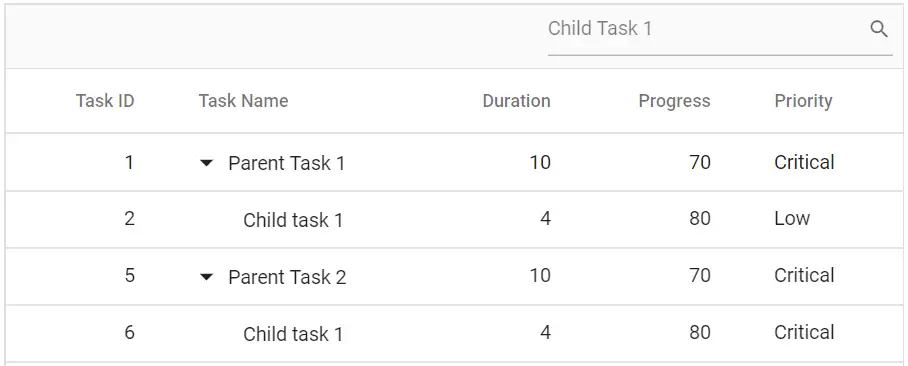
To apply search during initial rendering, configure the Fields, Operator, Key, and IgnoreCase properties in the TreeGridSearchSettings.
@using TreeGridComponent.Data;
@using Syncfusion.Blazor.TreeGrid;
@using Syncfusion.Blazor.Data;

<SfTreeGrid IdMapping="TaskId" TValue="BusinessObject" ParentIdMapping="ParentId" TreeColumnIndex="1" Toolbar="@(new List<string>() { "Search" })">
    <SfDataManager Json="@TreeGridData" Adaptor="Syncfusion.Blazor.Adaptors.JsonAdaptor">
    </SfDataManager>
    <TreeGridSearchSettings Key="Child Task 1"></TreeGridSearchSettings>
    <TreeGridColumns>
        <TreeGridColumn Field="TaskId" HeaderText="Task ID" Width="80" TextAlign="Syncfusion.Blazor.Grids.TextAlign.Right"></TreeGridColumn>
        <TreeGridColumn Field="TaskName" HeaderText="Task Name" Width="160"></TreeGridColumn>
        <TreeGridColumn Field="Duration" HeaderText="Duration" Width="100" TextAlign="Syncfusion.Blazor.Grids.TextAlign.Right"></TreeGridColumn>
        <TreeGridColumn Field="Progress" HeaderText="Progress" Width="100" TextAlign="Syncfusion.Blazor.Grids.TextAlign.Right"></TreeGridColumn>
        <TreeGridColumn Field="Priority" HeaderText="Priority" Width="80"></TreeGridColumn>
    </TreeGridColumns>
</SfTreeGrid>

@code{
    public BusinessObject[] TreeGridData { get; set; }
    protected override void OnInitialized()
    {
        this.TreeGridData = BusinessObject.GetSelfDataSource().ToList().Cast<BusinessObject>().ToArray();
    }
}
namespace TreeGridComponent.Data {
public class BusinessObject
{
public int TaskId { get; set;}
public string TaskName { get; set;}
public int? Duration { get; set;}
public int? Progress { get; set;}
public string Priority { get; set;}
public int? ParentId { get; set;}
public static List<BusinessObject> GetSelfDataSource()
{
List<BusinessObject> BusinessObjectCollection = new List<BusinessObject>();
BusinessObjectCollection.Add(new BusinessObject() { TaskId = 1,TaskName = "Parent Task 1",Duration = 10,Progress = 70,Priority = "Critical",ParentId = null });
BusinessObjectCollection.Add(new BusinessObject() { TaskId = 2,TaskName = "Child task 1",Progress = 80,Priority = "Low",ParentId = 1 });
BusinessObjectCollection.Add(new BusinessObject() { TaskId = 3,TaskName = "Child Task 2",Duration = 5,Progress = 65,Priority = "Critical",ParentId = 2 });
BusinessObjectCollection.Add(new BusinessObject() { TaskId = 4,TaskName = "Child task 3",Duration = 6,Priority = "High",Progress = 77,ParentId = 3 });
BusinessObjectCollection.Add(new BusinessObject() { TaskId = 5,TaskName = "Parent Task 2",Duration = 10,Progress = 70,Priority = "Critical",ParentId = null});
BusinessObjectCollection.Add(new BusinessObject() { TaskId = 6,TaskName = "Child task 1",Duration = 4,Progress = 80,Priority = "Critical",ParentId = 5});
BusinessObjectCollection.Add(new BusinessObject() { TaskId = 7,TaskName = "Child Task 2",Duration = 5,Progress = 65,Priority = "Low",ParentId = 5});
BusinessObjectCollection.Add(new BusinessObject() { TaskId = 8,TaskName = "Child task 3",Duration = 6,Progress = 77,Priority = "High",ParentId = 5});
BusinessObjectCollection.Add(new BusinessObject() { TaskId = 9,TaskName = "Child task 4",Duration = 6,Progress = 77,Priority = "Low",ParentId = 5});
return BusinessObjectCollection;
}
}
}
NOTE
By default, the TreeGrid searches all bound column values. To customize this behavior, define the
Fieldsproperty in TreeGridSearchSettings.Fields property.
Search Operators
The search operator can be defined in the Operators property of the TreeGridSearchSettings to configure specific searching.
The following operators are supported:
| Operator | Description |
|---|---|
| startsWith | Checks if a value begins with the specified text |
| endsWith | Checks if a value ends with the specified text |
| contains | Checks if a value contains the specified text |
| equal | Checks if a value is equal to the specified text |
| notEqual | Checks if a value is not equal to the text |
The default operator is contains.
Search by External Button
TreeGrid records can be searched from an external button by invoking the SearchAsync method.
@using TreeGridComponent.Data;
@using Syncfusion.Blazor.TreeGrid
@using  Syncfusion.Blazor.Data;

<button id="hide" @onclick="search">Search Tree</button>

<SfTreeGrid @ref="TreeGrid" DataSource="@TreeGridData" IdMapping="TaskId" ParentIdMapping="ParentId" TreeColumnIndex="1" Toolbar="@(new List<string>() { "Search" })">
    <TreeGridColumns>
        <TreeGridColumn Field="TaskId" HeaderText="Task ID" Width="80" TextAlign="Syncfusion.Blazor.Grids.TextAlign.Right"></TreeGridColumn>
        <TreeGridColumn Field="TaskName" HeaderText="Task Name" Width="160"></TreeGridColumn>
        <TreeGridColumn Field="Duration" HeaderText="Duration" Width="100" TextAlign="Syncfusion.Blazor.Grids.TextAlign.Right"></TreeGridColumn>
        <TreeGridColumn Field="Progress" HeaderText="Progress" Width="100" TextAlign="Syncfusion.Blazor.Grids.TextAlign.Right"></TreeGridColumn>
        <TreeGridColumn Field="Priority" HeaderText="Priority" Width="80"></TreeGridColumn>
    </TreeGridColumns>
</SfTreeGrid>

@code{
    SfTreeGrid<BusinessObject> TreeGrid;
    public List<BusinessObject> TreeGridData { get; set; }
    protected override void OnInitialized()
    {
        this.TreeGridData = BusinessObject.GetSelfDataSource().ToList();
    }

    private void search()
    {
        this.TreeGrid.SearchAsync("Child Task 1");
    }
}
namespace TreeGridComponent.Data {
public class BusinessObject
{
public int TaskId { get; set;}
public string TaskName { get; set;}
public int? Duration { get; set;}
public int? Progress { get; set;}
public string Priority { get; set;}
public int? ParentId { get; set;}
public static List<BusinessObject> GetSelfDataSource()
{
List<BusinessObject> BusinessObjectCollection = new List<BusinessObject>();
BusinessObjectCollection.Add(new BusinessObject() { TaskId = 1,TaskName = "Parent Task 1",Duration = 10,Progress = 70,Priority = "Critical",ParentId = null });
BusinessObjectCollection.Add(new BusinessObject() { TaskId = 2,TaskName = "Child task 1",Progress = 80,Priority = "Low",ParentId = 1 });
BusinessObjectCollection.Add(new BusinessObject() { TaskId = 3,TaskName = "Child Task 2",Duration = 5,Progress = 65,Priority = "Critical",ParentId = 2 });
BusinessObjectCollection.Add(new BusinessObject() { TaskId = 4,TaskName = "Child task 3",Duration = 6,Priority = "High",Progress = 77,ParentId = 3 });
BusinessObjectCollection.Add(new BusinessObject() { TaskId = 5,TaskName = "Parent Task 2",Duration = 10,Progress = 70,Priority = "Critical",ParentId = null});
BusinessObjectCollection.Add(new BusinessObject() { TaskId = 6,TaskName = "Child task 1",Duration = 4,Progress = 80,Priority = "Critical",ParentId = 5});
BusinessObjectCollection.Add(new BusinessObject() { TaskId = 7,TaskName = "Child Task 2",Duration = 5,Progress = 65,Priority = "Low",ParentId = 5});
BusinessObjectCollection.Add(new BusinessObject() { TaskId = 8,TaskName = "Child task 3",Duration = 6,Progress = 77,Priority = "High",ParentId = 5});
BusinessObjectCollection.Add(new BusinessObject() { TaskId = 9,TaskName = "Child task 4",Duration = 6,Progress = 77,Priority = "Low",ParentId = 5});
return BusinessObjectCollection;
}
}
}Search Specific Columns
By default, the TreeGrid searches all visible columns. To restrict the search to specific columns, define the desired field names in the Fields property of TreeGridSearchSettings.
@using TreeGridComponent.Data;
@using Syncfusion.Blazor.TreeGrid;
@using Syncfusion.Blazor.Data;

@{
    var Tool = (new List<string>() { "Search" });
    var SpecificCols = (new string[] { "TaskId", "Duration" });
}

<SfTreeGrid IdMapping="TaskId" DataSource="@TreeGridData" ParentIdMapping="ParentId" TreeColumnIndex="1" Toolbar="@Tool">
    <TreeGridSearchSettings Fields="@SpecificCols"></TreeGridSearchSettings>
    <TreeGridColumns>
        <TreeGridColumn Field="TaskId" HeaderText="Task ID" Width="80" TextAlign="Syncfusion.Blazor.Grids.TextAlign.Right"></TreeGridColumn>
        <TreeGridColumn Field="TaskName" HeaderText="Task Name" Width="160"></TreeGridColumn>
        <TreeGridColumn Field="Duration" HeaderText="Duration" Width="100" TextAlign="Syncfusion.Blazor.Grids.TextAlign.Right"></TreeGridColumn>
        <TreeGridColumn Field="Progress" HeaderText="Progress" Width="100" TextAlign="Syncfusion.Blazor.Grids.TextAlign.Right"></TreeGridColumn>
        <TreeGridColumn Field="Priority" HeaderText="Priority" Width="80"></TreeGridColumn>
    </TreeGridColumns>
</SfTreeGrid>

@code{
    public List<BusinessObject> TreeGridData { get; set; }
    protected override void OnInitialized()
    {
        this.TreeGridData = BusinessObject.GetSelfDataSource().ToList();
    }
}
namespace TreeGridComponent.Data {
public class BusinessObject
{
public int TaskId { get; set;}
public string TaskName { get; set;}
public int? Duration { get; set;}
public int? Progress { get; set;}
public string Priority { get; set;}
public int? ParentId { get; set;}
public static List<BusinessObject> GetSelfDataSource()
{
List<BusinessObject> BusinessObjectCollection = new List<BusinessObject>();
BusinessObjectCollection.Add(new BusinessObject() { TaskId = 1,TaskName = "Parent Task 1",Duration = 10,Progress = 70,Priority = "Critical",ParentId = null });
BusinessObjectCollection.Add(new BusinessObject() { TaskId = 2,TaskName = "Child task 1",Progress = 80,Priority = "Low",ParentId = 1 });
BusinessObjectCollection.Add(new BusinessObject() { TaskId = 3,TaskName = "Child Task 2",Duration = 5,Progress = 65,Priority = "Critical",ParentId = 2 });
BusinessObjectCollection.Add(new BusinessObject() { TaskId = 4,TaskName = "Child task 3",Duration = 6,Priority = "High",Progress = 77,ParentId = 3 });
BusinessObjectCollection.Add(new BusinessObject() { TaskId = 5,TaskName = "Parent Task 2",Duration = 10,Progress = 70,Priority = "Critical",ParentId = null});
BusinessObjectCollection.Add(new BusinessObject() { TaskId = 6,TaskName = "Child task 1",Duration = 4,Progress = 80,Priority = "Critical",ParentId = 5});
BusinessObjectCollection.Add(new BusinessObject() { TaskId = 7,TaskName = "Child Task 2",Duration = 5,Progress = 65,Priority = "Low",ParentId = 5});
BusinessObjectCollection.Add(new BusinessObject() { TaskId = 8,TaskName = "Child task 3",Duration = 6,Progress = 77,Priority = "High",ParentId = 5});
BusinessObjectCollection.Add(new BusinessObject() { TaskId = 9,TaskName = "Child task 4",Duration = 6,Progress = 77,Priority = "Low",ParentId = 5});
return BusinessObjectCollection;
}
}
}Searching with case sensitivity
The Blazor TreeGrid searching functionality allows control over whether uppercase and lowercase letters must match exactly or can be ignored. By default, searching is not case-sensitive, meaning matches are found regardless of character case (e.g., “Task” and “task” are treated the same). Case-sensitive search can be enabled by setting the TreeGridSearchSettings.IgnoreCase property to false.
@using TreeGridComponent.Data
@using Syncfusion.Blazor.TreeGrid
@using Syncfusion.Blazor.Grids
@using Syncfusion.Blazor.Buttons
<div class="container mt-4">
    <SfTreeGrid @ref="TreeGrid" DataSource="@TreeData" IdMapping="TaskID" ParentIdMapping="ParentID" TreeColumnIndex="1" AllowFiltering="true" AllowSorting="true" AllowReordering AllowResizing
                Toolbar="@(new List<string>() { "Search" })">
        <TreeGridSearchSettings IgnoreCase="false"></TreeGridSearchSettings>
        <TreeGridColumns>
            <TreeGridColumn Field=@nameof(TreeTask.TaskID) HeaderText="Task ID" TextAlign="Syncfusion.Blazor.Grids.TextAlign.Right" Width="90" IsPrimaryKey />
            <TreeGridColumn Field=@nameof(TreeTask.TaskName) HeaderText="Task Name" Width="200" />
            <TreeGridColumn Field=@nameof(TreeTask.ResourceName) HeaderText="Resource Name" Width="180" />
            <TreeGridColumn Field=@nameof(TreeTask.City) HeaderText="City" Width="140" />
            <TreeGridColumn Field=@nameof(TreeTask.StartDate) HeaderText="Start Date" Type="Syncfusion.Blazor.Grids.ColumnType.Date" Format="d" Width="130" />
            <TreeGridColumn Field=@nameof(TreeTask.Duration) HeaderText="Duration (days)" TextAlign="Syncfusion.Blazor.Grids.TextAlign.Right" Width="140" />
        </TreeGridColumns>
        <TreeGridEditSettings AllowAdding AllowDeleting AllowEditing></TreeGridEditSettings>
    </SfTreeGrid>
</div>
@code{
    private List<TreeTask> TreeData = new();
    public SfTreeGrid<TreeTask> TreeGrid;
    protected override void OnInitialized()
    {
        TreeData = TreeTask.GetTreeTasks();
    }

}
namespace TreeGridComponent.Data {
public class TreeTask
{
public int TaskID { get; set; }
public string TaskName { get; set; } = string.Empty;
public string ResourceName { get; set; } = string.Empty;
public string City { get; set; } = string.Empty;
public DateTime StartDate { get; set; }
public int Duration { get; set; }
public int? ParentID { get; set; }
public static List<TreeTask> GetTreeTasks() => new()
{
new TreeTask
{
TaskID = 1,
TaskName = "Market Analysis",
ResourceName = "José Álvarez",
City = "Sevilla",
StartDate = new DateTime(2024, 1, 2),
Duration = 5,
ParentID = null
},
new TreeTask
{
TaskID = 2,
TaskName = "Competitor Review",
ResourceName = "Zoë Brontë",
City = "São Paulo",
StartDate = new DateTime(2024, 1, 3),
Duration = 3,
ParentID = 1
},
new TreeTask
{
TaskID = 3,
TaskName = "Focus Group",
ResourceName = "François Dœuf",
City = "Montréal",
StartDate = new DateTime(2024, 1, 4),
Duration = 2,
ParentID = 1
},
new TreeTask
{
TaskID = 4,
TaskName = "Product Design",
ResourceName = "Mårten Šedý",
City = "Göteborg",
StartDate = new DateTime(2024, 1, 5),
Duration = 6,
ParentID = null
},
new TreeTask
{
TaskID = 5,
TaskName = "UX Workshop",
ResourceName = "Anaïs Löhn",
City = "München",
StartDate = new DateTime(2024, 1, 6),
Duration = 4,
ParentID = 4
},
new TreeTask
{
TaskID = 6,
TaskName = "Prototype Testing",
ResourceName = "Renée Faßbinder",
City = "Zürich",
StartDate = new DateTime(2024, 1, 8),
Duration = 3,
ParentID = 4
}
};
}
}Searching with ignore accent
The Blazor TreeGrid search functionality can ignore diacritic characters or accents for enhanced search accuracy. By default, searches are accent-sensitive, requiring exact matches (e.g., “José” vs. “Jose”). Accent-insensitive search is enabled by setting the TreeGridSearchSettings.IgnoreAccent property to true.
@using TreeGridComponent.Data
@using Syncfusion.Blazor.TreeGrid
@using Syncfusion.Blazor.Grids
@using Syncfusion.Blazor.Buttons
<div class="container mt-4">
    <SfTreeGrid @ref="TreeGrid" DataSource="@TreeData" IdMapping="TaskID" ParentIdMapping="ParentID" TreeColumnIndex="1" AllowFiltering="true" AllowSorting="true" AllowReordering AllowResizing
                Toolbar="@(new List<string>() { "Search" })">
        <TreeGridSearchSettings IgnoreAccent="false"></TreeGridSearchSettings>
        <TreeGridColumns>
            <TreeGridColumn Field=@nameof(TreeTask.TaskID) HeaderText="Task ID" TextAlign="Syncfusion.Blazor.Grids.TextAlign.Right" Width="90" IsPrimaryKey />
            <TreeGridColumn Field=@nameof(TreeTask.TaskName) HeaderText="Task Name" Width="200" />
            <TreeGridColumn Field=@nameof(TreeTask.ResourceName) HeaderText="Resource Name" Width="180" />
            <TreeGridColumn Field=@nameof(TreeTask.City) HeaderText="City" Width="140" />
            <TreeGridColumn Field=@nameof(TreeTask.StartDate) HeaderText="Start Date" Type="Syncfusion.Blazor.Grids.ColumnType.Date" Format="d" Width="130" />
            <TreeGridColumn Field=@nameof(TreeTask.Duration) HeaderText="Duration (days)" TextAlign="Syncfusion.Blazor.Grids.TextAlign.Right" Width="140" />
        </TreeGridColumns>
        <TreeGridEditSettings AllowAdding AllowDeleting AllowEditing></TreeGridEditSettings>
    </SfTreeGrid>
</div>
@code{
    private List<TreeTask> TreeData = new();
    public SfTreeGrid<TreeTask> TreeGrid;
    protected override void OnInitialized()
    {
        TreeData = TreeTask.GetTreeTasks();
    }

}
namespace TreeGridComponent.Data {
public class TreeTask
{
public int TaskID { get; set; }
public string TaskName { get; set; } = string.Empty;
public string ResourceName { get; set; } = string.Empty;
public string City { get; set; } = string.Empty;
public DateTime StartDate { get; set; }
public int Duration { get; set; }
public int? ParentID { get; set; }
public static List<TreeTask> GetTreeTasks() => new()
{
new TreeTask
{
TaskID = 1,
TaskName = "Market Analysis",
ResourceName = "José Álvarez",
City = "Sevilla",
StartDate = new DateTime(2024, 1, 2),
Duration = 5,
ParentID = null
},
new TreeTask
{
TaskID = 2,
TaskName = "Competitor Review",
ResourceName = "Zoë Brontë",
City = "São Paulo",
StartDate = new DateTime(2024, 1, 3),
Duration = 3,
ParentID = 1
},
new TreeTask
{
TaskID = 3,
TaskName = "Focus Group",
ResourceName = "François Dœuf",
City = "Montréal",
StartDate = new DateTime(2024, 1, 4),
Duration = 2,
ParentID = 1
},
new TreeTask
{
TaskID = 4,
TaskName = "Product Design",
ResourceName = "Mårten Šedý",
City = "Göteborg",
StartDate = new DateTime(2024, 1, 5),
Duration = 6,
ParentID = null
},
new TreeTask
{
TaskID = 5,
TaskName = "UX Workshop",
ResourceName = "Anaïs Löhn",
City = "München",
StartDate = new DateTime(2024, 1, 6),
Duration = 4,
ParentID = 4
},
new TreeTask
{
TaskID = 6,
TaskName = "Prototype Testing",
ResourceName = "Renée Faßbinder",
City = "Zürich",
StartDate = new DateTime(2024, 1, 8),
Duration = 3,
ParentID = 4
}
};
}
}
- This feature ignores accents for both searching and filtering operations in the Blazor TreeGrid when using an
IEnumerabledata source.- This feature works only for characters outside the ASCII range.