Integrate Azure OpenAI With Blazor AI AssistView
5 Aug 202615 minutes to read
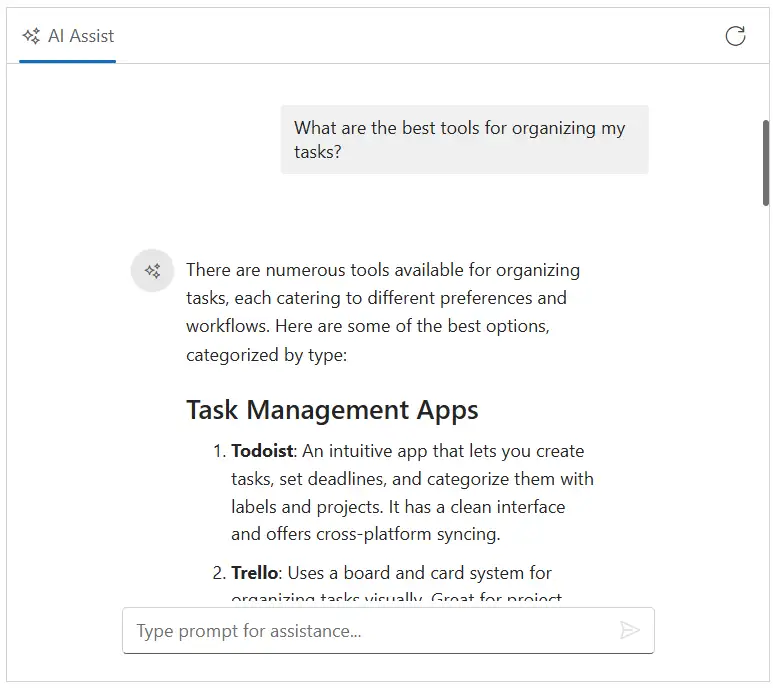
The AI AssistView component integrates with Azure OpenAI to enable advanced conversational AI features in your applications. The component acts as a user interface, where user prompts are sent to the Azure OpenAI service via API calls, providing natural language understanding and context-aware responses.
Prerequisites
Before starting, ensure you have the following:
-
An Azure account: with access to Azure OpenAI services and a generated API key.
-
Syncfusion AI AssistView: Package Syncfusion Blazor package installed.
Set Up the AI AssistView Component
Follow the Getting Started guide to configure and render the AI AssistView component in the application and that prerequisites are met.
Install Dependencies
Install the required packages:
- Install the
OpenAIandAzurenuget packages in the application.
NuGet\Install-Package OpenAI
NuGet\Install-Package Azure.AI.OpenAI
NuGet\Install-Package Azure.Core
Note: The sample below uses HttpClient directly and does not require the Azure/OpenAI SDKs.
Configure Azure OpenAI
-
Log in to the Azure Portal and navigate to your Azure OpenAI resource.
-
Under resource Management, select keys and endpoint to retrieve your API key and endpoint URL.
- Note the following values:
- API key
- Endpoint
- API version (must be supported by your resource)
- Deployment name (for example, gpt-4o-mini)
- Store these values securely, as they will be used in your application.
Security Note: expose your API key in client-side code for production applications. Use a server-side proxy or environment variables to manage sensitive information securely.
Configure AI AssistView with Azure OpenAI
-
Configure your Azure OpenAI endpoint, API key, and deployment name in your Program.cs (or using your preferred configuration mechanism).
-
Register the service for dependency injection.
-
Inject and use the service in your Razor component.
Modify the razor file to integrate the Azure OpenAI with the AI AssistView component.
@using AIAssistView_AzureAI.Components.Services
@using Syncfusion.Blazor.InteractiveChat
@using Syncfusion.Blazor.Navigations
@inject AzureOpenAIService OpenAIService

// Initialize AI AssistView component
<div class="aiassist-container" style="height: 450px; width: 650px;">
    <SfAIAssistView @ref="assistView" ID="aiAssistView" PromptSuggestions="@promptSuggestions" PromptRequested="@PromptRequest">
        <AssistViews>
            <AssistView>
                <BannerTemplate>
                    <div class="banner-content">
                        <div class="e-icons e-assistview-icon"></div>
                        <h3>AI Assistance</h3>
                        <i>To get started, provide input or choose a suggestion.</i>
                    </div>
                </BannerTemplate>
            </AssistView>
        </AssistViews>
        <AssistViewToolbar ItemClicked="ToolbarItemClicked">
            <AssistViewToolbarItem Type="ItemType.Spacer"></AssistViewToolbarItem>
            <AssistViewToolbarItem IconCss="e-icons e-refresh"></AssistViewToolbarItem>
        </AssistViewToolbar>
    </SfAIAssistView>
</div>

@code {
    private SfAIAssistView assistView;
    private string finalResponse { get; set; }
    private List<string> promptSuggestions = new List<string>
    {
        "What are the best tools for organizing my tasks?",
        "How can I maintain work-life balance effectively?"
    };

    // Handle user prompt: call Azure OpenAI Chat Completions
    private async Task PromptRequest(AssistViewPromptRequestedEventArgs args)
    {
        // Reset the response for this prompt
        var lastIdx = assistView.Prompts.Count - 1;
        assistView.Prompts[lastIdx].Response = string.Empty;
        finalResponse = string.Empty;
        try
        {
            await foreach (var chunk in OpenAIService.GetChatResponseStreamAsync(args.Prompt))
            {
                await UpdateResponse(args, chunk);
            }

            args.Response = finalResponse;
        }
        catch (Exception ex)
        {
            args.Response = $"Error: {ex.Message}";
        }
    }

    private async Task UpdateResponse(AssistViewPromptRequestedEventArgs args, string response)
    {
        var lastIdx = assistView.Prompts.Count - 1;
        await Task.Delay(10); // Small delay for UI updates
        assistView.Prompts[lastIdx].Response += response.Replace("\n", "<br>");
        finalResponse = assistView.Prompts[lastIdx].Response;
        StateHasChanged();
    }

    private void ToolbarItemClicked(AssistViewToolbarItemClickedEventArgs args)
    {
        assistView.Prompts.Clear();
        StateHasChanged();
    }
}
using System.Text.Json;
using System.Text.RegularExpressions;
namespace AIAssistView_AzureAI.Components.Services
{
public class AzureOpenAIService
{
private readonly HttpClient _httpClient;
private readonly string _endpoint;
private readonly string _apiKey;
private readonly string _deploymentName;
public AzureOpenAIService(HttpClient httpClient, string endpoint, string apiKey, string deploymentName)
{
_httpClient = httpClient;
_endpoint = endpoint;
_apiKey = apiKey;
_deploymentName = deploymentName;
}
public async IAsyncEnumerable<string> GetChatResponseStreamAsync(string prompt)
{
var request = new
{
messages = new[] { new { role = "user", content = prompt } },
max_tokens = 500,
};
var url = $"{_endpoint}/openai/deployments/{_deploymentName}/chat/completions?api-version=2024-02-15-preview";
_httpClient.DefaultRequestHeaders.Add("api-key", _apiKey);
Stream responseStream = null;
List<string> results = new List<string>();
try
{
var response = await _httpClient.PostAsJsonAsync(url, request);
if (response.IsSuccessStatusCode)
{
responseStream = await response.Content.ReadAsStreamAsync();
using var jsonDocument = JsonDocument.Parse(responseStream);
var choices = jsonDocument.RootElement.GetProperty("choices");
if (choices.GetArrayLength() > 0)
{
var content = choices[0].GetProperty("message").GetProperty("content").GetString();
var htmlContent = content;
htmlContent = Regex.Replace(htmlContent, @"\s+", " ").Trim();
// Collect each character to the results list before yielding
foreach (var chunk in htmlContent)
{
results.Add(chunk.ToString());
}
}
else
{
results.Add("Error: No choices returned in the response.");
}
}
else
{
var error = await response.Content.ReadAsStringAsync();
results.Add($"Error: {error}");
}
}
catch (Exception ex)
{
// Collect the error message to be yielded later
results.Add($"Error: {ex.Message}");
}
finally
{
if (responseStream != null)
{
responseStream.Dispose();
}
}
// Now yield each collected result
foreach (var result in results)
{
yield return result;
}
}
}
}// Initialize Azure OpenAI
var endpoint = "https://azure-testresource.openai.azure.com";
var apiKey = "<Your API Key>"; // Replace with your API key;
var deploymentName = "gpt-4o-mini";