Speech To Text in Blazor Chat UI
6 Aug 202610 minutes to read
The Blazor Chat UI component integrates Speech-to-Text functionality through the browser’s Web Speech API. This enables the conversion of spoken words into text using the device’s microphone, allowing users to interact with the Chat UI through voice input.
Configure Speech-to-Text
To enable Speech-to-Text functionality in the Blazor Chat UI component, update the Home.razor file to incorporate the Web Speech API.
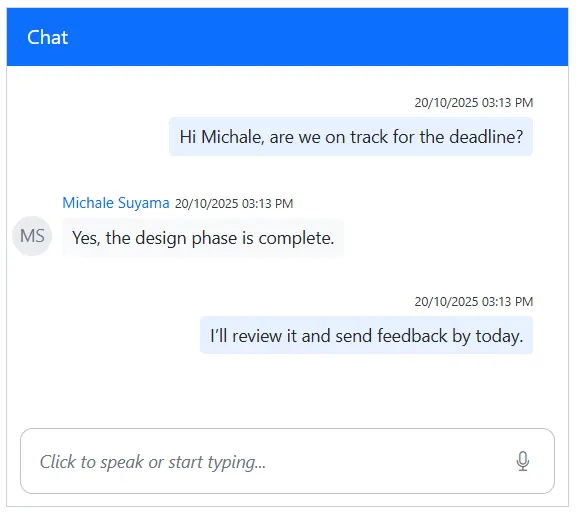
The SpeechToText component listens to audio input from the device’s microphone, transcribes spoken words into text, and updates the Chat UI’s editable footer using the FooterTemplate tag directive to display the transcribed text. Once the transcription appears in the footer, users can send it as a message to others.
Configuration Options
-
Language: Specifies the language for speech recognition. For example:-
en-USfor American English -
fr-FRfor French
-
-
AllowInterimResults: Set totrueto receive real-time (interim) recognition results, orfalseto receive only final results.
The speechtotext.js file handles operations related to the content of the editable footer, such as checking for meaningful input, clearing existing text, and updating the content with the transcribed value. Meanwhile, the speechtotext.css file styles the Chat UI layout and ensures the component remains responsive across different screen sizes and devices.
@using Syncfusion.Blazor.InteractiveChat
@using Syncfusion.Blazor.Buttons
@using Syncfusion.Blazor.Inputs
@inject IJSRuntime JSRuntime

<div class="integration-speechtotext">
    <SfChatUI @ref="chatUI" ID="chatUser" AutoScrollToBottom=true User="CurrentUserModel" Messages="ChatUserMessages">
        <FooterTemplate>
            <div class="e-footer-wrapper">
                <div id="chatui-footer" class="content-editor" contenteditable="true" placeholder="Click to speak or start typing..." @oninput="@UpdateContent" @onkeydown="@OnKeyDown" @ref="@EditableDiv">@ChatUIFooterValue</div>
                <div class="option-container">
                    <SfSpeechToText ID="speechToText" TranscriptChanging="@OnTranscriptChange" SpeechRecognitionStopped="@HandleStopRecognition"
                    CssClass="@($"e-flat {SpeechToTextCssClass}")" Disabled="@DisabledState"></SfSpeechToText>
                    <SfButton ID="chatui-sendButton" IconCss="e-assist-send e-icons" CssClass="@ButtonCssClass" @onclick="SendButtonClicked"></SfButton>
                </div>
            </div>
        </FooterTemplate>
    </SfChatUI>
</div>
@code {
    private SfChatUI chatUI;
    private static UserModel CurrentUserModel = new UserModel() { ID = "User1", User = "Albert" };
    private static UserModel MichaleUserModel = new UserModel() { ID = "User2", User = "Michale Suyama" };
    private string ChatUIFooterValue = String.Empty;
    private ElementReference EditableDiv;
    private string FooterContent = String.Empty;
    private string SpeechToTextCssClass = "visible";
    private string ButtonCssClass = String.Empty;
    private bool DisabledState = false;

    private List<ChatMessage> ChatUserMessages = new List<ChatMessage>()
    {
        new ChatMessage() { Text = "Hi Michale, are we on track for the deadline?", Author = CurrentUserModel },
        new ChatMessage() { Text = "Yes, the design phase is complete.", Author = MichaleUserModel },
        new ChatMessage() { Text = "I’ll review it and send feedback by today.", Author = CurrentUserModel }
    };

    private async void OnTranscriptChange(TranscriptChangeEventArgs args)
    {
        ChatUIFooterValue = args.Transcript;
        await JSRuntime.InvokeVoidAsync("updateContentEditableDiv", EditableDiv, ChatUIFooterValue);
        await InvokeAsync(StateHasChanged);
    }
    private async Task UpdateContent()
    {
        FooterContent = await JSRuntime.InvokeAsync<String>("isFooterContainsValue", EditableDiv);
        ToggleVisibility();
    }
    private async Task HandleStopRecognition()
    {
        FooterContent = ChatUIFooterValue;
        ToggleVisibility();
        await InvokeAsync(StateHasChanged);
    }
    private void ToggleVisibility()
    {
        ButtonCssClass = string.IsNullOrWhiteSpace(FooterContent) ? "" : "visible";
        SpeechToTextCssClass = string.IsNullOrWhiteSpace(FooterContent) ? "visible" : "";
    }

    private async Task SendButtonClicked()
    {
        chatUI.Messages.Add(new ChatMessage() { Text = FooterContent, Author = CurrentUserModel });
        ChatUIFooterValue = String.Empty;
        await JSRuntime.InvokeVoidAsync("emptyFooterValue", EditableDiv);
        await UpdateContent();
        ToggleVisibility();
    }
    private async Task OnKeyDown(KeyboardEventArgs e)
    {
        if (e.Key == "Enter" && !e.ShiftKey)
        {
            await SendButtonClicked();
        }
    }
}
// Checks if the content editable element contains meaningful text and cleans up.
function isFooterContainsValue(elementref) {
if (!elementref.innerText.trim() !== '') {
if ((elementref.innerHTML === '<br>' || elementref.innerHTML.trim() === '')) {
elementref.innerHTML = '';
}
}
return elementref.innerText || "";
}
// Clears the text content of a content editable element.
function emptyFooterValue(elementref) {
if (elementref) {
elementref.innerText = "";
}
}
// Updates the text content of a content editable element with a specified value.
function updateContentEditableDiv(element, value) {
if (element) {
element.innerText = value;
}
}.integration-speechtotext {
height: 400px;
width: 450px;
margin: 0 auto;
}
.integration-speechtotext #chatui-sendButton {
width: 40px;
height: 40px;
font-size: 15px;
border: none;
background: none;
cursor: pointer;
}
.integration-speechtotext #speechToText.visible,
.integration-speechtotext #chatui-sendButton.visible {
display: inline-block;
}
.integration-speechtotext #speechToText,
.integration-speechtotext #chatui-sendButton {
display: none;
}
@@media only screen and (max-width: 750px) {
.integration-speechtotext {
width: 100%;
}
}
.integration-speechtotext .e-footer-wrapper {
display: flex;
border: 1px solid #c1c1c1;
margin: 5px 5px 0 5px;
border-radius: 10px;
padding: 5px;
}
.integration-speechtotext .content-editor {
width: 100%;
overflow-y: auto;
font-size: 14px;
min-height: 20px;
max-height: 150px;
padding: 10px;
}
.integration-speechtotext .content-editor[contentEditable='true']:empty:before {
content: attr(placeholder);
color: #6b7280;
font-style: italic;
}
.integration-speechtotext .option-container {
align-self: flex-end;
}
Error Handling
The SpeechToText component provides events to handle errors that may occur during speech recognition. For more information, refer to the Error Handling section in the documentation.
Browser Compatibility
The SpeechToText component relies on the Speech Recognition API, which has limited browser support. Refer to the Browser Compatibility section for detailed information.