Force-Directed Tree Layout in Blazor Diagram Component
3 Jul 202622 minutes to read
The Force-Directed Tree Layout is a physics-based algorithm that arranges nodes by simulating attractive and repulsive forces. This layout is ideal for visualizing complex relationships such as social networks, dependency graphs, and knowledge maps.
In this layout, nodes apply repulsive forces to prevent overlap, while connectors behave like springs to draw related nodes closer together. This simulation produces a visually balanced and natural arrangement, improving the clarity of intricate connections.
Configure force-directed tree layout settings
To enable the Force-Directed Tree Layout, set the layout Type property to LayoutType.ForceDirectedTree and configure the ForceDirectedTreeLayoutSettings class, which provides control over the simulation. The properties of ForceDirectedTreeLayoutSettings class are listed below.
ConnectorLength
Defines the ideal distance between connected nodes.
Note: Minimum value: 30. Larger values spread nodes farther apart.
MaximumIteration
Specifies how many times the algorithm runs to stabilize the layout.
Note: Minimum value: 100. Higher values improve stability but increase processing time.
RepulsionStrength
Controls how strongly nodes repel each other.
Note: Minimum value: 3000. Higher values create more space between nodes.
AttractionStrength
Determines how strongly connected nodes pull toward each other.
Note: Range: 0 to 1. Higher values cluster connected nodes more tightly.
@using Syncfusion.Blazor.Diagram

<SfDiagramComponent @ref="_diagramComponent" Height="690px" Width="100%" @bind-Nodes="@_nodes" @bind-Connectors="@_connectors" Created="@OnCreated">
    <SnapSettings Constraints="@SnapConstraints.None"></SnapSettings>
    <Layout Type="LayoutType.ForceDirectedTree" @bind-ForceDirectedTreeLayoutSettings="@_layoutSettings"></Layout>
</SfDiagramComponent>

@code {
    private SfDiagramComponent _diagramComponent;
    private DiagramObjectCollection<Node> _nodes = new DiagramObjectCollection<Node>();
    private DiagramObjectCollection<Connector> _connectors = new DiagramObjectCollection<Connector>();

    private ForceDirectedTreeLayoutSettings _layoutSettings = new ForceDirectedTreeLayoutSettings
    {
        ConnectorLength = 120,
        MaximumIteration = 1500,
        RepulsionStrength = 20000,
        AttractionStrength = 0.8
    };

    private int _departmentsUnderCeo = 4;
    private int _managersPerDepartment = 4;
    private int _teamsPerManager = 6;

    protected override void OnInitialized()
    {
        InitializeDiagram();
    }

    private void InitializeDiagram()
    {
        List<OrganizationItem> organizationData = GetCompanyOrganizationData();
        PopulateDiagramFromOrganizationData(organizationData);
    }

    private void PopulateDiagramFromOrganizationData(IEnumerable<OrganizationItem> organizationItems)
    {
        Dictionary<string, OrganizationItem> itemsById = organizationItems.ToDictionary(item => item.Id);
        foreach (OrganizationItem item in organizationItems)
        {
            Node node = CreateOrganizationNode(item);
            _nodes!.Add(node);
            if (!string.IsNullOrEmpty(item.ParentId) && itemsById.ContainsKey(item.ParentId))
            {
                _connectors!.Add(CreateNodeConnector(item.ParentId, item.Id));
            }
        }
    }

    private void OnCreated()
    {
        FitOptions options = new FitOptions() { Mode = FitMode.Both, Region = DiagramRegion.Content };
        _diagramComponent.FitToPage(options);
    }

    private Node CreateOrganizationNode(OrganizationItem item)
    {
        ShapeStyle nodeStyle = new ShapeStyle { Fill = "orange", StrokeWidth = 2, StrokeColor = "#8c8c8c" };
        double nodeWidth = 35;
        double nodeHeight = 35;
        Shape nodeShape = new BasicShape() { Shape = NodeBasicShapes.Ellipse };
        switch (item.Level)
        {
            case OrganizationLevel.Header:
                nodeStyle.Fill = "#f39c12";
                nodeWidth = nodeHeight = 140;
                nodeShape = new BasicShape { Shape = NodeBasicShapes.Ellipse };
                break;
            case OrganizationLevel.Department:
                nodeStyle.Fill = "#27ae60";
                nodeWidth = nodeHeight = 120;
                nodeShape = new BasicShape { Shape = NodeBasicShapes.Ellipse };
                break;
            case OrganizationLevel.Manager:
                nodeStyle.Fill = "#2980b9";
                nodeShape = new BasicShape { Shape = NodeBasicShapes.Ellipse };
                nodeWidth = nodeHeight = 100;
                break;
            case OrganizationLevel.Team:
                nodeStyle.Fill = "#f39c12";
                nodeShape = new BasicShape { Shape = NodeBasicShapes.Ellipse };
                nodeWidth = nodeHeight = 80;
                break;
        }
        return new Node
        {
            ID = item.Id,
            Width = nodeWidth,
            Height = nodeHeight,
            Shape = nodeShape,
            Annotations = new DiagramObjectCollection<ShapeAnnotation>
            {
                new ShapeAnnotation
                {
                    ID = $"{item.Id}_label",
                    Content = item.Name,
                    Style = new TextStyle() { FontSize = 18, Bold = true, Color = "white" }
                }
            },
            Style = nodeStyle
        };
    }

    private Connector CreateNodeConnector(string sourceNodeId, string targetNodeId)
    {
        return new Connector
        {
            ID = $"{sourceNodeId}_{targetNodeId}",
            SourceID = sourceNodeId,
            TargetID = targetNodeId,
            Type = ConnectorSegmentType.Straight
        };
    }

    public enum OrganizationLevel
    {
        Header,
        Department,
        Manager,
        Team
    }

    public class OrganizationItem
    {
        public string Id { get; set; } = "";
        public string? ParentId { get; set; }
        public string Name { get; set; } = "";
        public OrganizationLevel Level { get; set; }
    }

    private static List<OrganizationItem> BuildOrganizationData(int departmentCount, int managersPerDepartment, int teamsPerManager)
    {
        List<OrganizationItem> organizationData = new List<OrganizationItem>
        {
            new OrganizationItem { Id = "departments", ParentId = null, Name = "Departments", Level = OrganizationLevel.Header }
        };
        // Create departments
        for (int departmentIndex = 1; departmentIndex <= departmentCount; departmentIndex++)
        {
            string departmentId = $"dept_{departmentIndex}";
            organizationData.Add(new OrganizationItem { Id = departmentId, ParentId = "departments", Name = $"Department {departmentIndex}", Level = OrganizationLevel.Department });
            // Create managers for each department
            for (int managerIndex = 1; managerIndex <= managersPerDepartment; managerIndex++)
            {
                string managerId = $"{departmentId}_mgr_{managerIndex}";
                organizationData.Add(new OrganizationItem { Id = managerId, ParentId = departmentId, Name = $"Manager {departmentIndex}.{managerIndex}", Level = OrganizationLevel.Manager });
                // Create teams for each manager
                for (int teamIndex = 1; teamIndex <= teamsPerManager; teamIndex++)
                {
                    string teamId = $"{managerId}_team_{teamIndex}";
                    organizationData.Add(new OrganizationItem
                    {
                        Id = teamId,
                        ParentId = managerId,
                        Name = $"Team {departmentIndex}.{managerIndex}.{teamIndex}",
                        Level = OrganizationLevel.Team
                    });
                }
            }
        }
        return organizationData;
    }

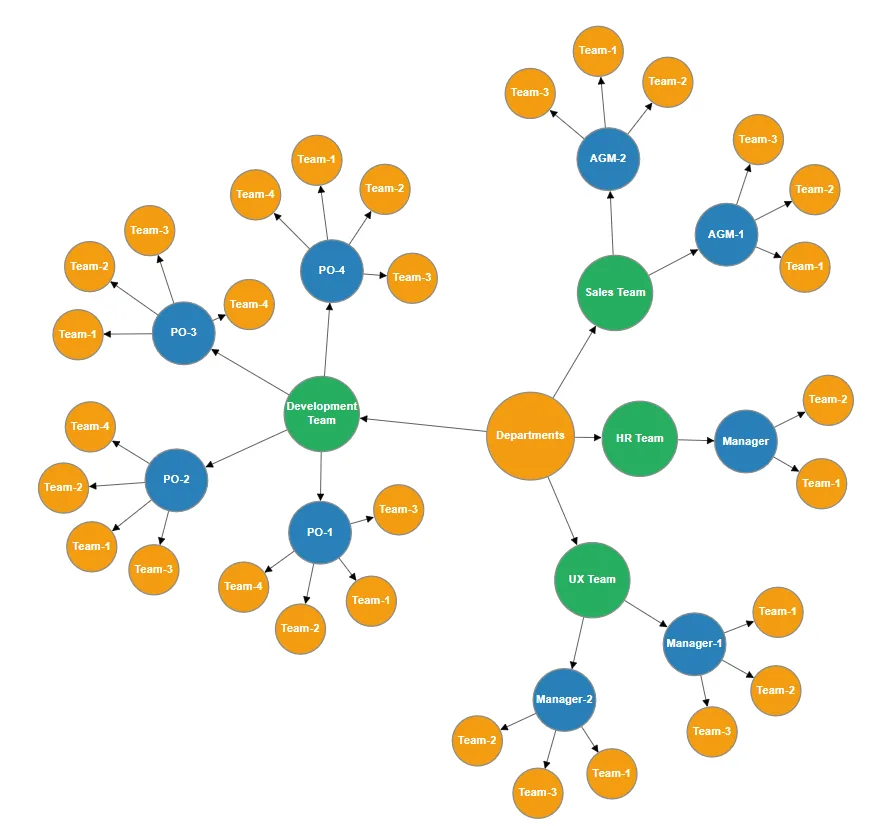
    // Realistic software company hierarchy: 1 CEO with 4 departments, each with managers and their respective teams
    private static List<OrganizationItem> GetCompanyOrganizationData()
    {
        List<OrganizationItem> companyData = new List<OrganizationItem>();
        // CEO level
        companyData.Add(new OrganizationItem { Id = "departments", ParentId = null, Name = "Departments", Level = OrganizationLevel.Header });
        // Department level (Level 2)
        List<OrganizationItem> departmentList = new List<OrganizationItem>
        {
            new OrganizationItem { Id = "uxTeam", ParentId = "departments", Name = "UX Team", Level = OrganizationLevel.Department },
            new OrganizationItem { Id = "devTeam", ParentId = "departments", Name = "Development Team", Level = OrganizationLevel.Department },
            new OrganizationItem { Id = "salesTeam", ParentId = "departments", Name = "Sales Team", Level = OrganizationLevel.Department },
            new OrganizationItem { Id = "hrTeam", ParentId = "departments", Name = "HR Team", Level = OrganizationLevel.Department }
        };
        foreach (OrganizationItem department in departmentList)
            companyData.Add(department);
        // Managers per department (Level 3) - 4 managers per department
        Dictionary<string, (string id, string name)[]> managersByDepartment = new Dictionary<string, (string id, string name)[]>
        {
            ["uxTeam"] = new[]
            {
                ("mgr1", "Manager-1"),
                ("mgr2", "Manager-2"),
            },
            ["devTeam"] = new[]
            {
                ("po1", "PO-1"),
                ("po2", "PO-2"),
                ("po3", "PO-3"),
                ("po4", "PO-4"),
            },
            ["salesTeam"] = new[]
            {
                ("agm1", "AGM-1"),
                ("agm2", "AGM-2"),
            },
            ["hrTeam"] = new[]
            {
                ("hr_mgr", "Manager"),
            },
        };
        foreach (string departmentKey in managersByDepartment.Keys)
        {
            foreach ((string id, string name) manager in managersByDepartment[departmentKey])
                companyData.Add(new OrganizationItem { Id = manager.id, ParentId = departmentKey, Name = manager.name, Level = OrganizationLevel.Manager });
        }
        // Teams per manager (Level 4) - Variable count based on requirements
        Dictionary<string, int> teamCountByManagerId = new Dictionary<string, int>
        {
            ["mgr1"] = 3,
            ["mgr2"] = 3,
            ["po1"] = 4,
            ["po2"] = 4,
            ["po3"] = 4,
            ["po4"] = 4,
            ["agm1"] = 3,
            ["agm2"] = 3,
            ["hr_mgr"] = 2,
        };
        foreach (string departmentKey in managersByDepartment.Keys)
        {
            foreach ((string managerId, string managerName) manager in managersByDepartment[departmentKey])
            {
                int teamCount = teamCountByManagerId.ContainsKey(manager.managerId) ? teamCountByManagerId[manager.managerId] : 0;
                for (int teamIndex = 1; teamIndex <= teamCount; teamIndex++)
                {
                    string teamId = $"{manager.managerId}_t{teamIndex}";
                    companyData.Add(new OrganizationItem
                    {
                        Id = teamId,
                        ParentId = manager.managerId,
                        Name = $"Team-{teamIndex}",
                        Level = OrganizationLevel.Team
                    });
                }
            }
        }
        return companyData;
    }
}
A complete working sample can be downloaded from GitHub.
How to create a force-directed tree using datasource
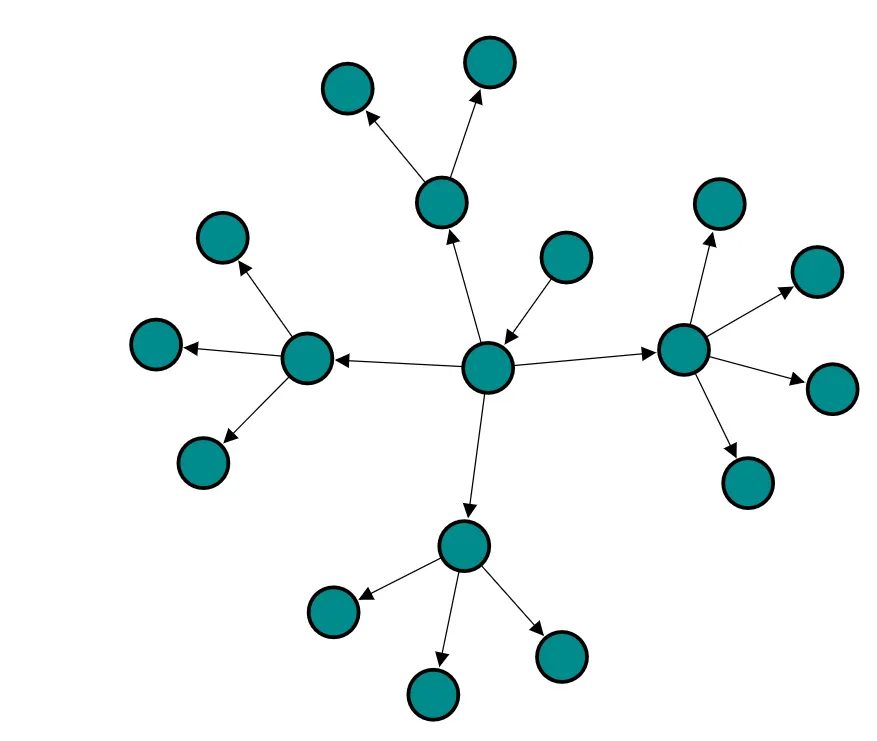
The Force-Directed Tree Layout can be rendered by binding a collection of objects to the DataSource property. In DataSourceSettings, the ID and ParentID properties must be strings, and the provided data source should define a parent-child relationship. At least one node must have an empty ParentID to serve as the root node. The following code example demonstrates how to bind a collection of objects to the DataSource property for rendering the Force-Directed Tree Layout.
@using Syncfusion.Blazor.Diagram

<SfDiagramComponent Height="600px" NodeCreating="@OnNodeCreating">
    <DataSourceSettings ID="Id" ParentID="Manager" DataSource="@_dataSource"></DataSourceSettings>
    <Layout Type="LayoutType.ForceDirectedTree" @bind-ForceDirectedTreeLayoutSettings="@_forceDirectedSettings"></Layout>
    <SnapSettings Constraints="@SnapConstraints.None"></SnapSettings>
</SfDiagramComponent>

@code
{
    private ForceDirectedTreeLayoutSettings _forceDirectedSettings = new ForceDirectedTreeLayoutSettings()
    {
        ConnectorLength = 100,
        AttractionStrength = 0.7,
        RepulsionStrength = 6000,
        MaximumIteration = 350
    };

    private void OnNodeCreating(IDiagramObject obj)
    {
        Node node = obj as Node;
        node.Height = 40;
        node.Width = 40;
        node.Shape = new BasicShape()
        {
            Type = NodeShapes.Basic,
            Shape = NodeBasicShapes.Ellipse,
        };
        node.Style = new ShapeStyle() { Fill = "darkcyan", StrokeWidth = 3, StrokeColor = "Black" };
    }

    public class ForceDirectedDetails
    {
        public string Id { get; set; }
        public string Role { get; set; }
        public string Manager { get; set; }
    }

    private List<ForceDirectedDetails> _dataSource = new List<ForceDirectedDetails>()
    {
        new ForceDirectedDetails() { Id = "parent", Role = "Board" },
        new ForceDirectedDetails() { Id = "1", Role = "General Manager", Manager = "parent" },
        new ForceDirectedDetails() { Id = "2", Role = "Human Resource Manager", Manager = "1" },
        new ForceDirectedDetails() { Id = "3", Role = "Trainers", Manager = "2" },
        new ForceDirectedDetails() { Id = "4", Role = "Recruiting Team", Manager = "2" },
        new ForceDirectedDetails() { Id = "5", Role = "Finance Asst. Manager", Manager = "2" },
        new ForceDirectedDetails() { Id = "6", Role = "Design Manager", Manager = "1" },
        new ForceDirectedDetails() { Id = "7", Role = "Design Supervisor", Manager = "6" },
        new ForceDirectedDetails() { Id = "8", Role = "Development Supervisor", Manager = "6" },
        new ForceDirectedDetails() { Id = "9", Role = "Drafting Supervisor", Manager = "6" },
        new ForceDirectedDetails() { Id = "10", Role = "Operation Manager", Manager = "1" },
        new ForceDirectedDetails() { Id = "11", Role = "Statistic Department", Manager = "10" },
        new ForceDirectedDetails() { Id = "12", Role = "Logistic Department", Manager = "10" },
        new ForceDirectedDetails() { Id = "16", Role = "Marketing Manager", Manager = "1" },
        new ForceDirectedDetails() { Id = "17", Role = "Oversea sales Manager", Manager = "16" },
        new ForceDirectedDetails() { Id = "18", Role = "Petroleum Manager", Manager = "16" },
        new ForceDirectedDetails() { Id = "20", Role = "Service Dept. Manager", Manager = "16" },
        new ForceDirectedDetails() { Id = "21", Role = "Quality Department", Manager = "16" }
    };
}
A complete working sample can be downloaded from GitHub.