AI Integration with Syncfusion Blazor A2UI
13 Oct 202624 minutes to read
This page shows the production wiring between a Syncfusion A2UI Blazor host and a remote A2UI v0.9 agent that speaks the A2A (Agent-to-Agent) protocol over JSON-RPC 2.0. A2UI is a transport-agnostic JSON message format that describes UI surfaces — it does not define a transport. A2A is the transport that A2UI v0.9 reference agents ship over, and the message/send method used by the snippet below is part of A2A, not A2UI. The Getting Started page showed how to render a Syncfusion surface from a static A2UI v0.9 message list. This page covers the next step: connecting your Blazor app to a remote A2A agent so the agent’s responses drive the surface in real time, and the user’s interactions inside the surface are forwarded back to the agent.
Syncfusion A2UI for Blazor is currently in preview (beta) and will be published on NuGet. Syncfusion.A2UI.Core and Syncfusion.Blazor.A2UI are both at
preview. The A2UI v0.9 wire format is stable, but the package API, catalog id, and validation schemas may evolve before the first stable release. See the Overview for the full preview terms.
Prerequisites
The following tools and runtime are required to build and run an A2UI-integrated Syncfusion Blazor application.
| Tool | Version |
|---|---|
| .NET SDK | .NET 8, .NET 9, or .NET 10 |
| Visual Studio / VS Code | Latest stable |
Supported .NET versions
Both Syncfusion.A2UI.Core and Syncfusion.Blazor.A2UI multi-target the same three TFMs, so the host application can stay on whatever LTS / current track it already targets:
| .NET version | Syncfusion.A2UI.Core |
Syncfusion.Blazor.A2UI |
|---|---|---|
.NET 8 (net8.0) |
✅ Supported | ✅ Supported |
.NET 9 (net9.0) |
✅ Supported | ✅ Supported |
.NET 10 (net10.0) |
✅ Supported | ✅ Supported |
You also need:
- An existing Blazor Web App that already uses the Syncfusion A2UI for Blazor package, has
AddA2UIWithSyncfusionComponents()registered in Program.cs, and renders a static surface as described in the Getting Started page. - A running A2UI v0.9-compatible agent exposed over HTTP that accepts JSON-RPC 2.0
message/sendrequests. The reference implementation is thesyncfusion-a2ui-agentADK, which ships ready-to-run example agents you can launch locally. The example below targets the bundled Contoso Dynamics demo athttp://localhost:10004; replace it with the URL of your own agent. - A registered Syncfusion license key. See Generate a Blazor License Key and Register License Key in a Blazor Application.
What “AI integration” means here
The Syncfusion A2UI for Blazor package is the rendering half of an A2UI flow. The agent half (the LLM, the tool-calling loop, the A2A server) is a separate concern. To wire the two together, your host app needs to:
-
Send the user’s prompt to the agent as a JSON-RPC
message/sendrequest whoseparams.message.parts[0]is{ text: query }. -
Receive the agent’s response as a JSON-RPC envelope whose
result.artifacts[0].parts[0].data.a2uiEnvelopeis an array of A2UI v0.9 messages (createSurface,updateComponents,updateDataModel, …). -
Pass that array to
processor.ProcessMessages(messages). The processor validates each message against the bundled schemas, mutates theSurfaceGroupModel, and raisesOnSurfaceCreated/OnSurfaceUpdatedevents. Subscribe to those events from your page and assign the latestSurfaceModelto<SyncfusionA2UIProvider Surface="surface"/>. Re-resolve the surface fromProcessor.Model.GetSurface(id)after the call —_surfaceis a snapshot and stale references won’t update if the agent emits a freshcreateSurfacefor an existing id. -
Forward component interactions to the agent. Whenever the user clicks a button, sorts a grid, picks a date, or selects a row, the matching Syncfusion adapter wraps the interaction in the v0.9 envelope
{ "event": { "name": "...", "context": { ... } } }(viaSyncfusion.Blazor.A2UI.Adapter.EventDispatchHelper) and the surface emits anA2uiClientAction. Forward that payload to the agent as a new A2Amessage/sendrequest whoseparams.message.parts[0]is{ "kind": "data", "data": <a2ui client action> }, and the cycle repeats. TheA2uiClientActioncarriesname,surfaceId,sourceComponentId,timestamp, andcontextfields per the v0.9 spec — see the action payload section below for the canonical shape.
How it works
The diagram from the Overview applies here too, with one extra back arrow: every component action flows back to the agent as a message/send request whose params.message.parts[0] is { data: action }. The agent decides what to do next — update the same surface (updateComponents / updateDataModel) or replace it (createSurface on a different surfaceId) — and returns a new a2uiEnvelope. The cycle repeats for as long as the surface is active.
Connect to a remote A2UI agent
Replace the contents of Pages/Home.razor with the snippet below. It builds on the Getting Started example and adds a small chat input, a JSON-RPC message/send request, and the round-trip back to the agent on every user interaction inside the surface.
@page "/"
@rendermode InteractiveServer

@using System.Net.Http.Json
@using System.Text.Json
@using Microsoft.AspNetCore.Components
@using Microsoft.AspNetCore.Components.Web
@using Syncfusion.A2UI.Core.Common
@using Syncfusion.A2UI.Core.Errors
@using Syncfusion.A2UI.Core.Processing
@using Syncfusion.A2UI.Core.Schema
@using Syncfusion.A2UI.Core.Serialization
@using Syncfusion.A2UI.Core.State
@using Syncfusion.Blazor.A2UI.NodeView
@implements IDisposable

<PageTitle>A2UI Demo</PageTitle>

<div class="a2ui-demo">
    <h3>A2UI Interactive Demo</h3>
    <p class="demo-hint">Ask the AI to create UI components - try "show me a data grid" or "create a form with name and email fields"</p>

    <div class="a2ui-input-section">
        <textarea @bind="_query"
                  @bind:event="oninput"
                  placeholder="Type your request here..."
                  rows="3"></textarea>
        <button class="btn btn-primary" @onclick="SendQuery" disabled="@_isLoading">
            @(_isLoading ? "⏳ Processing..." : "🚀 Send to AI")
        </button>
    </div>

    @if (!string.IsNullOrEmpty(_error))
    {
        <div class="alert alert-danger mt-3" role="alert">
            <strong>Error:</strong> @_error
        </div>
    }

    @if (_surface is not null)
    {
        <div class="a2ui-surface-container mt-4">
            <h5>AI Generated UI:</h5>
            <SyncfusionA2UIProvider Surface="_surface" />
        </div>
    }
</div>

<style>
    .a2ui-demo {
        max-width: 1200px;
        margin: 2rem auto;
        padding: 2rem;
    }

    .demo-hint {
        color: #666;
        font-style: italic;
        margin-bottom: 1.5rem;
    }

    .a2ui-input-section {
        display: flex;
        gap: 1rem;
        margin-bottom: 1rem;
    }

    .a2ui-input-section textarea {
        flex: 1;
        padding: 0.75rem;
        border: 1px solid #ddd;
        border-radius: 4px;
        font-family: inherit;
        font-size: 1rem;
        resize: vertical;
    }

    .a2ui-input-section textarea:focus {
        outline: none;
        border-color: #0d6efd;
        box-shadow: 0 0 0 0.2rem rgba(13, 110, 253, 0.25);
    }

    .a2ui-input-section button {
        height: fit-content;
        align-self: flex-end;
        white-space: nowrap;
    }

    .a2ui-surface-container {
        padding: 1.5rem;
        border: 2px solid #e0e0e0;
        border-radius: 8px;
        background: #f8f9fa;
    }

    .a2ui-surface-container h5 {
        margin-top: 0;
        margin-bottom: 1rem;
        color: #333;
    }
</style>

@code {
    [Inject] private MessageProcessor Processor { get; set; } = default!;
    [Inject] private HttpClient Http { get; set; } = default!;

    private string _query = string.Empty;
    private string? _error;
    private bool _isLoading;
    private SurfaceModel? _surface;
    private ISubscription? _actionSubscription;

    // TODO: Update this URL to point to your A2UI agent endpoint
    private const string AgentUrl = "http://localhost:10004";

    protected override void OnInitialized()
    {
        // Subscribe to client actions from all surfaces and forward to agent
        _actionSubscription = Processor.Model.OnAction.Subscribe(action =>
        {
            _ = SendActionToAgentAsync(action);
            return ValueTask.CompletedTask;
        });
    }

    private async Task SendQuery()
    {
        if (string.IsNullOrWhiteSpace(_query))
        {
            _error = "Please enter a request first.";
            return;
        }

        _error = null;
        _isLoading = true;

        try
        {
            // Format request with proper JSON-RPC structure
            var requestBody = new
            {
                jsonrpc = "2.0",
                id = $"req-{DateTimeOffset.UtcNow.ToUnixTimeMilliseconds()}",
                method = "message/send",
                @params = new
                {
                    message = new
                    {
                        kind = "message",
                        messageId = $"msg-{DateTimeOffset.UtcNow.ToUnixTimeMilliseconds()}",
                        role = "user",
                        parts = new[] { new { text = _query } }
                    }
                }
            };

            var response = await Http.PostAsJsonAsync(AgentUrl, requestBody);

            if (response.IsSuccessStatusCode)
            {
                using var doc = JsonDocument.Parse(await response.Content.ReadAsStringAsync());

                try
                {
                    var a2uiEnvelope = doc.RootElement
                        .GetProperty("result")
                        .GetProperty("artifacts")[0]
                        .GetProperty("parts")[0]
                        .GetProperty("data")
                        .GetProperty("a2uiEnvelope");

                    var parsedMessages = A2uiJson.ParseMessages(a2uiEnvelope);
                    Processor.ProcessMessages(parsedMessages);

                    // Re-resolve the surface every time. `_surface` is a
                    // snapshot; a follow-up createSurface for the same id
                    // returns the same SurfaceModel from the registry, but
                    // a new id creates a fresh surface we must look up.
                    var createdId = parsedMessages
                        .Where(m => m.CreateSurface is not null)
                        .Select(m => m.CreateSurface!.SurfaceId)
                        .FirstOrDefault();

                    _surface = createdId is not null
                        ? Processor.Model.GetSurface(createdId)
                        : null;

                    if (_surface is null)
                    {
                        _error = "No component was generated. Try a different request.";
                    }

                    await InvokeAsync(StateHasChanged);
                }
                catch (A2uiError a2ui)
                {
                    _error = $"A2UI rejected the agent's response: {a2ui.Code} - {a2ui.Message}";
                }
                catch (Exception ex)
                {
                    _error = $"Error processing component: {ex.Message}";
                }
            }
            else
            {
                _error = $"Unable to reach AI service (HTTP {response.StatusCode})";
            }
        }
        catch (HttpRequestException ex)
        {
            _error = $"Could not connect to AI agent at {AgentUrl}. Make sure the agent is running. ({ex.Message})";
        }
        catch (Exception ex)
        {
            _error = $"Error: {ex.Message}";
        }
        finally
        {
            _isLoading = false;
        }
    }

    private async Task SendActionToAgentAsync(A2uiClientAction action)
    {
        try
        {
            // A2A parts[0] carries the A2UI v0.9 client action. The action
            // envelope matches A2uiClientAction: name, surfaceId,
            // sourceComponentId, timestamp, context.
            var requestBody = new
            {
                jsonrpc = "2.0",
                id = $"req-{DateTimeOffset.UtcNow.ToUnixTimeMilliseconds()}",
                method = "message/send",
                @params = new
                {
                    message = new
                    {
                        kind = "message",
                        messageId = $"msg-{DateTimeOffset.UtcNow.ToUnixTimeMilliseconds()}",
                        role = "user",
                        parts = new[]
                        {
                            new
                            {
                                kind = "data",
                                data = new
                                {
                                    version = "v0.9",
                                    action = action
                                }
                            }
                        }
                    }
                }
            };

            var response = await Http.PostAsJsonAsync(AgentUrl, requestBody);

            if (!response.IsSuccessStatusCode)
            {
                Console.Error.WriteLine($"Agent rejected action (HTTP {response.StatusCode}).");
                return;
            }

            using var doc = JsonDocument.Parse(await response.Content.ReadAsStringAsync());

            if (doc.RootElement.TryGetProperty("result", out var result) &&
                result.TryGetProperty("artifacts", out var artifacts) &&
                artifacts.GetArrayLength() > 0 &&
                artifacts[0].TryGetProperty("parts", out var parts) &&
                parts.GetArrayLength() > 0 &&
                parts[0].TryGetProperty("data", out var data) &&
                data.TryGetProperty("a2uiEnvelope", out var a2uiEnvelope))
            {
                var parsedMessages = A2uiJson.ParseMessages(a2uiEnvelope);
                Processor.ProcessMessages(parsedMessages);
                await InvokeAsync(StateHasChanged);
            }
        }
        catch (Exception ex)
        {
            Console.Error.WriteLine($"Error sending action to agent: {ex.Message}");
        }
    }

    void IDisposable.Dispose() => _actionSubscription?.Dispose();
}
Import the component styles
The stylesheets imported on the Getting Started page cover the components used in the static example. For an agent-driven app, ensure the stylesheet for every Syncfusion component family the agent might generate is loaded; A2UI surfaces are dynamic, so missing stylesheets cause the agent’s output to render as plain HTML.
For example, if your chat often surfaces text inputs and buttons, make sure the inputs / textbox / buttons resources from the Syncfusion.Blazor.Themes static web assets are loaded alongside the base theme (for example, fluent2) registered in App.razor.
If you are using a different theme (material3, bootstrap5, tailwind3, fluent), switch the link in App.razor to the matching theme asset (for example, _content/Syncfusion.Blazor.Themes/material3.css).
How the round-trip works
-
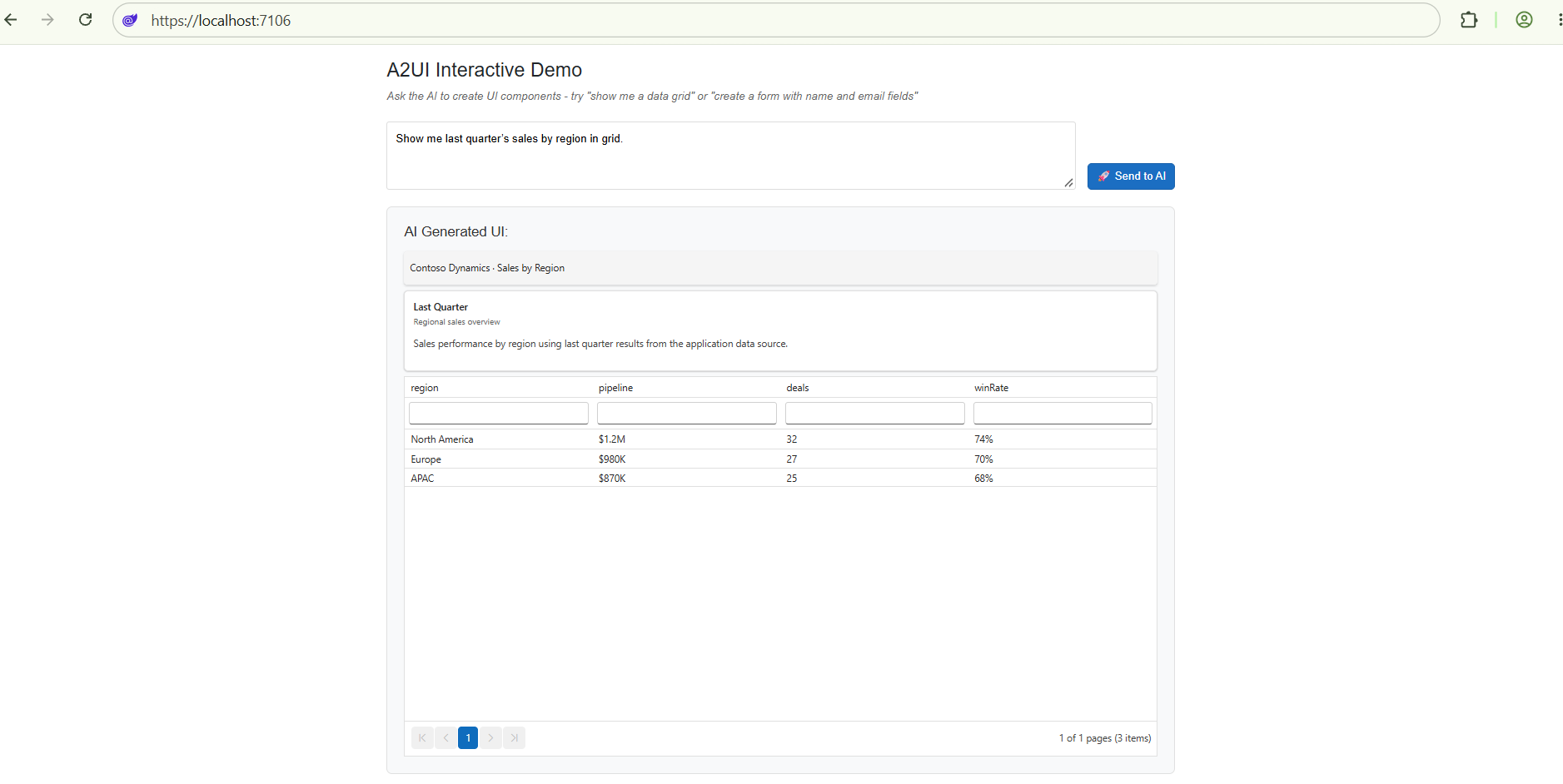
Initial prompt. The user types a query (“Show me last quarter’s sales by region”) and clicks Send.
SendQuery()POSTs a JSON-RPCmessage/sendrequest whoseparams.message.parts[0]is{ text: query }toAgentUrl. -
Agent response. The agent runs the LLM, decides which A2UI components to render, and returns a JSON-RPC envelope whose
result.artifacts[0].parts[0].data.a2uiEnvelopeis an array of A2UI v0.9 messages (typicallycreateSurface→updateComponents→updateDataModel). -
Process the messages.
Processor.ProcessMessages(messages)validates each message against the bundled schemas (Syncfusion.A2UI.Core.Errors.A2uiErroron malformed input), mutates theSurfaceGroupModel, and raisesOnSurfaceCreated. The page callsProcessor.Model.GetSurface(surfaceId)to look up the newSurfaceModeland assigns it to<SyncfusionA2UIProvider/>, which renders the surface. -
User interacts. When the user clicks a button, sorts the grid, picks a date, or selects a row, the matching Syncfusion adapter wraps the interaction in the v0.9 event envelope
{ "event": { "name": "...", "context": { ... } } }and the surface emits anA2uiClientActioncarryingname,surfaceId,sourceComponentId,timestamp, andcontexttoProcessor.Model.OnAction. -
Forward to agent. The page subscribes to
Processor.Model.OnActionand POSTs the action back to the agent as a newmessage/sendrequest whoseparams.message.parts[0]is{ kind: "data", data: { version: "v0.9", action: <A2uiClientAction> } }. The agent decides what to do next — update the same surface (updateComponents/updateDataModel), or replace it with a new one (createSurfaceon a differentsurfaceId) — and returns a newa2uiEnvelope. The cycle repeats.
The page’s subscription fires for every action across every surface in the same
SurfaceGroupModel. On Blazor Server / Auto where the processor is a singleton, an action from one user’s surface reaches the agent once per subscribed circuit — not just once per originating user — because theOnActionstream is shared.
Things to customize
-
Agent URL. The example uses the default
http://localhost:10004(the Contoso Dynamics demo’s default port). Replace it with the URL of your own agent, or read it from configuration / an environment variable such asASPNETCORE_AGENT_URLorAgentUrl. -
DI scope.
AddA2UIWithSyncfusionComponents()registers theMessageProcessoras a singleton. For Blazor Server / Auto, every circuit reaches the sameSurfaceGroupModelso surfaces persist across reconnects. For Blazor WebAssembly, prefer the default singleton — circuit isolation happens at the WASM boundary. Switch to a per-scope processor by passing aconfigurecallback that callsservices.AddScoped(...)instead and adjustingOnInitializedaccordingly. -
Authentication. Most production agents require a bearer token, an API key, or a session cookie. Add an Authorization header (or whatever your agent expects) to both HTTP requests before deploying. With
HttpClient, prefer aDelegatingHandlerover inlineHttpClient.DefaultRequestHeadersmutation. -
Error handling. The snippet catches every exception and renders it as a Bootstrap
.alert-danger. For richer UX, render a Syncfusion<SfMessage Severity="MessageSeverity.Error">inline; the package wires upSyncfusionMessageas an adapter. CatchSyncfusion.A2UI.Core.Errors.A2uiErrorseparately to surface validation failures from malformed agent output without confusing them with HTTP errors. -
Action forwarding scope. Subscribing to
Processor.Model.OnActionis fine for app-wide forwarding. For page-scoped forwarding, take aMessageProcessorfrom DI throughIServiceScopeFactory.CreateScope()so handlers live and die with the page. -
Security. Treat every agent response as untrusted. Run an allow-list of catalog ids (
Processor.Model.Surfacesshould not contain a catalog id the host did not register), sanitize theTextcomponent’s Markdown / HTML output, and consider an output filter that strips<script>and event-handler attributes. The basicTextrenderer passes string content through Blazor’s normal encoding, so HTML intextdoes not auto-render; verify the agent is constrained to a known catalog before trusting payloads. -
Styling. The example uses a small
.a2ui-input-sectionblock in the stylesheet for the input and button. Move any production styling into your own design system or theme. -
Multiple surfaces. A single
SurfaceGroupModelcan hold many surfaces at once (one persurfaceId). Track them in aDictionary<string, SurfaceModel>keyed bysurfaceId, populated fromOnSurfaceCreated/OnSurfaceDeleted, and feed the matching entry to each<SyncfusionA2UIProvider/>instance. -
deleteSurface. A surface can be torn down with adeleteSurfacemessage. The processor raisesOnSurfaceDeletedwith thesurfaceId; in your page, remove the entry from the dictionary and dispose the matching<SyncfusionA2UIProvider/>. This is how the agent signals “I’m done with this surface; show me the next one”. -
sendDataModel: true. WhencreateSurface.sendDataModelis true, the surface is eligible to stream its data model back to the server. The current Syncfusion A2UI for Blazor renderer does not automatically send those snapshots — wire up aProcessor.Model.OnError/OnActionhandler (or a periodic flush) and a corresponding A2Amessage/sendrequest with the data model in the part payload if you need round-tripped state.
Run the agent
The example agent referenced above is the Contoso Dynamics demo that ships in the syncfusion-a2ui-agent repository. To run it locally:
# 1. Clone the agent repo
git clone https://github.com/syncfusion/syncfusion-a2ui-agent.git
cd syncfusion-a2ui-agent

# 2. Install the ADK and the example package
#    Use `python -m pip` instead of `pip` so the command works on every
#    platform (Windows, macOS, Linux), even if `pip` is not on PATH.
#    On Windows, use `py -m pip …` if `python` is not on PATH.
python -m pip install -e ".[dev]"
python -m pip install -e examples

# 3. Configure your AI provider credentials
cp examples/.env.example examples/.env
# Open examples/.env and fill in AZURE_API_KEY, AZURE_API_BASE, MODEL_NAME, etc.

# 4. Start the agent as an A2A server on http://localhost:10004
python examples/generic_demo_agent.py --serve
Which example should I run? Two ship with the repository:
| Example | Port | Use it for |
|---|---|---|
python examples/generic_demo_agent.py --serve |
10004 |
Contoso Dynamics enterprise dashboards, grounded on demo_examples.json (employees, sales, inventory, calendar events). The default choice for the snippet above. |
python examples/flight_booking_agent.py --serve |
10006 |
SkyWave Airlines three-stage flight booking workflow (search → results → booking & confirmation). |
The snippet above targets port 10004 (Contoso). If you switch to the SkyWave example, change AgentUrl to http://localhost:10006.
The agent boots an HTTP server that speaks the A2A protocol over JSON-RPC 2.0 message/send. Leave the terminal running and start the Blazor app in a second terminal.
Run the application
In the project where the Syncfusion A2UI for Blazor package is installed, start the Blazor app:
dotnet runOpen the generated local URL (the .NET 8+ defaults are typically https://localhost:7106 and http://localhost:5106; replace those with whatever dotnet run prints in the terminal — the old 5000 / 5001 defaults only apply when ASPNETCORE_URLS is set explicitly).
With Visual Studio, press F5 to start debugging. With Visual Studio Code, press F5 or run
dotnet runfrom the integrated terminal.
Type a query such as “Show me last quarter’s sales by region” and press Send. The agent’s response renders as a working Syncfusion surface inside the page; any interaction you perform in that surface (clicks, sorts, row selections) is sent back to the agent in real time.
Verify the integration
Confirm the Blazor app, the agent, and the A2A round-trip are wired up end-to-end:
- The agent terminal prints the listening URL (default
http://localhost:10004). The browser console shows no errors when the Blazor app loads. - Type a query such as “Show me last quarter’s sales by region” and click Send. In Blazor Server / Auto the HTTP request runs on the server, so the browser Network tab stays empty — check the server terminal (or the agent terminal) for the
POSTbody instead. In Blazor WebAssembly the browser fetches directly, so the Network tab does show the call. Either way, the response is200 OKand itsresult.artifacts[0].parts[0].data.a2uiEnvelopeis an array. - The matching Syncfusion widget (chart, grid, scheduler, etc.) renders in the page within a few seconds. No
A2uiErrorin the console. - Click a button or sort a column inside the surface. The second
POSTtoAgentUrlhasparams.message.parts[0]shaped as{ kind: "data", data: { version: "v0.9", action: <A2uiClientAction> } }, and the surface updates (or is replaced with a new one) based on the agent’s reply. Same caveat as step 2 for Server / Auto.
Stop the agent process (Ctrl+C). Repeat the same query; the fetch should reject with a network error and the surface should not silently freeze — thetry/catchhandler should surface the error to the user.
If any step fails, check both terminals for stack traces. Common causes at this point: wrong AgentUrl, agent process not running, missing CORS headers on the agent (only relevant for Blazor WebAssembly), missing stylesheet for the generated component, AddA2UIWithSyncfusionComponents() not called (the processor would then be a default new MessageProcessor(...) with no catalog), or the action handler not subscribed to Processor.Model.OnAction.