Getting Started with Syncfusion Blazor A2UI
13 Oct 202615 minutes to read
This section explains how to include the Syncfusion A2UI for Blazor component in a Blazor App using Visual Studio, Visual Studio Code, and the .NET CLI. The Syncfusion A2UI for Blazor package converts streamed A2UI v0.9 messages into a SurfaceModel that is rendered as native Syncfusion Blazor components — DataGrid, Chart, Scheduler, Calendar, RichTextEditor, Diagram, Kanban, DocumentEditorContainer, and more.
The runtime is composed of two NuGet packages:
-
Syncfusion.A2UI.Core— the framework-agnostic A2UI v0.9 engine. -
Syncfusion.Blazor.A2UI— the Blazor renderer that adds Syncfusion Blazor Components on top of the engine. When you register the combined catalog viaAddA2UIWithSyncfusionComponents(), it transitively brings in every Syncfusion Blazor component package it depends on (Syncfusion.Blazor.Grid,Syncfusion.Blazor.Charts,Syncfusion.Blazor.Schedule,Syncfusion.Blazor.Themes, and more).
Syncfusion A2UI for Blazor is currently in preview (beta) and will be published on NuGet under placeholder package ids (
Syncfusion.A2UI.CoreandSyncfusion.Blazor.A2UI, both atpreview).
Prerequisites
| Tool | Version |
|---|---|
| .NET SDK | .NET 8, .NET 9, or .NET 10 |
| Visual Studio / VS Code | Latest stable |
Create a new Blazor App
Create a Blazor Web App using Visual Studio via Microsoft Templates or via the .NET CLI.
dotnet new blazor -o BlazorA2UIApp --interactivity Server
cd BlazorA2UIApp
For step-by-step instructions on creating a new Blazor App, see Getting Started with Blazor Web App.
Install the Syncfusion A2UI Blazor package
Install the Syncfusion.Blazor.A2UI NuGet package. All Syncfusion Blazor packages are available on nuget.org. See the NuGet packages topic for details.
- Go to Tools → NuGet Package Manager → Manage NuGet Packages for Solution.
- Search
Syncfusion.Blazor.A2UIand install it.
Alternatively, install using the Package Manager Console:
Install-Package Syncfusion.Blazor.A2UI
Open the terminal and run:
dotnet add package Syncfusion.Blazor.A2UI
Open the command prompt and run:
dotnet add package Syncfusion.Blazor.A2UI
The Syncfusion Blazor component packages the renderer depends on (
Syncfusion.Blazor.Grid,Syncfusion.Blazor.Charts,Syncfusion.Blazor.Schedule,Syncfusion.Blazor.Themes, etc.) come in transitively fromSyncfusion.Blazor.A2UI. No separatedotnet add packageis needed. See Supported Components for the full list of component families the agent can render.
Add import namespaces
After the package is installed, open ~/_Imports.razor and import the Syncfusion A2UI namespaces alongside the base Syncfusion.Blazor namespace.
@using Syncfusion.Blazor
@using Syncfusion.A2UI.Core.Processing
@using Syncfusion.A2UI.Core.Serialization
@using Syncfusion.A2UI.Core.State
@using Syncfusion.Blazor.A2UI.NodeView
@using Syncfusion.Blazor.A2UI.SyncfusionComponents
Register the Blazor service
Open Program.cs and register the Syncfusion Blazor services plus the A2UI engine. AddA2UIWithSyncfusionComponents() registers both the A2UI Core engine and the Syncfusion widget-backed catalog in one call. Add using Syncfusion.Blazor; at the top of the file.
using Syncfusion.Blazor;
using Syncfusion.Blazor.A2UI.SyncfusionComponents;

...

builder.Services.AddSyncfusionBlazor();
builder.Services.AddHttpClient();
builder.Services.AddA2UIWithSyncfusionComponents();
Add stylesheet and script resources
The theme stylesheet and script can be accessed from NuGet through Static Web Assets. Include the stylesheet at the end of the <head> section in App.razor (or wwwroot/index.html for Blazor WebAssembly).
<link href="_content/Syncfusion.Blazor.Themes/fluent2.css" rel="stylesheet" />Include the required script references at the end of the <body> section.
<script src="_content/Syncfusion.Blazor.Core/scripts/syncfusion-blazor.min.js" type="text/javascript"></script>Render your first Blazor A2UI surface
Open Components/Pages/Home.razor (created by the blazor template at the path Components/Pages/) and add the markup below. The page declares an A2UI v0.9 JSON envelope with four messages (createSurface, two updateDataModel payloads, and updateComponents that mounts the SyncfusionDataGrid), parses it through A2uiJson.ParseMessages(...), feeds it to the MessageProcessor, and renders the resulting SurfaceModel through <SyncfusionA2UIProvider>. @rendermode InteractiveServer is required so the grid’s paging, sorting, and filtering actually respond to clicks.
@page "/"
@rendermode InteractiveServer
@implements IDisposable
@using System.Text.Json
@using Syncfusion.A2UI.Core.Common
@using Syncfusion.A2UI.Core.Processing
@using Syncfusion.A2UI.Core.Serialization
@using Syncfusion.A2UI.Core.State
@using Syncfusion.Blazor.A2UI.NodeView
@inject MessageProcessor Processor

<PageTitle>SyncfusionDataGrid sample</PageTitle>

<h1>SyncfusionDataGrid via A2UI</h1>

<SyncfusionA2UIProvider Surface="@surface" />

@code {
    private SurfaceModel? surface;
    private ISubscription? _selectionSub;

    protected override void OnInitialized()
    {
        try { Processor.Model.DeleteSurface("orders"); } catch { /* Surface didn't exist */ }

        var messages = A2uiJson.ParseMessages(JsonDocument.Parse(Json).RootElement);
        Processor.ProcessMessages(messages);
        surface = Processor.Model.GetSurface("orders");
    }

    void IDisposable.Dispose() => _selectionSub?.Dispose();

    private const string Json = """
    {
      "version": "v0.9",
      "messages": [
        { "version": "v0.9", "createSurface": { "surfaceId": "orders", "catalogId": "syncfusion-a2ui-catalog", "sendDataModel": true } },

        { "version": "v0.9", "updateDataModel": {
            "surfaceId": "orders",
            "path": "/orders",
            "value": [
              { "OrderID": 10248, "CustomerID": "VINET",  "Freight":  32.38, "OrderDate": "1996-07-04", "ShipCountry": "France"     },
              { "OrderID": 10249, "CustomerID": "TOMSP",  "Freight":  11.61, "OrderDate": "1996-07-05", "ShipCountry": "Germany"    },
              { "OrderID": 10250, "CustomerID": "HANAR",  "Freight":  65.83, "OrderDate": "1996-07-08", "ShipCountry": "Brazil"     },
              { "OrderID": 10251, "CustomerID": "VICTE",  "Freight":  41.34, "OrderDate": "1996-07-08", "ShipCountry": "France"     },
              { "OrderID": 10252, "CustomerID": "SUPRD",  "Freight":  51.30, "OrderDate": "1996-07-09", "ShipCountry": "Belgium"    },
              { "OrderID": 10253, "CustomerID": "HANAR",  "Freight":  58.17, "OrderDate": "1996-07-10", "ShipCountry": "Brazil"     },
              { "OrderID": 10254, "CustomerID": "CHOPS",  "Freight":  22.98, "OrderDate": "1996-07-11", "ShipCountry": "Switzerland"},
              { "OrderID": 10255, "CustomerID": "RICSU",  "Freight": 148.33, "OrderDate": "1996-07-12", "ShipCountry": "Switzerland"},
              { "OrderID": 10256, "CustomerID": "WELLI",  "Freight":  13.97, "OrderDate": "1996-07-15", "ShipCountry": "Brazil"     },
              { "OrderID": 10257, "CustomerID": "HILAA",  "Freight":  81.91, "OrderDate": "1996-07-16", "ShipCountry": "Venezuela"  },
              { "OrderID": 10258, "CustomerID": "ERNSH",  "Freight": 140.51, "OrderDate": "1996-07-17", "ShipCountry": "Austria"    },
              { "OrderID": 10259, "CustomerID": "CENTC",  "Freight":   3.25, "OrderDate": "1996-07-18", "ShipCountry": "Mexico"     },
              { "OrderID": 10260, "CustomerID": "OTTIK",  "Freight":  55.09, "OrderDate": "1996-07-19", "ShipCountry": "Germany"    },
              { "OrderID": 10261, "CustomerID": "QUEDE",  "Freight":   3.05, "OrderDate": "1996-07-19", "ShipCountry": "Brazil"     },
              { "OrderID": 10262, "CustomerID": "RATTC",  "Freight":  48.29, "OrderDate": "1996-07-22", "ShipCountry": "USA"        }
            ]
        }},

        { "version": "v0.9", "updateDataModel": {
            "surfaceId": "orders",
            "path": "/selectedRowJson",
            "value": ""
        }},

        { "version": "v0.9", "updateComponents": {
            "surfaceId": "orders",
            "components": [
              {
                "id": "root",
                "component": "Column",
                "children": ["grid", "selected-json"]
              },
              {
                "id": "grid",
                "component": "SyncfusionDataGrid",
                "dataSource": { "path": "/orders" },
                "allowPaging":    true,
                "allowSorting":   true,
                "allowFiltering": true,
                "allowGrouping":  false,
                "allowReordering": true,
                "allowResizing":  true,
                "enableAltRow":   true,
                "enableHover":    true,
                "gridLines":      "Both",
                "clipMode":       "EllipsisWithTooltip",

                "pageSettings": { "pageSize": 10, "pageCount": 5, "currentPage": 1 },
                "filterSettings": { "type": "Excel", "mode": "Immediate" },
                "sortSettings": {
                  "columns": [
                    { "field": "OrderID", "direction": "Ascending" }
                  ]
                },
                "selectionSettings": {
                  "mode": "Row",
                  "type": "Single",
                  "persistSelection": false
                },

                "columns": [
                  { "field": "OrderID",    "headerText": "Order ID",    "isPrimaryKey": true,
                    "type": "number",   "width": "110", "textAlign": "Right", "format": "N0" },
                  { "field": "CustomerID", "headerText": "Customer",    "width": "140" },
                  { "field": "Freight",    "headerText": "Freight",
                    "width": "120", "textAlign": "Right", "format": "C2" },
                  { "field": "OrderDate",  "headerText": "Order Date",
                    "width": "150", "type": "date" },
                  { "field": "ShipCountry","headerText": "Ship Country","width": "150" }
                ]
              },
              {
                "id": "selected-json",
                "component": "Text",
                "text": { "path": "/selectedRowJson" },
                "variant": "caption"
              }
            ]
        }}
      ]
    }
    """;
}
What the snippet does, in order:
- Opts the page in to interactive rendering with
@rendermode InteractiveServer(required under--interactivity Auto). - Injects the
MessageProcessorregistered byAddA2UIWithSyncfusionComponents()(or, for Server / Auto hosts, the scoped instance registered byAddAUI()— see the Program.cs note above). - Embeds an A2UI v0.9 JSON envelope covering four messages (
createSurface→ twoupdateDataModelpayloads →updateComponents) that mounts aColumncontaining a fully-featuredSyncfusionDataGridand aTextcaption wired to{ "path": "/selectedRowJson" }. Each message carries its ownversionfield per the A2UI v0.9 spec, even though the top-level envelope also has one. - In the Blazor lifecycle (
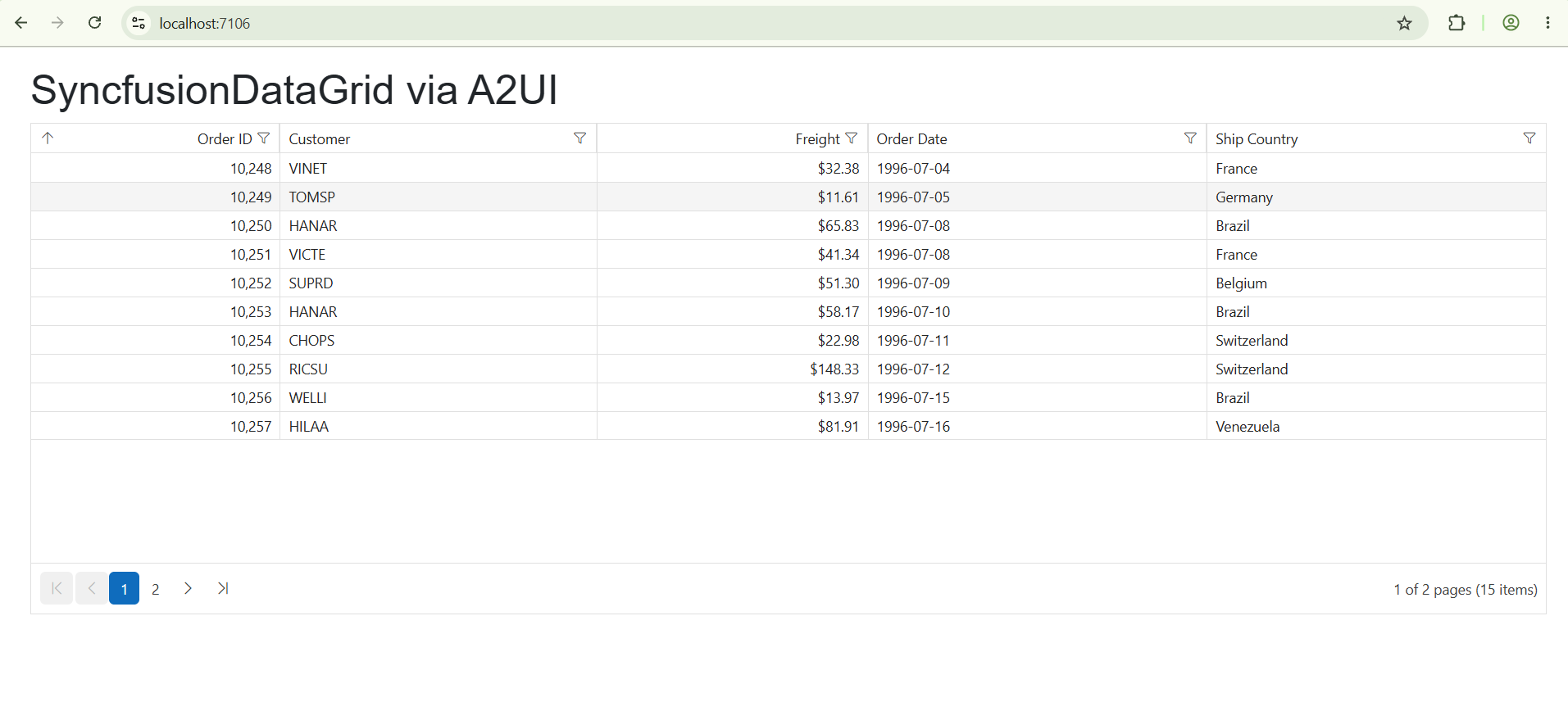
OnInitialized), parses the JSON viaA2uiJson.ParseMessages(...), callsProcessor.ProcessMessages(...), and reads the assembledSurfaceModelfromProcessor.Model.GetSurface("orders")so<SyncfusionA2UIProvider>can render it. - The grid renders 15
Ordersrows with paging (pageSize: 10,pageCount: 5), Excel-style immediate filtering, ascending sort byOrderID, single-row selection, alt rows, hover, gridlines, ellipsis-with-tooltip clipping, and a full column schema (format, width, alignment, primary key). - The
Textcaption under the grid binds to/selectedRowJson. Because the data model seeds that path with""and nothing in the sample writes to it, the caption stays empty until you forward grid events to the agent (or write back from a handler). The provider is generic — swapSyncfusionDataGridforSyncfusionChart,SyncfusionScheduler,SyncfusionCalendar,SyncfusionTextBox,SyncfusionDocumentEditorContainer,SyncfusionKanban, … and the same pipeline renders it.
In production, replace the embedded JSON with messages streamed from an A2UI v0.9-compatible agent. See AI Integration for the agent round-trip pattern.
Run the application
Press Ctrl+F5 (Windows) to launch the application without the debugger. The Syncfusion Blazor DataGrid will render in your default web browser.
Open the terminal and run:
dotnet run
Open the command prompt and run:
dotnet run
The page renders a Syncfusion Blazor SfDataGrid populated with 15 sample Orders rows (Order ID, Customer, Freight, Order Date, Ship Country). The grid enables paging, sorting, filtering, reordering, resizing, alt rows, hover, and a single-row selection mode, all driven from a static A2UI v0.9 JSON message list — no agent or backend is involved.
Register the Syncfusion license key
Syncfusion® Blazor components require a valid license key to be registered before they render without a trial-license watermark. The A2UI adapters call into the same components under the hood, so a registered key is required even when the UI is generated by an agent.
For instructions on generating and registering a license key, see: