How can I help you?
Getting Started with Blazor DataGrid
21 May 20267 minutes to read
This section explains you through the step-by-step process of integrating the Syncfusion® Blazor DataGrid component in your Blazor MAUI App using both Visual Studio and Visual Studio Code.
Ready to streamline your Syncfusion® Blazor development?
Discover the full potential of Syncfusion® Blazor components with Syncfusion® AI Coding Assistants. Effortlessly integrate, configure, and enhance your projects with intelligent, context-aware code suggestions, streamlined setups, and real-time insights—all seamlessly integrated into your preferred AI-powered IDEs like VS Code, Cursor, Syncfusion® CodeStudio and more. Explore Syncfusion® AI Coding Assistants
Prerequisites
To use the MAUI project templates, install the Mobile development with the .NET extension for Visual Studio. For more details, refer to here or the Syncfusion® Blazor Extension.
Create a new Blazor MAUI App in Visual Studio
Create a Blazor MAUI App using Visual Studio via Microsoft Templates. For detailed instructions, refer to the Blazor MAUI App Getting Started documentation.
Prerequisites
To use the MAUI project templates, install the Mobile development with the .NET extension for Visual Studio Code. For more details, refer to here or the Syncfusion® Blazor Extension.
Create a new Blazor MAUI App in Visual Studio Code
Create a Blazor MAUI App using Visual Studio Code via Microsoft Templates or the Syncfusion® Blazor Extension. For detailed instructions, refer to the Blazor MAUI App Getting Started documentation.
Alternatively, create a MAUI application by using the following command in the integrated terminal (Ctrl+`).
dotnet new maui-blazor -o MauiBlazorApp
cd MauiBlazorApp
Install Syncfusion® Blazor packages
Install Syncfusion.Blazor.Grid and Syncfusion.Blazor.Themes NuGet packages in your project using the NuGet Package Manager in Visual Studio (Tools → NuGet Package Manager → Manage NuGet Packages for Solution), or the integrated terminal in Visual Studio Code (dotnet add package).
Alternatively, run the following commands in the Package Manager Console to achieve the same.
Install-Package Syncfusion.Blazor.Grid -Version 33.2.3
Install-Package Syncfusion.Blazor.Themes -Version 33.2.3
NOTE
All Syncfusion Blazor packages are available on nuget.org. See the NuGet packages topic for details.
Add import namespaces
After the packages are installed, open the ~/_Imports.razor file and import the Syncfusion.Blazor and Syncfusion.Blazor.Grids namespaces.
@using Syncfusion.Blazor
@using Syncfusion.Blazor.Grids
Register Syncfusion® Blazor service
Register the Syncfusion® Blazor service in the ~/MauiProgram.cs file.
....
using Syncfusion.Blazor;

....

public static class MauiProgram
{
    public static MauiApp CreateMauiApp()
    {
        ....
        builder.Services.AddSyncfusionBlazor();
        ....
    }
}
Add stylesheet and script resources
The theme stylesheet and script can be accessed from NuGet through Static Web Assets. Include the stylesheet and script references in the ~/index.html file.
<link href="_content/Syncfusion.Blazor.Themes/fluent2.css" rel="stylesheet" />
<script src="_content/Syncfusion.Blazor.Core/scripts/syncfusion-blazor.min.js" type="text/javascript"></script>
NOTE
Check out the Blazor Themes topic to discover various methods (Static Web Assets, CDN, and CRG) for referencing themes in your Blazor application. Also, check out the Adding Script Reference topic to learn different approaches for adding script references in your Blazor application. Refer to the Style and Appearance topic for customizing the DataGrid appearance and styling options.
Add Blazor DataGrid component
Add the Blazor DataGrid component in the ~/Pages/Home.razor file.
@using Syncfusion.Blazor.Grids

<SfGrid DataSource="@OrderData">
    <GridColumns>
        <GridColumn Field=@nameof(OrderDetails.OrderID) HeaderText="Order ID" TextAlign="TextAlign.Right" Width="120"></GridColumn>
        <GridColumn Field=@nameof(OrderDetails.CustomerID) HeaderText="Customer Name" Width="120"></GridColumn>
        <GridColumn Field=@nameof(OrderDetails.Freight) HeaderText="Freight" Format="C2" TextAlign="TextAlign.Right" EditType="EditType.NumericEdit" Width="120"></GridColumn>
        <GridColumn Field=@nameof(OrderDetails.ShipCountry) HeaderText="Ship Country" EditType="EditType.DropDownEdit" Width="150"></GridColumn>
    </GridColumns>
</SfGrid>

@code {
    public List<OrderDetails> OrderData { get; set; }
    protected override void OnInitialized()
    {
        OrderData = OrderDetails.GetAllRecords();
    }
}
public class OrderDetails
{
public static List<OrderDetails> Order = new List<OrderDetails>();
public OrderDetails(int OrderID, string CustomerId, double Freight, string ShipCountry)
{
this.OrderID = OrderID;
this.CustomerID = CustomerId;
this.Freight = Freight;
this.ShipCountry = ShipCountry;
}
public static List<OrderDetails> GetAllRecords()
{
if (Order.Count == 0)
{
Order.Add(new OrderDetails(10248, "VINET", 32.38, "France"));
Order.Add(new OrderDetails(10249, "TOMSP", 11.61, "Germany"));
Order.Add(new OrderDetails(10250, "HANAR", 65.83, "Brazil"));
Order.Add(new OrderDetails(10251, "VICTE", 41.34, "France"));
Order.Add(new OrderDetails(10252, "SUPRD", 51.3, "Belgium"));
}
return Order;
}
public int OrderID { get; set; }
public string CustomerID { get; set; }
public double Freight { get; set; }
public string ShipCountry { get; set; }
}How to run the sample on windows
Run the sample in Windows Machine mode, and it will run Blazor MAUI in Windows.
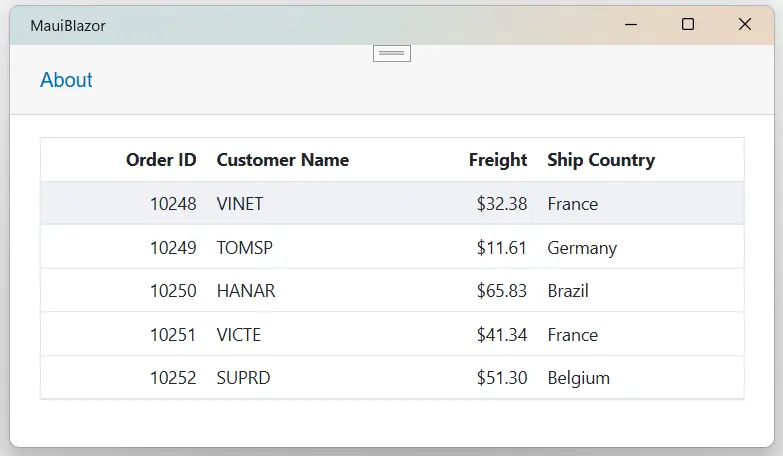
How to run the sample on android
To run the Blazor DataGrid in a Blazor Android MAUI application using the Android emulator, follow these steps:
Refer here to install and launch Android emulator.
NOTE
If encounter any errors while using the Android Emulator, refer to the following link for troubleshooting guidanceTroubleshooting Android Emulator.