How can I help you?
Blazor Sankey Diagram: Printing and Exporting
4 Nov 202515 minutes to read
This guide explains how to print and export the Blazor Sankey Diagram using built-in methods. These features enable high-quality output generation for presentations, reports, or further analysis.
Printing the Sankey Diagram
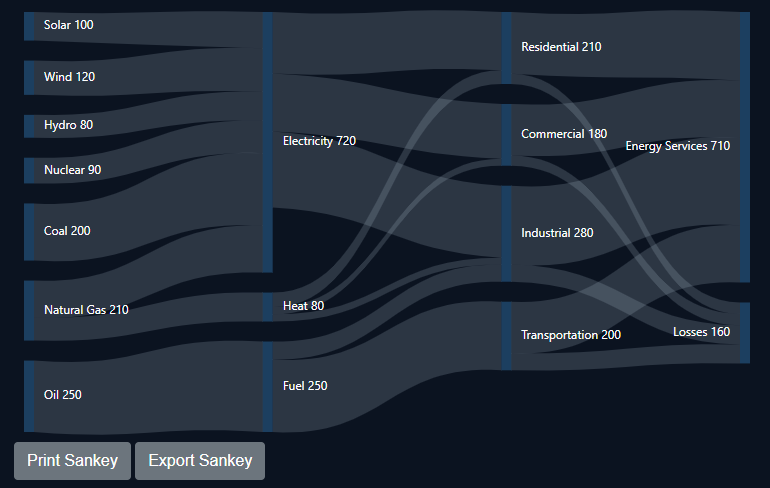
The Sankey Diagram provides a convenient way to print its contents from the browser. The PrintAsync method invokes the browser’s print dialog, allowing users to select print settings and send the diagram to a printer. The appearance and availability of print options are determined by the user’s browser and operating system.
@using Syncfusion.Blazor;
@using Syncfusion.Blazor.Sankey;

<div style="background-color: @_backgroundColor; padding: 20px;">
    <div>
        <SfSankey @ref="sankey" BackgroundColor="@_backgroundColor" Nodes=@Nodes Links=@Links>
            <SankeyNodeSettings Color="#1c3f60" Width="10" Padding="20"></SankeyNodeSettings>
            <SankeyLinkSettings Color="#afc1d0" Opacity="0.2"></SankeyLinkSettings>
            <SankeyLabelSettings Color="#FFFFFF" FontWeight="400"></SankeyLabelSettings>
            <SankeyLegendSettings Visible="false"></SankeyLegendSettings>
        </SfSankey>
    </div>
    <div>
        <button class="btn btn-secondary" @onclick="PrintSankey">Print Sankey</button>
    </div>
</div>

@code {
    SfSankey sankey;
    string _backgroundColor = "#0b1320";
    public List<SankeyDataNode> Nodes = new List<SankeyDataNode>();
    public List<SankeyDataLink> Links = new List<SankeyDataLink>();

    private async Task PrintSankey()
    {
        await sankey.PrintAsync();
    }

    protected override void OnInitialized()
    {
        Nodes = new List<SankeyDataNode>()
        {
            new SankeyDataNode() { Id = "Solar", Label = new SankeyDataLabel() { Text = "Solar" } },
            new SankeyDataNode() { Id = "Wind", Label = new SankeyDataLabel() { Text = "Wind" } },
            new SankeyDataNode() { Id = "Hydro", Label = new SankeyDataLabel() { Text = "Hydro" } },
            new SankeyDataNode() { Id = "Nuclear", Label = new SankeyDataLabel() { Text = "Nuclear" } },
            new SankeyDataNode() { Id = "Coal", Label = new SankeyDataLabel() { Text = "Coal" } },
            new SankeyDataNode() { Id = "Natural Gas", Label = new SankeyDataLabel() { Text = "Natural Gas" } },
            new SankeyDataNode() { Id = "Oil", Label = new SankeyDataLabel() { Text = "Oil" } },
            new SankeyDataNode() { Id = "Electricity", Label = new SankeyDataLabel() { Text = "Electricity" } },
            new SankeyDataNode() { Id = "Heat", Label = new SankeyDataLabel() { Text = "Heat" } },
            new SankeyDataNode() { Id = "Fuel", Label = new SankeyDataLabel() { Text = "Fuel" } },
            new SankeyDataNode() { Id = "Residential", Label = new SankeyDataLabel() { Text = "Residential" } },
            new SankeyDataNode() { Id = "Commercial", Label = new SankeyDataLabel() { Text = "Commercial" } },
            new SankeyDataNode() { Id = "Industrial", Label = new SankeyDataLabel() { Text = "Industrial" } },
            new SankeyDataNode() { Id = "Transportation", Label = new SankeyDataLabel() { Text = "Transportation" } },
            new SankeyDataNode() { Id = "Energy Services", Label = new SankeyDataLabel() { Text = "Energy Services" } },
            new SankeyDataNode() { Id = "Losses", Label = new SankeyDataLabel() { Text = "Losses" } }
        };

        Links = new List<SankeyDataLink>()
        {
            // Energy Sources to Carriers
            new SankeyDataLink() { SourceId = "Solar", TargetId = "Electricity", Value = 100 },
            new SankeyDataLink() { SourceId = "Wind", TargetId = "Electricity", Value = 120 },
            new SankeyDataLink() { SourceId = "Hydro", TargetId = "Electricity", Value = 80 },
            new SankeyDataLink() { SourceId = "Nuclear", TargetId = "Electricity", Value = 90 },
            new SankeyDataLink() { SourceId = "Coal", TargetId = "Electricity", Value = 200 },
            new SankeyDataLink() { SourceId = "Natural Gas", TargetId = "Electricity", Value = 130 },
            new SankeyDataLink() { SourceId = "Natural Gas", TargetId = "Heat", Value = 80 },
            new SankeyDataLink() { SourceId = "Oil", TargetId = "Fuel", Value = 250 },

            // Energy Carriers to Sectors
            new SankeyDataLink() { SourceId = "Electricity", TargetId = "Residential", Value = 170 },
            new SankeyDataLink() { SourceId = "Electricity", TargetId = "Commercial", Value = 160 },
            new SankeyDataLink() { SourceId = "Electricity", TargetId = "Industrial", Value = 210 },
            new SankeyDataLink() { SourceId = "Heat", TargetId = "Residential", Value = 40 },
            new SankeyDataLink() { SourceId = "Heat", TargetId = "Commercial", Value = 20 },
            new SankeyDataLink() { SourceId = "Heat", TargetId = "Industrial", Value = 20 },
            new SankeyDataLink() { SourceId = "Fuel", TargetId = "Transportation", Value = 200 },
            new SankeyDataLink() { SourceId = "Fuel", TargetId = "Industrial", Value = 50 },

            // Sectors to End Use and Losses
            new SankeyDataLink() { SourceId = "Residential", TargetId = "Energy Services", Value = 180 },
            new SankeyDataLink() { SourceId = "Commercial", TargetId = "Energy Services", Value = 150 },
            new SankeyDataLink() { SourceId = "Industrial", TargetId = "Energy Services", Value = 230 },
            new SankeyDataLink() { SourceId = "Transportation", TargetId = "Energy Services", Value = 150 },
            new SankeyDataLink() { SourceId = "Residential", TargetId = "Losses", Value = 30 },
            new SankeyDataLink() { SourceId = "Commercial", TargetId = "Losses", Value = 30 },
            new SankeyDataLink() { SourceId = "Industrial", TargetId = "Losses", Value = 50 },
            new SankeyDataLink() { SourceId = "Transportation", TargetId = "Losses", Value = 50 }
        };
        base.OnInitialized();
    }
}
Exporting the Sankey Diagram
The diagram can be exported to multiple formats, including PNG, JPEG, SVG, and PDF. The ExportAsync method handles this process, accepting a file format and name. The exported image reflects the current state of the chart, including all customizations and user interactions.
@using Syncfusion.Blazor;
@using Syncfusion.Blazor.Sankey;

<div style="background-color: @_backgroundColor; padding: 20px;">
    <div>
        <SfSankey @ref="sankey" BackgroundColor="@_backgroundColor" Nodes=@Nodes Links=@Links>
            <SankeyNodeSettings Color="#1c3f60" Width="10" Padding="20"></SankeyNodeSettings>
            <SankeyLinkSettings Color="#afc1d0" Opacity="0.2"></SankeyLinkSettings>
            <SankeyLabelSettings Color="#FFFFFF" FontWeight="400"></SankeyLabelSettings>
            <SankeyLegendSettings Visible="false"></SankeyLegendSettings>
        </SfSankey>
    </div>
    <div>
        <button class="btn btn-secondary" @onclick="ExportSankey">Export Sankey</button>
    </div>
</div>

@code {
    SfSankey sankey;
    string _backgroundColor = "#0b1320";
    public List<SankeyDataNode> Nodes = new List<SankeyDataNode>();
    public List<SankeyDataLink> Links = new List<SankeyDataLink>();

    private async Task ExportSankey()
    {
        await sankey.ExportAsync(SankeyExportType.PNG, $"Sankey{DateTime.Now.Ticks}", null, true, false);
    }
    protected override void OnInitialized()
    {
        Nodes = new List<SankeyDataNode>()
        {
            new SankeyDataNode() { Id = "Solar", Label = new SankeyDataLabel() { Text = "Solar" } },
            new SankeyDataNode() { Id = "Wind", Label = new SankeyDataLabel() { Text = "Wind" } },
            new SankeyDataNode() { Id = "Hydro", Label = new SankeyDataLabel() { Text = "Hydro" } },
            new SankeyDataNode() { Id = "Nuclear", Label = new SankeyDataLabel() { Text = "Nuclear" } },
            new SankeyDataNode() { Id = "Coal", Label = new SankeyDataLabel() { Text = "Coal" } },
            new SankeyDataNode() { Id = "Natural Gas", Label = new SankeyDataLabel() { Text = "Natural Gas" } },
            new SankeyDataNode() { Id = "Oil", Label = new SankeyDataLabel() { Text = "Oil" } },
            new SankeyDataNode() { Id = "Electricity", Label = new SankeyDataLabel() { Text = "Electricity" } },
            new SankeyDataNode() { Id = "Heat", Label = new SankeyDataLabel() { Text = "Heat" } },
            new SankeyDataNode() { Id = "Fuel", Label = new SankeyDataLabel() { Text = "Fuel" } },
            new SankeyDataNode() { Id = "Residential", Label = new SankeyDataLabel() { Text = "Residential" } },
            new SankeyDataNode() { Id = "Commercial", Label = new SankeyDataLabel() { Text = "Commercial" } },
            new SankeyDataNode() { Id = "Industrial", Label = new SankeyDataLabel() { Text = "Industrial" } },
            new SankeyDataNode() { Id = "Transportation", Label = new SankeyDataLabel() { Text = "Transportation" } },
            new SankeyDataNode() { Id = "Energy Services", Label = new SankeyDataLabel() { Text = "Energy Services" } },
            new SankeyDataNode() { Id = "Losses", Label = new SankeyDataLabel() { Text = "Losses" } }
        };

        Links = new List<SankeyDataLink>()
        {
            // Energy Sources to Carriers
            new SankeyDataLink() { SourceId = "Solar", TargetId = "Electricity", Value = 100 },
            new SankeyDataLink() { SourceId = "Wind", TargetId = "Electricity", Value = 120 },
            new SankeyDataLink() { SourceId = "Hydro", TargetId = "Electricity", Value = 80 },
            new SankeyDataLink() { SourceId = "Nuclear", TargetId = "Electricity", Value = 90 },
            new SankeyDataLink() { SourceId = "Coal", TargetId = "Electricity", Value = 200 },
            new SankeyDataLink() { SourceId = "Natural Gas", TargetId = "Electricity", Value = 130 },
            new SankeyDataLink() { SourceId = "Natural Gas", TargetId = "Heat", Value = 80 },
            new SankeyDataLink() { SourceId = "Oil", TargetId = "Fuel", Value = 250 },

            // Energy Carriers to Sectors
            new SankeyDataLink() { SourceId = "Electricity", TargetId = "Residential", Value = 170 },
            new SankeyDataLink() { SourceId = "Electricity", TargetId = "Commercial", Value = 160 },
            new SankeyDataLink() { SourceId = "Electricity", TargetId = "Industrial", Value = 210 },
            new SankeyDataLink() { SourceId = "Heat", TargetId = "Residential", Value = 40 },
            new SankeyDataLink() { SourceId = "Heat", TargetId = "Commercial", Value = 20 },
            new SankeyDataLink() { SourceId = "Heat", TargetId = "Industrial", Value = 20 },
            new SankeyDataLink() { SourceId = "Fuel", TargetId = "Transportation", Value = 200 },
            new SankeyDataLink() { SourceId = "Fuel", TargetId = "Industrial", Value = 50 },

            // Sectors to End Use and Losses
            new SankeyDataLink() { SourceId = "Residential", TargetId = "Energy Services", Value = 180 },
            new SankeyDataLink() { SourceId = "Commercial", TargetId = "Energy Services", Value = 150 },
            new SankeyDataLink() { SourceId = "Industrial", TargetId = "Energy Services", Value = 230 },
            new SankeyDataLink() { SourceId = "Transportation", TargetId = "Energy Services", Value = 150 },
            new SankeyDataLink() { SourceId = "Residential", TargetId = "Losses", Value = 30 },
            new SankeyDataLink() { SourceId = "Commercial", TargetId = "Losses", Value = 30 },
            new SankeyDataLink() { SourceId = "Industrial", TargetId = "Losses", Value = 50 },
            new SankeyDataLink() { SourceId = "Transportation", TargetId = "Losses", Value = 50 }
        };
        base.OnInitialized();
    }
}
Key Considerations
- Print Functionality: Printing depends on browser capabilities. Ensure users have correctly configured printer drivers and settings.
- Export Formats: Select an appropriate format. PNG and JPEG are raster formats suitable for bitmaps, while SVG and PDF are vector formats that support lossless scaling.
- File Naming: Use descriptive filenames for exported charts to aid organization.
-
Event Handling:
PrintCompletedandExportCompletedevents can be used to provide feedback or trigger actions after an operation concludes. Refer to the Events section for more information.